How to collect and finalize sales targets without 30 spreadsheets

Key takeaways
- Sales quota management is the process of setting, allocating, approving and tracking the targets each rep, team and territory is measured against. The hard part is rarely the math. It is collecting the numbers from the people who own them.
- Target setting is a multi-owner, multi-stage decision. Finance sets the top number, regional managers split it, business heads approve exceptions, and RevOps collates it all. A single-user spreadsheet cannot govern that.
- Shared spreadsheets fail on four controls: who sees which rows, who can edit which columns, who approved a number and what changed afterward.
- A governed target cycle gives every row an owner, a status and a history. Contributors see only their rows, rejections carry a reason, and approved rows lock.
- The same workflow fits any commission input that lives outside your CRM and needs sign-off: credit splits, MBO scores, cash collection, clawbacks and territory assignments.
- Visdum's Collaborative Worksheets run this workflow inside the commission platform, so approved targets feed incentive calculation directly.
What is sales quota management?
Sales quota management is the end-to-end process of setting sales targets, allocating them to reps, teams and territories, getting them approved, and tracking attainment against them through the year. It covers the top-down number from finance, the bottom-up split from regional managers, every mid-year change, and the record of who approved each figure.
It sits between sales quota planning (deciding what the number should be) and commission calculation (paying on it). Good sales quota management answers three questions at any point in the year: what is each person's target, who approved it, and what has changed since then.
Links
Why sales quota management still breaks at most companies
The math was never the hard part. Collecting the numbers was.
This guide answers the questions Finance, RevOps and Sales leaders asked us most often about sales quota management, grounded in Visdum deployment calls with mid-market teams.
Most companies believe their targets live in a spreadsheet. In reality, they live in 30 spreadsheets, an inbox and a chain of follow-up calls. That is not an exaggeration: one finance team told us it ran its entire target cycle across 30 separate files.
The industry data says the same thing. In Alexander Group's 2026 Sales Compensation Trends Survey, 57% of companies said they struggle to set accurate quotas, and allocating quotas and goals on time was the number one sales compensation program management challenge, cited by 46%. Pigment's Office of the CRO Report 2025 puts a price on the delay: nearly 40% of organizations deliver quotas more than a month late, at an average cost of 5.5% in missed revenue.
Late quotas are not only a quota setting problem. They are a collection problem. Picture a sales ops leader at a 300-person company running the December target cycle. Finance sends the annual number. A category team splits it into months. Fourteen regional managers each need to divide their region across territories and reps. Sheets go out by email and come back late, as "final_v3_revised," with edits to rows the manager was never meant to touch. Nobody can say who changed the West region's Q2 number, or when.
The buyers we speak with describe the same week, in almost the same words:
"It is not complicated. It is just time consuming and back and forth." A sales leader at an 8-rep commercial services company
"Some are an Excel file with multiple tabs. Another one comes as a PDF. Another one comes as an email from somebody" A buyer on a Visdum discovery call, describing how plan inputs arrive
"If I count my team's time, my time… and the approver's time, then I would say it takes around 20 days a month." A financial controller at a 200-payee healthcare SaaS company
Target setting is a multi-owner decision
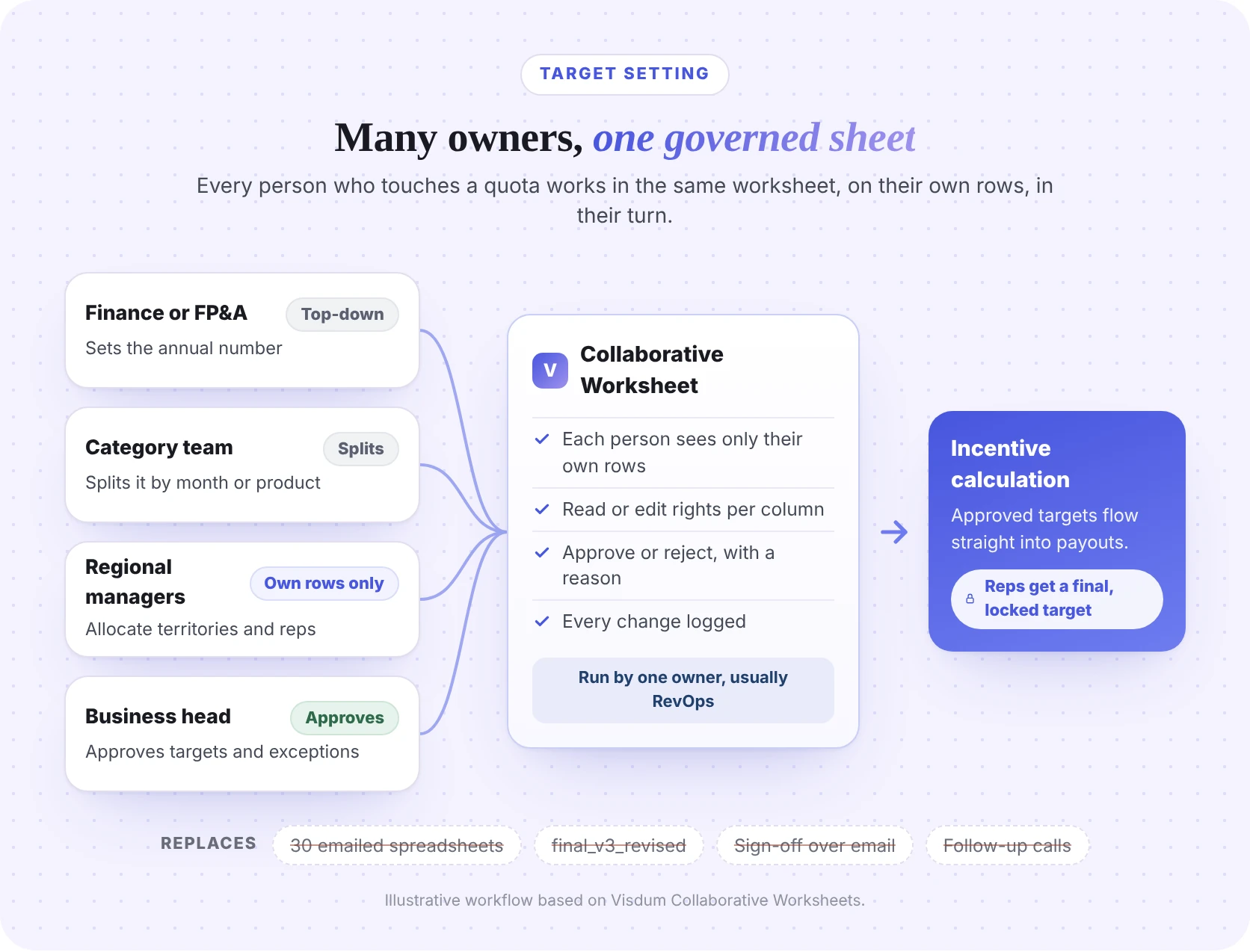
Target setting is a multi-owner, multi-stage decision. Most teams run it through a tool built for a single user. Here is who usually touches a quota before it reaches a rep:
Six roles, at least four handoffs, and in most companies the only thing connecting them is an email thread. Territory and quota planning tools can model the number, but the handoffs between these people still run through files and inboxes.
Links for the tables
Where spreadsheets break in sales quota management
Excel is a great single-user tool. Target collection is not a single-user process. A 2024 literature review covering more than 35 years of research, published in Frontiers of Computer Science, found that 94% of spreadsheets used in business decision-making contain errors. Add 15 contributors and an inbox, and the spreadsheet risk multiplies. The same applies to the commission spreadsheet that reads those targets downstream: one broken lookup and a rep is paid on the wrong number.
Buyers put it more bluntly:
"In Excel, the biggest problem is auditing. There is no auditing, right? There is no change log." A CFO at a medtech company
"With Google Sheets it was really finicky for us. Someone else was viewing it and by mistake deleted a row" A commission manager at a 60-rep business-financing firm
"just a bit tiresome of every month having to firstly calculate it, then send out kind of sensitive documents to whoever is allowed to see each one." A commercial finance lead at a 16-rep SaaS company
Moving to Google Sheets or a shared drive solves co-editing, not governance. As one buyer said of free tools: "Free is very hard to argue with, but it's also easy to break." CV Library ran 25+ comp plan variations on 10+ spreadsheets across nine sales departments before moving to Visdum. It cut the time spent on sales comp by 90%.
Sources
- Phys.org, Study finds 94% of business spreadsheets have critical errors (Poon et al., Spreadsheet quality assurance: a literature review, Frontiers of Computer Science, 2024)
Links for the tables
- What is Excel hell?
- What is a commission audit trail?
- Why commission errors happen and how to eliminate them
What good sales quota management needs: 6 controls
Collaboration without control just moves the chaos into a new tool. The Six Governance Controls keep the familiarity of a spreadsheet and add the controls a spreadsheet never had. Visdum packages them as Collaborative Worksheets, a governed sheet inside the commission platform. Every audit question eventually comes down to one: who changed this number, and who approved it? These six controls are the answer.
Two more details matter in practice. First, access should follow people: when a manager moves teams, their department or team-based access should move with them. Second, the field that decides who sees a row must be protected, so nobody can reassign targets to themselves.
Links for the tables
- Who can see whose commission data? A guide to commission data access control
- Sales commission approval process: a practical guide
How to run a sales quota cycle in one governed sheet: 7 steps
Where do you set individual sales rep quota target values? Eight companies on Visdum buyer calls asked this, in nearly these words. In a governed workflow, you set them in one worksheet that the cycle owner prepares and each manager fills in for their own reps, not in a separate file per region. Here is the cycle, step by step.
Step 1: Assign an owner to the worksheet
An admin assigns one owner to each target worksheet, usually the RevOps or sales ops lead. The owner runs the cycle from there without waiting on IT or an admin for every change.
Step 2: Prepare the rows
The owner loads the structure: one row per territory, rep or reference code, with the top-down number from finance and any monthly split from the category team. You can paste from Excel or upload a file, so there is no new format to learn.
Step 3: Share only the rows that matter
The owner sends rows out for input. Each regional manager sees only the rows that match their territory or team. Their own manager can see those rows read-only, so leadership stays informed without overwriting anyone's work.
Step 4: Contributors enter and submit
Managers enter targets inline, or download, work offline and upload. When they submit, the row moves to Pending and locks for editing. Questions go into cell comments with an @mention, and any comment can become an action item.
Step 5: Approvers approve or reject, with a reason
Submissions route through one or more approvers, in the order your process needs. For example, a regional sales manager, then a business head. Nine companies on Visdum calls asked whether a multi-tier approval workflow could be saved and reused every cycle; here it is set once and persists all year. A rejection requires a reason, so the contributor knows exactly what to fix and does not have to start over.
Step 6: Rejected rows return; approved rows lock
Rejected rows go back to the contributor with the reason attached, and the loop repeats until the row is approved. Approved rows cannot be edited. As one buyer put it, targets are "not set in stone until they get approved." After approval, they are. Deadlines and email reminders keep each step moving, so the coordinator manages exceptions, not inboxes.
Step 7: Approved targets feed incentive calculation
Once a row is approved, the target flows straight into commission calculation. No export, no copy-paste, no second version. If something changes mid-year, the owner re-opens the affected rows, the change is made and resubmitted, and the approver signs off again.
Links
Row statuses: what each one means and who can edit
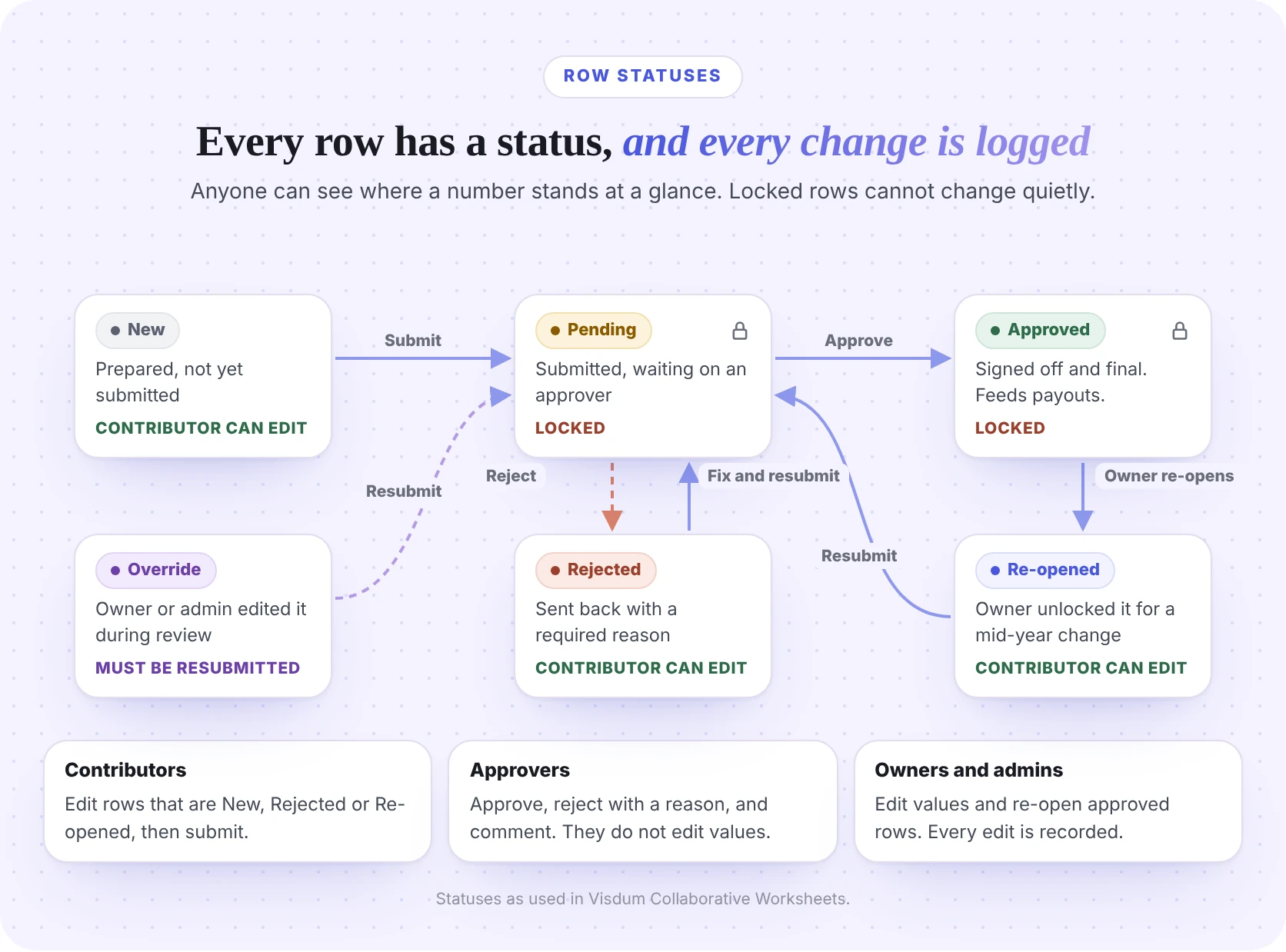
Every row in a governed target worksheet carries a status, and every status change is logged. That is what lets anyone see where a number stands at a glance.
Separation of duties sits on top of these states. Approvers approve, reject and comment. Only owners and admins can edit values or re-open approved rows. For a CFO, this means one answer to the question every audit eventually asks: who changed this number, and who approved it?
Links for the tables
Worked example: one rejection and one mid-year change
Megan's cycle in one line: a four-territory West region at $12M, with one rejected submission that forces a rework and one mid-year re-open for a new hire.
Scenario: Megan Carter runs sales ops at a mid-market SaaS company. Her FY2027 West region number is $12,000,000, split across four territories. Regional sales manager Jason Miller allocates the territories and submits them. VP of Sales Ashley Brooks is the approver. Ashley rejects the Mountain territory because its target is out of line with pipeline coverage. In July, a new rep joins the Southwest territory, so Megan re-opens that row to raise its target.
What this table shows:
- Region total after the rejection: $3,600,000 + $3,800,000 + $2,000,000 + $2,200,000 = $11,600,000. Jason's region now sits $400,000 below finance's number, and that gap is visible to everyone before targets go live.
- Region total after the July change: $3,600,000 + $3,800,000 + $2,000,000 + $2,600,000 = $12,000,000. The new hire's ramp closes the gap without restarting the whole cycle.
- Every number has a history. Months later, anyone with access can see who proposed $2,400,000 for Mountain, why it was rejected and who approved $2,000,000.
In a spreadsheet, the same story is four email threads, two file versions and a cell that quietly changed from $2,200,000 to $2,600,000.
Links for the tables
Beyond quotas: other commission inputs that need the same workflow
Target collection is where the pain is sharpest, but it is not the only input with this shape. Any commission input that lives outside your CRM, has more than one owner and needs sign-off before it touches a payout belongs in a governed worksheet.
The same workflow also covers rate cards for new SKUs, partner attribution, ramp schedules, leaves and proration, and manual adjustments. If a number changes what someone gets paid, it deserves an owner, an approver and a history.
Links for the tables
- What is MBO (management by objectives)?
- What is a clawback?
- Multi-currency commission calculation
- ASC 606 and commission amortization
- Best commission software for complex plans
Checklist: moving your next target cycle off spreadsheets
You do not need to rebuild your whole process at once. Start small and prove it on one cycle.
- Pick one worksheet. Start with next quarter's or next year's targets.
- Name one owner. Usually the RevOps or sales ops lead who chases the files today.
- Map rows to people. Decide which field controls visibility: territory, employee ID or a reference code.
- Set column access. Decide who can read and who can edit each column, by user, department or team.
- Choose your approvers. Start with one approver per region, then add a second level if your process needs it.
- Set a deadline. Let reminders do the chasing.
- Lock and connect. Make sure approved targets feed commission calculation directly, with no export step.
Ownership, visibility, column access and approvers are set once and persist all year, including through ownership changes. You do not rebuild them every month.
How Visdum runs sales quota management with Collaborative Worksheets
Most quota tools stop at planning, and most commission tools start after targets are final. The handoff between them is where the spreadsheets come back. Visdum closes that gap with Collaborative Worksheets, a governed sheet that lives inside the commission platform, so the target that gets approved is the same target the calculation runs on.
With Collaborative Worksheets, you can:
- Assign worksheet ownership. Admins assign an owner, who runs the cycle without waiting on IT.
- Share only the rows that matter. Each collaborator sees only their own rows, matched by territory, employee or reference code. Managers get read-only access to their reportees' rows.
- Control every column. Set read or edit rights by user, department or team. When people move teams, their access moves with them.
- Comment on any cell. @mention a colleague and turn the comment into an action item. Open items show yellow; resolved items turn green.
- Route multi-level approvals. Rejections require a reason, so feedback is never a guess.
- Set deadlines and reminders. Visdum sends email reminders, so the coordinator manages exceptions, not inboxes.
- Lock approved rows. Changes require the owner to re-open them, so finalized targets stay final.
- Keep a full audit trail. Every edit, submission, approval, rejection and override is recorded.
- Work like a sheet. Edit inline, paste from Excel, or download, work offline and upload.
Around the worksheet, Visdum gives finance and RevOps the rest of the commission lifecycle: a no-code plan builder, approval workflows for payouts, in-app dispute resolution, role-based access control, rep dashboards and 100+ integrations including Salesforce and HubSpot. The platform is SOC 2 Type II certified and rated #1 on G2 for Ease of Use.
What this looks like in practice: CV Library, a 900-employee job board with 85+ commissioned reps across nine sales departments, was running 25+ comp plan variations on 10+ spreadsheets per department, with data re-uploaded for every plan and a separate calculation for every rep. After moving to Visdum, it replaced 25+ spreadsheets with a single data entry point, ran computations once instead of once per rep, and cut the time spent on sales comp by 90%.
Ready to run your next target cycle in one sheet? Book a demo or take the product tour.
Sources
- CV Library case study
- Visdum platform overview
- Automate commissions from deal close to payout
- Best AI commission management tools in 2026
About Visdum
Visdum is a sales compensation platform that helps finance, RevOps and sales teams design, automate and explain commission plans. Teams use Visdum to collect and approve targets and other commission inputs in Collaborative Worksheets, calculate commissions accurately from CRM and billing data, route payouts through approval workflows, resolve disputes in-app and give every rep a real-time view of what they have earned. Visdum has processed more than $1.5 billion in commissions for 30,000+ payees across 13+ countries, offers 100+ integrations including Salesforce and HubSpot, and is SOC 2 Type II certified. Learn more about Visdum for mid-market teams.
FAQs
What is sales quota management?
Sales quota management is the process of setting sales targets, allocating them to reps, teams and territories, getting them approved, and tracking attainment through the year. It includes mid-year changes and a record of who approved each number. In most companies, the hardest part is not the math but collecting targets from the many managers who own them, then proving later who approved each figure. That is why the process works best in one governed sheet rather than a chain of emailed spreadsheets.
Where do you set individual sales rep quota target values?
Set them in one governed worksheet rather than a file per region. The cycle owner prepares one row per rep or territory, each manager fills in only their own rows, and approvers sign off. Approved targets then feed commission calculation directly, so there is no second copy to keep in sync. If a target changes mid-year, the owner re-opens that row instead of sending out a new file.
Can sales reps be restricted to seeing only their own commission data?
Yes. With row-level access, each person sees only the rows that match a field such as their email, employee ID or territory. Column-level access then decides which columns they can read or edit. In Visdum, reps can be view-only through column-level Read access and can still comment. Contributors also cannot change the field that controls who sees a row, so nobody can reassign targets to themselves.
Do managers need explicit permission to view their direct reports' data?
Managers do not need a separate copy of the file. In Visdum's Collaborative Worksheets, managers can be given read-only visibility into their reportees' rows as part of the worksheet setup, so they stay informed without being able to overwrite anyone's work. Department and team-based access updates automatically when people change teams.
Does it keep an audit trail showing who changed a data value and why?
Yes. Four companies on Visdum buyer calls asked exactly this. In Visdum's Collaborative Worksheets, every edit, submission, approval, rejection and override is recorded with who made it and when. Rejections require a reason, and any edit an admin or owner makes during review is marked Override and must be resubmitted, so nothing changes quietly.
Can a target be changed after final approval?
Yes, but not silently. Approved rows are locked. To change one, the worksheet owner re-opens the row, the change is made and resubmitted, and the approver signs off again. This handles promotions, new hires and territory changes mid-year without restarting the whole cycle.
Can a multi-tier approval workflow be reused every cycle?
Yes. Ownership, visibility, column access and approvers are set once and persist all year, including through ownership changes. You can route submissions through one or more approvers in the order your process needs, for example a regional manager and then a business head.
Why not just use Google Sheets for target collection?
Google Sheets solves co-editing, not governance. It was not built to show each manager only their own rows, track an approval status on every row, require a reason for a rejection or link a target to the payout it drives. That is why version sprawl, silent overwrites and email sign-offs persist even on shared sheets. Spreadsheets are still useful for modeling the number. They are the wrong place to collect, approve and lock it.
What else can a collaborative worksheet be used for besides quotas?
Any commission input that lives outside your CRM, has more than one owner and needs sign-off: credit splits, MBO goals and scores, cash collection confirmation, clawback triggers, territory and account assignment, OTE and pay mix, SDR meeting qualification, deal classification, FX rates and ASC 340-40 capitalization inputs.
How long does it take to set up a governed target cycle?
Start with one worksheet, one owner, one approver and your regional managers. Because contributors can paste from Excel or upload a file, there is no new format to learn. Settings persist across cycles, so the setup work happens once.