Why Commission Errors Happen and How to Eliminate Them

TL;DR: Sales commission errors happen when payouts are calculated on wrong or stale data, before the event that makes a deal payable (like cash collection on pay-on-collections plans), or without accounting for churn clawbacks. Most are eligibility and reconciliation errors, not math errors. The fix is one rules engine connected to CRM, billing and ERP data, with approvals and an audit trail.
Key takeaways
- Errors enter at four gates: credit, eligibility, calculation and payout. Each needs its own control.
- Eligibility is where most errors start. The rule that makes a deal payable (cash collected, invoice issued, customer still active) usually lives outside the commission sheet.
- The cost is mostly time and trust, and few teams measure it. That is why it keeps growing.
- Software fixes the problem only when it reads eligibility from your billing or ERP system, keeps an audit trail and routes approvals.
Two out of three companies get commission payouts wrong. In a 2025 survey of more than 200 US incentive compensation leaders, 66% said they had overpaid or underpaid commissions in the past 12 months.
If you run commissions, you already know what that looks like from the inside. A reconciliation sheet that one finance lead described to us as "all in red... all question marks." Every deal is checked against QuickBooks by hand, because reps are only paid on collected invoices. A rep who left three months ago, still disputing a payout.
Here is the uncomfortable part. In most of these cases, the formula was right. The deal was simply not payable yet, or it had already churned, and the spreadsheet had no way of knowing.
That is the real story behind most sales commission errors. This guide breaks down the four gates where errors enter, what they cost, the controls that catch them before payroll does, and when software actually solves the problem.
What counts as a sales commission error?
A sales commission error is any payout that differs from what the comp plan and the source data say a rep earned, in amount, recipient or timing. It is not the same as an "error of commission" in accounting, which refers to a wrong entry in the ledger.
Most teams only count obvious math mistakes. That undercounts the problem. Sales commission errors come in five types:
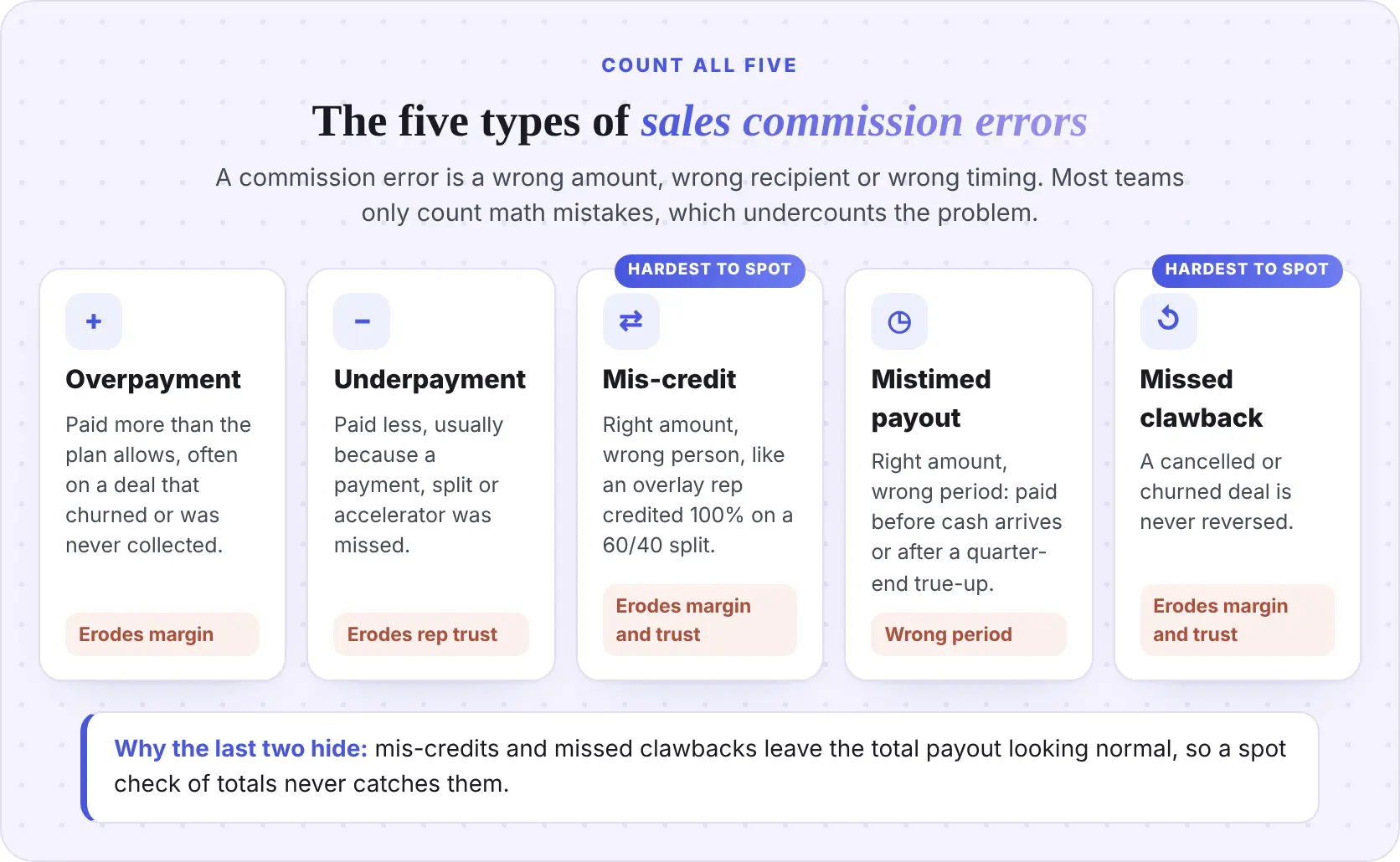
TL;DR: A commission error is a wrong amount, wrong recipient or wrong timing. Count all five types, not just math mistakes.
Why do sales commission errors happen?
Sales commission errors happen because a deal must pass four gates before it becomes a correct payout, and each gate draws on a different system. When a gate's data is wrong, stale or re-keyed by hand, the error flows downstream to the paycheck.
Most teams think commission errors are a spreadsheet problem. The real issue is the hand-off between systems. Here is where errors enter at each gate.
Where do crediting errors come from?
Crediting errors happen when the wrong person gets credit for a deal. Common causes include split percentages kept off the deal record, owner or territory changes made mid-period, and reps tagging a renewal as new business.
Duplicates are the quiet version. One buyer asked us, "Will cloning a deal record in HubSpot cause duplicate or incorrect commission calculations?" The answer in a spreadsheet is yes, unless someone catches it. A cloned deal looks identical to a real one until it is paid twice.
The control is simple: make split, owner and deal type required fields before a deal can close, and check every payout run for duplicate deal IDs. If you run on HubSpot, our HubSpot integration setup guide shows which fields to map.
Why are eligibility errors the most common?
Eligibility errors are the most common because the rule that makes a deal payable (client paid, invoice issued, customer still active) lives outside the commission calculation.
Plans pay on collected invoices, split bookings-based and cash triggers, or churn clawback windows. Payment status sits in QuickBooks or NetSuite, churn flags in HubSpot or Salesforce, and the math in Excel, joined by hand.
Neither error was a math mistake, and both surfaced at the quarter-end true-up as a dispute. Reading payment and churn events from source systems turns each into a dated, approved statement line.
What causes calculation errors in commission spreadsheets?
Calculation errors come from fragile formulas: broken lookups, sheets that feed other sheets, and plan changes pasted into old tabs. Spreadsheets are a known risk here.
The worst part is the lack of history. As one finance leader said, "In Excel, the biggest problem is auditing. There is no change log."
To reduce errors in commission spreadsheets, lock plan logic in one tab, version every plan with an effective date, and keep a change log, even a manual one.
How do payout and adjustment errors creep in after the math is done?
Payout errors happen between the final calculation and the paycheck. Retroactive deal-value changes, prior-period adjustments that never reach the statement, and negative balances sent to payroll are the usual suspects.
Close pressure makes it worse. When the run is late, approvals get skipped, and adjustments go into a side sheet that nobody reconciles.
TL;DR: Errors enter at four gates. Crediting errors come from CRM data, calculation errors from fragile formulas, payout errors from untracked adjustments, and eligibility errors, the most common, from payment and churn data that lives in another system.
How much do sales commission errors actually cost?
Sales commission errors cost far more than the amount paid wrongly. Most of the cost is time spent reconciling and correcting, plus the trust lost with reps. Very few teams measure either, which is why the problem keeps getting funded with overtime instead of fixed.
What is the time cost of manual commission reconciliation?
One mid-market SaaS team we spoke with gave us a useful benchmark. Their Sales Ops manager spent 10 to 12 hours a month just formatting statements, work he called "no value add." Finance spent roughly three to four person-days a month on the calculation itself. Their controller's buying test was simple: show her the tool saves her team "30 hours a month."
Here is what that looks like over a year.
Sources: benchmark hours from Visdum's buyer analysis - the $75 loaded hourly rate is illustrative.
This excludes off-cycle true-up runs, dispute handling and any overpayment, because none of the teams we spoke with had measured them. Swap in your own loaded rate to build a commission error reduction ROI case.
Want this math run on your own plans? Talk to the Visdum team for a payout-time estimate based on your payees and data sources.
What does a commission dispute cost?
Disputes cost the most and get measured the least. In Salesforce’s Trends in Sales Compensation report, 74% of 500 US sales reps surveyed in 2025 said they do not trust how their pay is calculated. A late or wrong statement is all it takes to turn that distrust into a dispute.
Departed reps are the expensive tail. One finance lead described disputes with former reps that dragged on for months, turning her team into “a collections agency.” Three companies on Visdum buyer calls asked what happens when a commission calculation is disputed and needs to be corrected after the fact.
Slow fixes keep disputes open. In HiBob’s 2025 survey of 2,000 US employees, 22% said pay-error fixes came with delays, miscommunication or unresolved issues, and 53% said repeated mistakes would make them consider leaving. Miscalculated bonuses and commissions were among the most common errors reported.
Even without formal disputes, reps keep asking. “I do regularly receive questions from the sales team on... did I get paid properly?” a RevOps lead at a SaaS company told us. On collections-based plans, the question is “Why didn’t I get paid?”
No buyer we spoke with could say how long a dispute takes to resolve. If you do not track median days to resolve, you cannot prove the process is improving, so it sits in the KPI table below.
How big is commission overpayment leakage?
Most teams cannot say, and that is the finding. A controller at a SaaS company put it this way: "there might be a bit of leakage, you know, overpayments." None of the buyers we spoke with could put a dollar figure on it. If you cannot see your overpayments, you cannot recover them, and you cannot prove the process works.
What is the compliance and audit exposure?
Commission errors carry legal and accounting risk, not just payroll risk. California, for example, requires employers to give commissioned employees a signed written contract that sets out how commissions are computed and paid. If payouts drift from that method, the written plan and the paycheck no longer match.
On the accounting side, sales commissions are usually incremental costs of obtaining a contract under ASC 340-40. They are capitalized as an asset and amortized, unless the amortization period is one year or less. A wrong commission is also a wrong asset and a wrong amortization schedule. Our guide to sales commission accounting walks through the journal entries.
How do you catch sales commission errors before payroll does?
You catch sales commission errors before payroll by reconciling each gate against its source system on every run, not by spot-checking the final total. Commission reconciliation is a set of tie-outs, each with an owner and a pass condition.
Set the variance threshold as a written policy. The number matters less than the fact that everyone knows it.
Two habits make this work. First, flag missing data during the period, not at close. One buyer asked whether the system would "come back with alerts, basically saying like, we couldn't credit this to a certain user or we're missing something." Second, replace "check the top three and bottom three earners" with a risk-based review. Look at every deal with a split, a retroactive change, a credit note or a churn flag. Those are where the errors are.
For audit preparation, our five tips for sales commission audits cover the documentation auditors ask for.
TL;DR: Reconcile each gate against its source system on every run. Flag missing fields in period, and review the risky deals, not a random sample.
How do you fix a commission error that has already been paid?
You fix a paid commission error with a dated, visible adjustment on the next statement and a written reason, never by quietly editing last month's numbers. How you handle it matters as much as the correction itself, because the rep is watching.
How should you correct a commission underpayment?
Pay it in the next cycle as a separate line, labelled with the original period and the reason. Do not fold it into the current total. Reps who can see the correction trust the process more, not less. Visibility is the whole point of commission transparency.
How do you recover a commission overpayment fairly?
Recover overpayments under a written sales commission clawback policy that defines the trigger, the window and the repayment schedule before you need it. Offsetting against future commissions is the most common approach. One RevOps lead described a rep repaying an overpayment by applying 60% of each new commission until the balance was cleared.
Three rules keep recovery fair:
- Check state law and the signed plan first. Rules on deducting overpayments vary by state. Involve HR and legal.
- Show gross and net on the statement. A rep should see the original commission, the clawback and the net, not just a smaller number.
- Separate rep errors from company errors. One controller told us an AE should not lose commission for credits issued because of the company's own mistakes. Decide that in policy, not case by case.
For clawback types and a step-by-step playbook, read our guide to sales commission overpayments and clawbacks.
How do you eliminate sales commission errors for good?
You eliminate sales commission errors by fixing the hand-offs between systems, not by checking the formula harder. These seven steps map to the four gates.
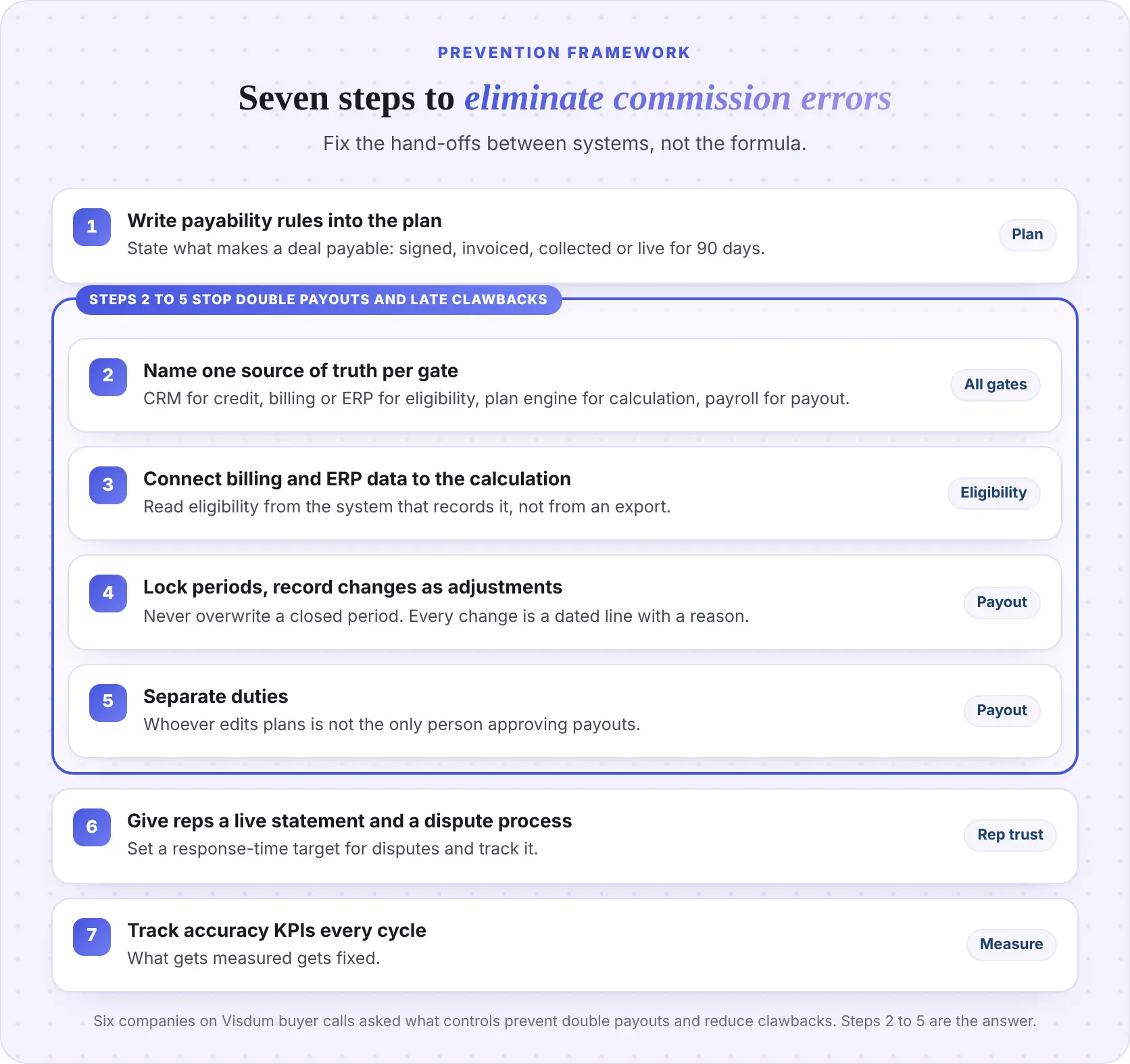
Six companies on Visdum buyer calls asked, "What controls prevent double commission payouts and reduce the need for clawbacks?" Steps 2 to 5 are that answer. Most double payouts are duplicate records or overwritten periods, and most clawbacks are eligibility rules applied too late.
TL;DR: Write payability into the plan, read eligibility from billing or ERP, lock periods, separate duties, and give reps visibility.
What KPIs show your commission process is getting more accurate?
Five KPIs show whether your commission process is getting more accurate. Track them every payout cycle and report them to finance leadership quarterly.
Start with a baseline from your last two quarters, even if it is rough. A team that cannot produce these numbers has found its first problem.
When does commission software actually fix the error problem?
Commission software fixes the error problem only when it reads eligibility directly from your billing or ERP system, keeps an audit trail of every adjustment, and routes payouts through approvals. A tool that just moves your spreadsheet logic into a nicer interface leaves the riskiest gate untouched.
Two assumptions come up again and again on buyer calls. The first is "a tool will mean more work for my team." The second is that commission software is mainly a rep engagement or gamification product. Both are fair worries, and both point to the same test.
When you evaluate commission calculation error prevention tools or commission reconciliation automation, ask four questions:
- Does it pull invoices, payments and credit notes from QuickBooks, NetSuite or your ERP, and gate payouts on them?
- Does it apply clawbacks automatically when a credit note, bad debt or churn event appears?
- Is every calculation, override and adjustment logged with who changed what?
- Who builds and maintains the plans, and how long until the first live payout?
This is the problem Visdum was built to solve. Visdum pulls invoices, credit notes and payments from QuickBooks, can hold a payout until a set percentage of an invoice is paid, and claws back earnings when a credit note is issued or an invoice goes unpaid. With NetSuite, it syncs payments, credit notes and bad debt status, and only releases commissions when your payment conditions are met.
On the other gates, the Visdum platform keeps a full audit trail on every calculation, runs approval workflows before payroll, auto-generates statements, and gives reps a live view of their payouts with in-app dispute resolution. Deal and credit data comes from Salesforce or HubSpot.
On the "more work" worry: Visdum typically goes live in 2 to 4 weeks, with CSM support included as standard, so your team does not run the implementation alone.
The results show up in close time. Hubilo moved off a master Excel sheet that only one finance team member fully understood, and cut payout time from 40 hours to 12 while handling ASC 606 capitalization in the same system. Subex automated more than 20 plans for over 100 reps, splitting commission between booking and billing across five currencies.
Who this is for: mid-market Finance and RevOps teams with 20 or more payees, plans that pay on collections or include clawbacks, and data split across a CRM and an accounting system.
Not for you yet: teams with fewer than about five reps on one simple plan. A well-kept spreadsheet is fine until the plan or the team grows.
For a side-by-side view of options, see our guide to commission software for finance teams and the best commission software for mid-market companies.
Spreadsheets vs commission software: which errors does each prevent?
Spreadsheets can calculate a commission correctly. They cannot tell you whether the deal should have been paid. That is the difference that matters.
Links for the tables: Visdum + QuickBooks · Visdum + NetSuite · Visdum + Salesforce · Visdum platform
Software does not fix everything. It will not correct a rep who enters the wrong deal type, and it cannot rescue a plan document that never defined what "payable" means. Steps 1 and 2 of the prevention framework are still your job.
Fix the hand-off, not the formula
Most sales commission errors are not caused by bad math. They are caused by a payability rule that lives in one system while the calculation lives in another, with a person and a spreadsheet in between. Check the formula harder and you will still miss the churned deal and the late payment.
Close the gap at the eligibility gate, lock your periods, and give reps a statement they can trust. The errors, the true-ups and most of the disputes go with it.
Want to see your own plan's eligibility rules run against your billing data? Talk to the Visdum team and we will walk through it with your plans.
About Visdum
Visdum is sales compensation software built for Finance, RevOps and Sales teams at mid-market and enterprise companies. It is rated #1 on G2 for Ease of Use, Fastest Implementation and Best Relationship, and G2 Spring 2026 data puts its average implementation at about 3 weeks against a 3.48-month category average. Native integrations cover HubSpot, Salesforce, QuickBooks and NetSuite. See why finance teams choose Visdum or explore the platform.
FAQs
What is the most common cause of sales commission errors?
The most common cause is eligibility data that lives outside the commission sheet. When plans pay on collected invoices or include churn clawbacks, payment and churn status sit in billing, ERP or CRM systems. Re-keying that data by hand from exports is where most errors enter.
How do you reduce sales commission errors?
Write payability rules into the plan, name one source of truth for each step, and connect billing or ERP data to the calculation. Lock closed periods, record every change as a dated adjustment, separate who edits plans from who approves payouts, and track error KPIs every cycle.
What is a commission true-up?
A commission true-up is a reconciliation run that corrects earlier payouts to match actual results, such as final collections, attainment or deal values. Some plans schedule true-ups quarterly or annually. Frequent off-cycle true-ups are a sign that eligibility data is reaching the calculation too late.
What is a commission clawback, and when is it fair?
A commission clawback recovers commission already paid on a deal that was cancelled, churned or never collected. It is fair when the trigger, window and repayment method are written into the signed plan in advance, and when the rep's statement shows the original amount, the clawback and the net.
Can an employer recover overpaid commissions in the US?
Often yes, but it depends on state law and the signed commission plan. Some states restrict deductions from wages, and California requires a written commission contract that explains how commissions are computed and paid. Check with HR and employment counsel before deducting anything. This is not legal advice.
How often should you reconcile commissions?
Reconcile on every payout run. Tie bookings to the CRM, commissionable revenue to billing or ERP collections, and payout totals to the payroll register. Run exception reports for missing fields weekly during the period, so problems are fixed before close rather than after.
What are the best tools for commission dispute resolution?
The best tools give reps a live statement showing how each payout was calculated, a way to raise a dispute in the app, and a full audit trail of changes and approvals. Visdum includes in-app dispute resolution alongside audit-ready approvals, so disputes are resolved against the record.
When should a company stop calculating commissions in spreadsheets?
Move off spreadsheets when plans pay on collections or include clawbacks, when data is split across a CRM and an accounting system, or when one person is the only one who understands the file. For very small teams on one simple plan, a well-kept spreadsheet is usually enough.
How do pay-on-collections commission plans create errors?
Pay-on-collections plans tie commission eligibility to when the customer actually pays, not when the deal closes. The error pattern is predictable: the commission formula sits in a spreadsheet, but the payment status lives in QuickBooks, NetSuite, or Sage Intacct. When finance re-keys collection data from exports (or forgets to), reps get paid at the wrong time or on the wrong amount. The fix is reading payment status directly from the billing or ERP system, with the commission run gated on cash-collected rather than booked.
How do multi-trigger commission plans cause errors?
Multi-trigger commission plans pay reps at multiple events: a portion at contract signing, a portion at invoice issuance, a portion at cash collection, and sometimes a true-up at renewal. Each trigger requires reading status from a different system (CRM for signing, billing for invoicing, ERP for collection). When any one trigger’s status is stale, the commission run calculates against wrong data. The error pattern we see most often: a rep gets paid the signing portion but the collection portion either gets paid late or gets missed entirely, because the collection status never made it from the ERP into the commission sheet.