Commission Software Rep Dashboard: What Reps See vs What Admins See
TL;DR: A good commission software rep dashboard shows each rep their attainment, deal-level earnings, payout status, and a what-if estimator, and nothing about anyone else's pay. Admins keep plans, rates, adjustments, and approvals. Managers get a team rollup. Reps see numbers only after approval.
Key takeaways
- The rep view answers one question: "What am I getting paid, and why?" Deal lines, attainment, payout status, and an estimator.
- The admin view answers a different one: "Is this run correct, approved, and audit-ready?"
- Managers sit in between: team attainment and each rep's pace, inside their own hierarchy only.
- The gate matters most: draft runs stay with admins. Reps see a statement once it is approved.
- Permissions are the product: role-based access decides who sees what, so no rep sees another rep's pay.
Your reps already have a commission dashboard. It is just a spreadsheet they built themselves.
In a 2024 Pollfish survey of 1,000 US commissioned workers,
85% said they recalculate their commissions manually at least some of the time, and fewer than half were completely confident their payout is always accurate.
Separately, Salesforce’s 2026 Trends in Sales Compensation Report, a survey of 500 US sellers, found that 74% want more transparency in how their pay is calculated (Salesforce, 2026).
That is not a motivation problem. It is a visibility problem, and finance pays for it twice: once in rep hours spent on shadow accounting, and again in admin hours answering "why is my number different?"
That is why the rep dashboard is the first screen almost every buyer asks to see. Across 285 recorded Visdum sales calls between January 2025 and August 2026, buyers from 17 different companies asked some version of the same question: what does the dashboard look like for a sales rep versus an admin? It was the most common product question in the entire set.
Most teams evaluate the rep view on looks. Mature teams evaluate it on permissions and timing: what each role can see, what it can change, and when numbers become visible. This guide breaks down the rep view, the manager view, and the admin view in commission software, then gives you a checklist to run in your next demo.
Why does the rep view vs admin view split matter?
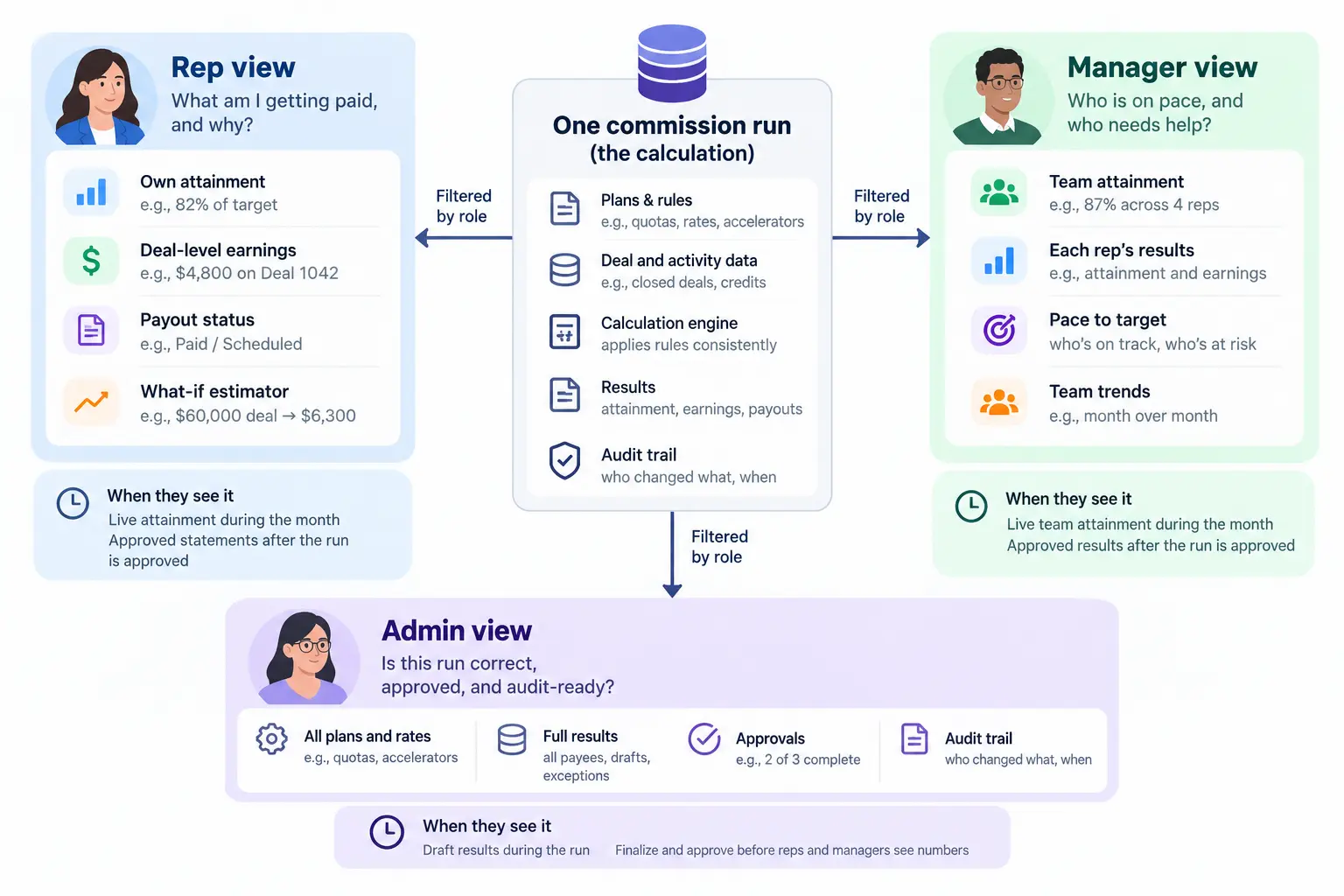
TL;DR: The split matters because one calculation serves three audiences with different decisions to make. Reps need to answer “why this number.” Managers need to coach their team. Admins need to validate and approve. Each role needs a view built for its decision, not a scaled version of the admin console.
The real decision is not "which tool has the nicest dashboard." It is whether one calculation can serve three audiences without leaking the wrong data to any of them.
When the split is wrong, the failure is predictable. Reps get no view, so they track deals on their own and dispute every statement. Or reps get too much, such as draft numbers that move during a recompute, and the admin inbox fills up. A RevOps lead at a SaaS company described that fear directly on a call: "if they see the numbers changing i'm a bit worried they'll be like oh no it was this before why is it this."
The fix is not hiding numbers. It is giving each role a view built for the decision it has to make.
Source: See how Visdum handles the payee side on the Payee Experience page, and the admin side on the Visdum platform overview.
What should a sales rep see in a commission dashboard?
A rep dashboard earns its keep when a rep can answer "why this number?" without messaging anyone. A RevOps lead at a 49-payee SaaS company put it simply: "If people can't see it, it's hard to value it."
Whether a vendor calls it a rep dashboard, a payee portal, or a sales commission tracker, the minimum rep view in commission tracking software covers five things:
- Attainment against quota, updated as deals sync from the CRM, so reps can pace the month instead of guessing.
- Deal-level earnings, one line per deal, showing the rate or tier that applied. This is what kills disputes.
- Payout status, so a rep knows whether a commission is earned, approved, or paid.
- Adjustments with reasons, such as a split correction or a clawback, so the statement explains itself.
- A way to raise a query inside the tool, tied to the exact line in question.
We cover the full payee side, including statements, leaderboards, and alerts, on our Payee Experience page. This guide focuses on how that view relates to what managers and admins see.
Do sales reps get their own login view separate from the admin console?
Yes, and they should. Six companies on Visdum sales calls asked this exact question, often mid-demo: "right now when you're demonstrating this, are you still in the admin view?" In Visdum, every rep gets a secure individual login (with SSO and mobile access) that opens on their own dashboard and statements. The admin console is a separate permission level, not a different tab the rep can click into.
Should reps see the full calculation detail, or is that admin-only?
Reps should see the outcome and the logic, not the levers. A rep needs to know that Deal 1042 paid at 10% because they were at 82% of quota. They do not need edit access to the rate table.
Buyers ask this in almost these words: "Can each individual salesperson see this level of detail, or is this like an admin view?" The right answer is a statement that shows every deal line and rule applied, while the plan builder, rate tables, and deal credit rules stay in the admin console.
Can reps see commission owed on revenue that hasn't been collected yet?
This is a sleeper requirement for teams that pay on invoice or collection, common in SaaS, professional services, and fintech. Reps want to see three buckets: commission earned on bookings, commission pending on invoiced amounts, and commission paid.
Without that split, a rep who closed a large annual deal sees nothing for weeks and assumes the system lost it. With it, the statement says exactly which invoice is holding the payout.
Can reps forecast their own commission?
Yes, and it is one of the strongest drivers of rep adoption. A commission estimator lets a rep model a deal before it closes: "if I close this $60,000 deal, where does my attainment land and what does it pay?"
The estimator does two jobs. It motivates, because reps see how close they are to the accelerator tier. And it removes the main reason reps keep shadow spreadsheets, which is answering "what if" questions the official system cannot.
Visdum's rep view includes a what-if estimator and progress toward accelerators, so reps model deals in the same system that pays them. The admin side has its own version of forecasting: finance models total commission expense before quarter close, which is a different question from "what will I earn?"
TL;DR: Reps see outcomes, deal lines, payout status, and a what-if estimator. They never get edit access to rates or plans. Commission owed on uncollected revenue should show as a separate bucket.
What does an admin see that reps don't?
TL;DR: Admins work with plans, rate tables, deal credits, drafts, recomputes, adjustments, approvals, and audit trails. Reps never see this layer. The admin view exists so someone always owns the validation that reps rely on.
The admin view is where the commission run is built, checked, and approved. Reps never see this layer, and that is the point.
In Visdum, admins work with:
- Plans and rate tables: a no-code plan builder, plan components, and rate tables that map attainment bands to rates.
- Deal credits: owner, split, and overlay credits, editable before the run is submitted.
- Draft computations: a run can be saved as a draft, reviewed, and only then submitted for approval.
- Recomputes: when data or rules change, the recompute shows every commission that was updated, created, or deleted before anything goes live.
- Adjustments: top-ups and clawbacks, each with a reason that carries through to the rep's statement.
- Approvals: multi-step approval chains (for example, manager then HR or finance) with reminders.
- Audit trail: paid commissions are frozen, and every change is logged.
This is the layer finance cares about. A controller at a healthcare company summed up the worry on a call: "I'm always worried about back-end changes that may or may not happen. We need to know what's going on." The admin view exists so someone always does.
Source: Visdum's approval flow is covered in how commission approval workflows work. For clawback mechanics, see sales commission clawbacks explained.
When should reps see their commission numbers?
This is the question most teams answer last, and it causes the most trouble.
There are two models. Live visibility shows reps numbers as deals sync. Published visibility shows reps a statement only once the run is approved. Most teams need both: live attainment for pacing, and published statements for money.
The trap is mixing them. If a rep sees a draft payout of $5,200 on Tuesday and an approved payout of $4,850 on Friday, you have created a dispute out of a routine correction. One RevOps lead predicted exactly this: "we're going to be hammered with all those questions of... Hey, this yesterday was this, now it's this, what changed?"
The fix is a gate:
- Attainment and deal progress update for reps as CRM data syncs.
- Commission calculations run as drafts in the admin view.
- Admins resolve exceptions, recompute if needed, and route for approval.
- Only the approved run becomes the rep's statement.
- Paid records freeze for audit.
High-performing RevOps teams prioritize this sequence over payout speed. A fast statement that changes twice is worse than a correct one a day later.
What do sales managers see in commission software?
Managers need a rollup first, then a drill-down. Think of it as a sales compensation dashboard for one team, not a smaller copy of the admin console. A sales ops lead at a manufacturing company described the requirement precisely: "Managers would need a similar dashboard, but starting with a higher level, but then be able to drill down into the individual reps."
A useful manager view shows:
- Team attainment against the combined target.
- Each direct report's attainment, so the manager knows who is ahead, on pace, or at risk.
- Pacing signals like daily run rate, so coaching happens mid-period, not after close.
- Scope limited to their hierarchy. A manager sees their team, not the whole company.
Do managers need explicit permission to see their direct reports' data?
They should not need a manual grant every time a rep joins. The manager view should follow the sales hierarchy, so access updates when the org chart does. In Visdum, reports can be scoped by role (Admin, Individual Contributor, Manager, Leader), by department, or to specific users.
Can managers see their reps' salary?
Usually they should not, and buyers ask this out loud ("Would I get his salary as well?"). Commission software should show variable pay and attainment. Base salary lives in your HRIS. Decide this policy before implementation and configure it once.
TL;DR: Managers get a team rollup and each direct report's attainment, limited to their own hierarchy. Access should follow the org chart, not manual grants.
How do you stop reps from seeing each other's commissions?
With role-based access, set once at implementation. This is the objection that quietly kills rep portals. A comp admin at a manufacturing company asked it in three words on a call: "showing everyone's income?"
The answer should be no, by design:
- Reps see their own statements, attainment, and deal lines.
- Leaderboards, if you use them, show rank or attainment, not dollar payouts. Decide this deliberately.
- Managers see their own hierarchy.
- Admins and finance see everything, with every change logged.
- Single sign-on (Okta, Google, OneLogin, Azure AD, or SAML 2.0 in Visdum's case) keeps logins tied to your identity provider, so offboarded reps lose access with everything else.
Ask every vendor to log in as a rep during the demo and try to open another rep's statement. It is the fastest trust test you can run.
How do leading commission platforms handle role-based access?
Source: Vendor documentation and G2 comparison pages, pulled October 2026.
Rep view vs manager view vs admin view: full comparison
Source: For the rep side, see Visdum Payee Experience. For real-time visibility on the admin side, see how Visdum improves commission visibility with dashboards.
Worked example: one deal, three views
Here is how one quarter looks from each seat. All names and figures are illustrative.
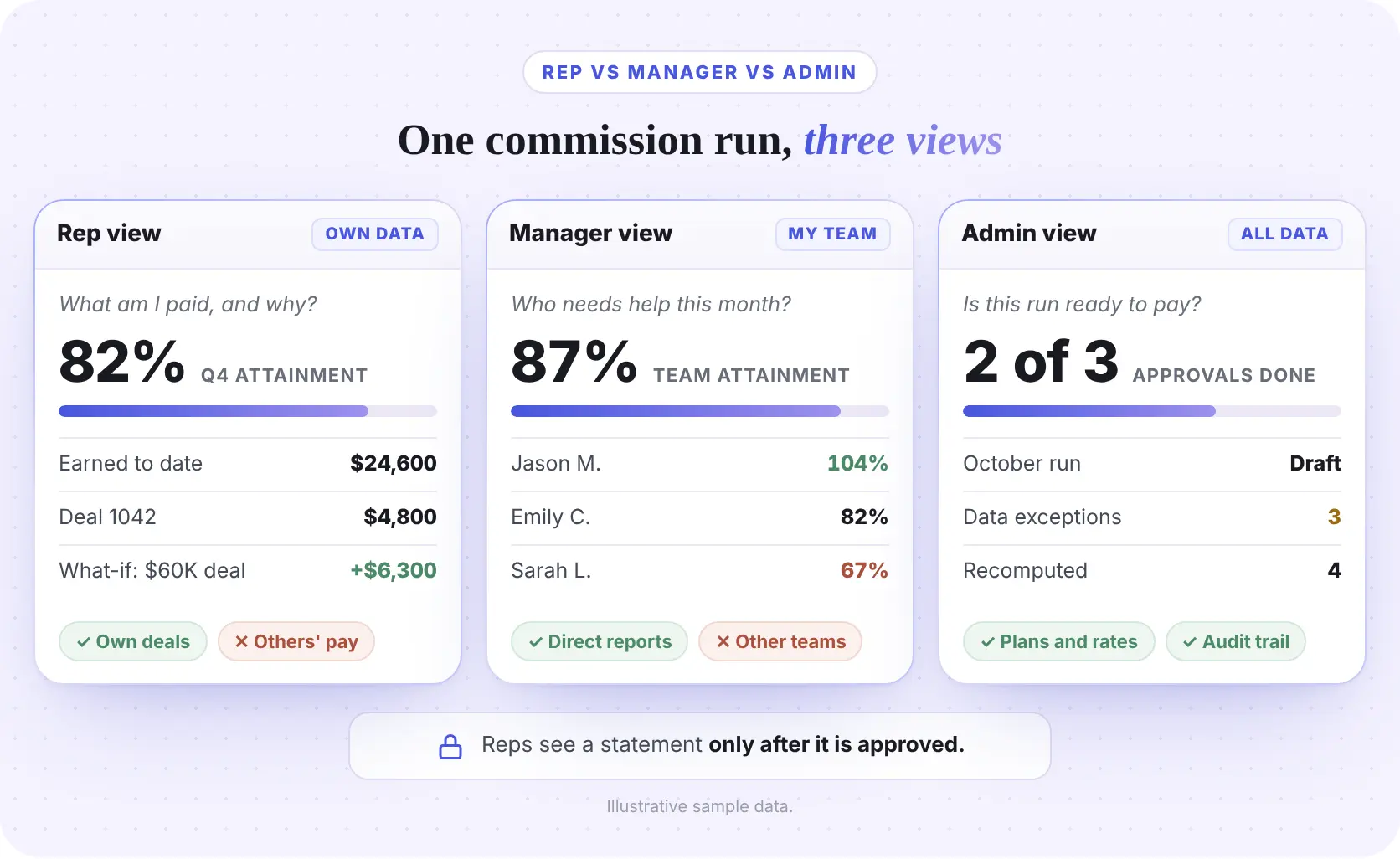
The setup:
Emily Carter is an AE in Austin with a $300,000 quarterly quota. Her plan pays 10% up to 100% attainment and 15% above it. She has closed $246,000 so far, which is 82% attainment and $24,600 earned.
Emily's rep view:
She sees 82% attainment, $24,600 earned, and a line for Deal 1042, a $48,000 renewal that paid $4,800. A $350 adjustment shows with its reason: a split correction. Her estimator shows that closing a $60,000 deal takes her to $306,000, or 102%. That deal would pay $6,300: $5,400 on the first $54,000 at 10%, plus $900 on the last $6,000 at 15%.
Marcus Reed's manager view:
Marcus manages four AEs with a combined $1.2M target. The team has booked $1.04M, 87% attainment. Jason Miller is at 104%, David Brooks at 95%, Emily at 82%, and Sarah Lopez at 67%. Marcus knows where to spend his coaching time before the quarter closes.
Rachel Kim's admin view:
Rachel runs RevOps. Her October run covers 48 payees and is still a draft. Three deals are missing a required CRM field, a recompute updated four commissions after a data fix, and approvals are two of three complete. Nobody outside the admin view sees these numbers until the run is approved.
The outcome:
Emily never emails Rachel to ask why she was paid $4,800. Marcus coaches Sarah in week nine, not after close. Rachel approves once, and the statement does not change after it lands.
See it with your own plan. Want to see Emily's view built on your real comp plan instead of sample data? Take the Visdum product tour, then ask the team in your demo to log in as a rep, a manager, and an admin on the same run.
How to evaluate a commission software rep dashboard in a demo
Most buyers underestimate how different a polished demo account looks from a real rep login with real permissions. Use this checklist and ask the vendor to switch roles live.
Source: see our guides to commission management software and the best commission tracking software for wider evaluation criteria.
TL;DR: In every demo, log in as a rep, try to open another rep's statement, and change a rate to see whether reps get a gated update.Those three tests reveal more than any feature list.
Why Visdum fits teams that need all three views
You do not need three dashboards. You need one commission system with three permissioned views of the same calculation. That is how Visdum is built.
Visdum is rated 4.8 out of 5 on G2. Teams that moved from spreadsheets to Visdum share how it went in our customer case studies, including WebEngage's shift from spreadsheets to an aligned commission process.
If your reps are still rebuilding their commissions in Google Sheets, start with the rep view. Take the Visdum product tour or see pricing.
About Visdum
Visdum is sales compensation software for Finance, RevOps, and Sales teams at high-growth and mid-market to enterprise companies. It replaces spreadsheets and legacy commission tools with one platform for plan design, automated calculations, approvals, rep statements, reporting, and ASC 606 compliance. See the Visdum platform.
FAQs
What should a commission software rep dashboard show?
A commission software rep dashboard should show attainment against quota, deal-level earnings with the rate or tier applied, payout status (earned, approved, paid), adjustments with reasons, and a way to raise a query on a specific line. A strong rep dashboard also includes a what-if commission estimator, so reps can model a deal before it closes and see whether it pushes them into an accelerator. What it should not show is anyone else's pay, draft numbers that are still under review, or edit access to plans and rates. If a rep can answer "why was I paid this?" without emailing RevOps, the dashboard is doing its job.
What features should a commission software rep dashboard include?
A commission software rep dashboard should include seven core features: real-time attainment against quota, deal-level earnings with the rate or tier applied, payout status (earned, approved, paid), a what-if commission estimator for modeling deals before they close, adjustments shown with reasons, in-app query submission tied to specific deal lines, and separate buckets for commission on uncollected revenue (earned, pending, paid). Stronger dashboards also add progress toward accelerators and mobile access for reps who work in the field. The dashboard should not include edit access to rates, visibility into other reps’ pay, or draft numbers that are still under review.stop reps
What is the difference between the rep view and the admin view in commission software?
The rep view shows one person's outcomes: attainment, deal-level statements, payout status, and an estimator. The admin view controls the inputs: plans, rate tables, deal credits and splits, adjustments and clawbacks, draft runs, recomputes, approvals, and the audit trail. Reps see results, admins see and change the machinery. A third view, the manager view, sits in between and shows team attainment for the manager's own hierarchy. All three should read from one calculation, so the number a rep sees is the same number finance approved.
Can sales reps see other reps' commissions?
Not in a well-configured system. Role-based access limits each rep to their own data. Leaderboards can show rank or attainment without showing payout amounts. Test this in the demo by trying to open another rep's statement.
Should reps see commission numbers before payroll is approved?
Reps should see live attainment for pacing, but commission statements should appear only after the run is approved. Draft calculations often change after admins fix CRM data, correct a split, or recompute after a rate update. If reps see a draft payout of $5,200 on Tuesday and an approved $4,850 on Friday, a routine correction becomes a dispute. The cleaner model is a gate: attainment updates live, calculations run as drafts in the admin view, approvals happen, and only then does the statement publish to the rep. Paid records should then freeze for audit.
Do sales managers get a separate commission dashboard?
Yes. Managers need a team rollup with each direct report's attainment, scoped to their own hierarchy. Access should follow the sales org chart so it updates automatically when reps join or move teams.
How do I stop sales reps from shadow accounting their commissions?
Give reps a statement that explains every deal line, a way to raise queries on a specific line, and an estimator for what-if questions. Reps keep shadow spreadsheets when the official system cannot answer "why" or "what if." Read more on commission transparency and replacing Excel for commission tracking.
Do reps need a separate login, or can they see commissions in the CRM?
Visdum gives each rep a secure individual login, with SSO and mobile access, and syncs deal data from Salesforce or HubSpot. If you want commission data surfaced inside your CRM, ask about the options for your specific CRM during the demo. See how CRM and commission software integration works.
Can commission software send notifications to Slack or Microsoft Teams?
Yes, most modern commission platforms offer Slack and Teams integrations for payout notifications, approval requests, and deal-level alerts. Visdum supports Slack and Teams notifications for payout statuses, pending approvals, and plan sign-offs. Everstage and Spiff offer similar capabilities. Before enabling notifications, decide what you want to push to chat (approvals, exceptions, payout notifications) and what should stay in email or inside the dashboard. For distributed sales teams, chat notifications can replace a lot of RevOps follow-up. For teams that already feel chat-fatigued, the dashboard-only model is often preferable.
Do companies have to show reps how commissions are calculated?
In some states, yes. California Labor Code Section 2751, for example, requires commission agreements for California employees to be in writing, set out how commissions are computed and paid, and be signed with a copy given to the employee (see the statute text). Other states, including New York and Massachusetts, have their own commission disclosure requirements. A rep view that links each statement to the plan makes that easier to maintain. This is general information, not legal advice.

.webp)