How to Build Complex Commission Plans Without a Developer

TL;DR: You can build complex commission plans without a developer if the logic is split into four no-code blocks: crediting rules (who gets credit), condition blocks (what qualifies), rate tables (which rate applies), and payout rules (when it pays). Spreadsheets and custom code bundle all four into formulas only their author can safely change.
Key Takeaways
- Complex commission plans fail on maintenance, not math. The formula works in January. It breaks in July when a rep is promoted, a territory moves, or a deal gets split three ways.
- Separate the four questions. Who gets credit, does the deal qualify, at what rate, and when does it pay. Each one should be its own editable rule.
- Rate tables remove plan sprawl. Put every rep's negotiated rate in one lookup table instead of cloning a plan per rep.
- Crediting runs before calculation. Most split disputes and double payouts start with a crediting rule that was never written down.
- "No developer" does not mean "no help." The right setup is vendor-built at the start and admin-owned after go-live, with a preview step before every change hits payroll.
Why do complex commission plans end up needing a developer?
Complex commission plans end up needing a developer because the logic lives in code or nested formulas that only one person can read. This decision matters because comp plans are no longer annual documents. They are living systems that change every quarter.
The data backs that up. According to the Alexander Group's 2026 Sales Compensation Trends Survey, reported by WorldatWork in August 2026,
97% of companies changed their sales compensation plans for 2026, up from 86% the year before.
Every one of those changes has to be rebuilt somewhere: in a spreadsheet, in a script, or in a ticket queue.
86% of operational spreadsheets contain at least one error that produces a wrong result. That is the finding from Dartmouth researchers’ audit of 50 workbooks, published in the Journal of Organizational and End User Computing. Now apply that rate to a commission file with dozens of plan variations.
One RevOps lead put the problem plainly on a call with Visdum:
"coming up with 224 different ways to calculate commissions every month is unsustainable"
That is the real cost. Not the calculation itself, but the number of hand-built versions of it. Sales commission automation only fixes this if the automation is something your own admins can change. A sales ops leader at a manufacturer described the custom-code version of the same trap: every plan tweak, even switching from net to gross sales, "becomes like a coding change."
Sources:
- The Hidden Forces Driving Annual Sales Compensation Changes, WorldatWork (Aug 2026)
- Errors in Operational Spreadsheets, Powell, Baker and Lawson, Journal of Organizational and End User Computing (2009)
What are the four building blocks of complex commission logic?
Every complex commission plan, no matter how many components it has, answers four questions in a fixed order. The mistake most teams make is answering all four inside one formula.
Links for the tables:
Here is how one deal moves through all four blocks:
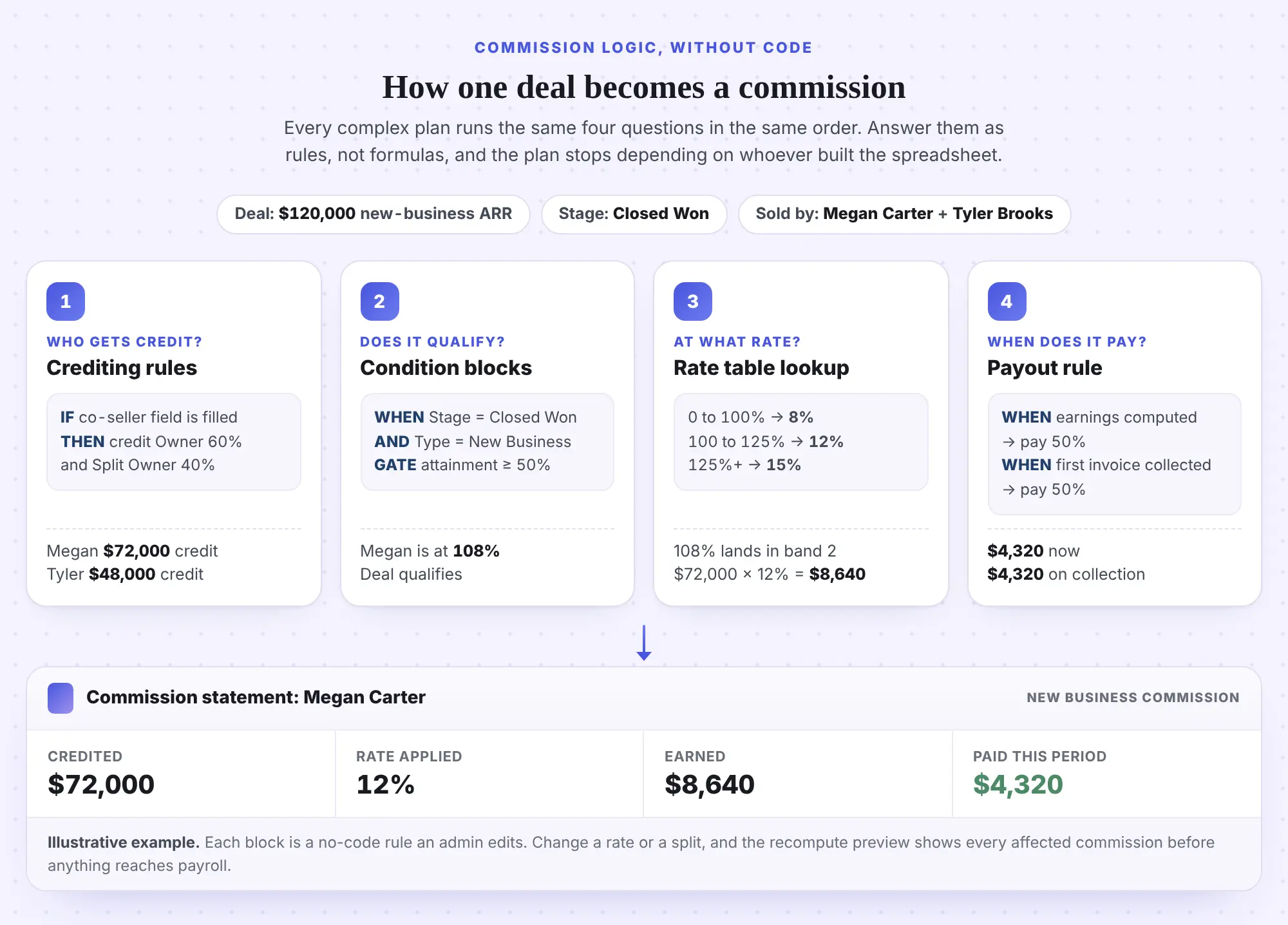
The point of the sequence is ownership. When each block is its own rule, a RevOps admin can change a split without touching the rate, and Finance can change a rate without touching eligibility. When all four live in one cell, every change is a rebuild.
TL;DR : Crediting, conditions, rates, payouts. Keep them as four separate rules and each change stays small.
How do rate tables replace per-rep plan copies?
A rate table is a lookup that maps inputs, like quota attainment, product line, region, or the rep themselves, to an output rate. It is the single biggest lever for shrinking a complex commission plan.
Can each sales rep have a negotiated individual commission rate in the rate table?
Yes. Add the rep as an input column and store each negotiated rate as its own row. This is the most common rate table question buyers ask: seven different companies asked a version of it on Visdum calls. One RevOps lead said it simply: "every rep is going to have different percentages, right?"
Without a rate table, the answer is a cloned plan per rep. With one, every rep shares the same plan logic and the table returns their rate. When a rep is promoted, you edit one row. Every plan linked to that table picks up the change.
What does a tiered rate table look like in practice?
Take Megan Carter, an account executive with a $1M annual quota who closes $1.2M. Her plan uses three attainment bands, which is what buyers often call a "payment curve" or a kinked pay curve: the rate bends upward at each breakpoint.
Links for the tables:
Paid marginally, Megan earns $104,000. Paid retroactively, where the top band's 12% applies to all $1.2M, she earns $144,000. Same table, same rates, a $40,000 difference. That is why the application method has to be explicit in the rate table, not implied by whoever wrote the formula.
Should different roles share one rate table or get their own?
Use one table with a role column when roles share the same bands and only the rates differ. Use separate tables when the bands themselves differ, for example when AEs tier on attainment but area VPs tier on team revenue. A buyer asked this exact question in October 2026: whether AE and AVP rates should live together with a role identifier. The rule above keeps lookups predictable and stops overlapping ranges.
Two maintenance habits matter more than table design:
- Version, do not overwrite. Create an FY27 table instead of editing FY26 mid-period, so prior payouts still trace to the rates that produced them.
- Keep a default row. A fallback row prevents a failed lookup when a new rep or product is added before the table is updated.
For a deeper walkthrough of Visdum's rate table setup, see the rate table guide.
TL;DR: One plan, one rate table, one row per variation. Rate changes become data edits, not plan rebuilds.
How do condition blocks handle eligibility, gates, and exceptions?
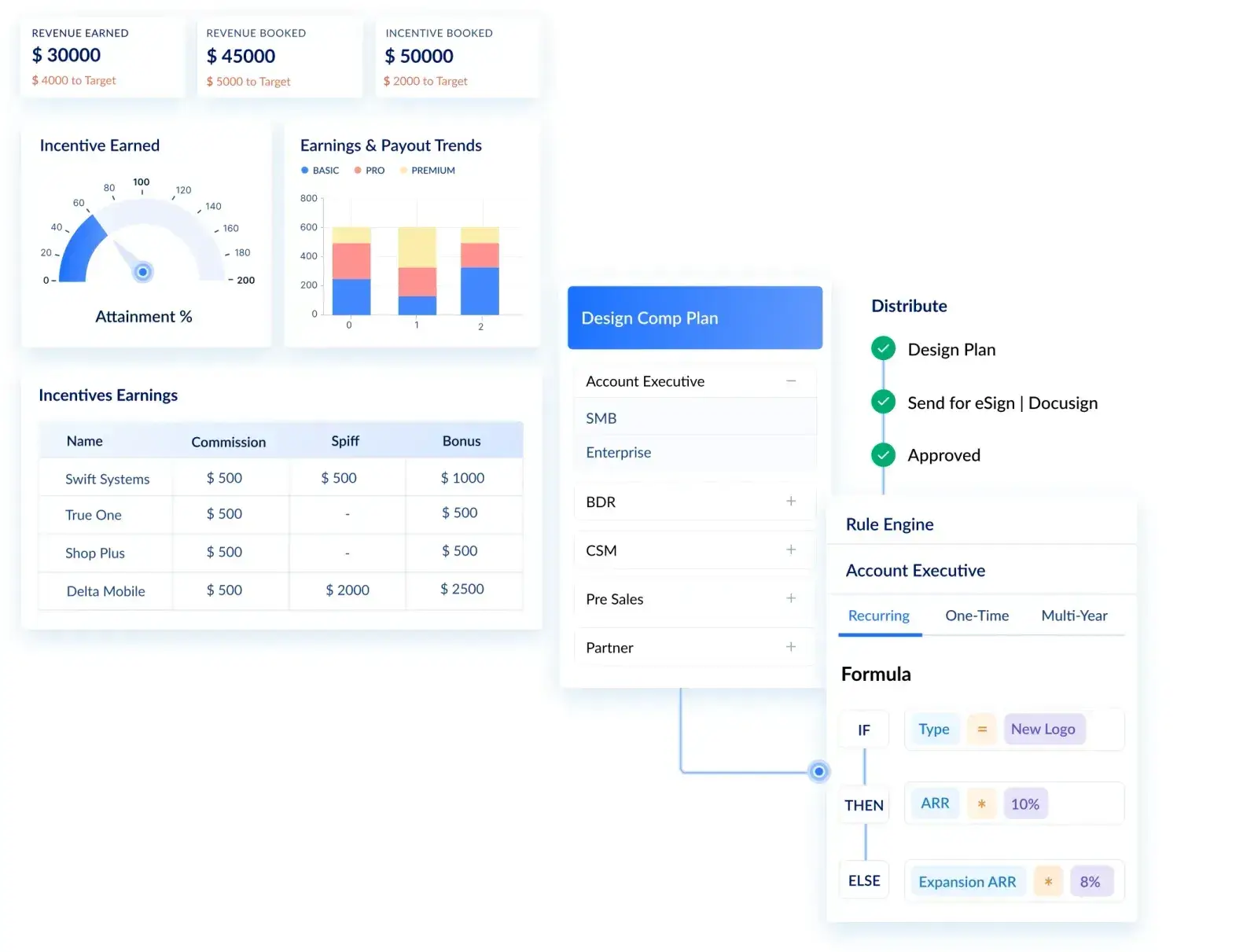
Condition blocks are the WHEN, IF, THEN and ELSE rules that decide which deals count and how they calculate. They do the job nested Excel IFs do, but each condition is a visible, named block instead of a formula string.
Buyers frame this question two ways.
The technical version: "Can complex, multi-condition commission calculation logic be programmed into the plan builder?"
The practical version, from a SaaS buyer: "Is it similar to setting it up as you would set it up in Excel or how does that work?"
The honest answer is that it mirrors Excel's logic without Excel's fragility. In Visdum, an earning rule has three layers:
- WHEN (qualifying filter): which records count at all. Example: Stage equals Closed Won AND Deal Type equals New Business.
- IF (gate): the minimum performance before anything pays. Example: attainment of at least 50%. Below the gate, the rep earns $0 on that component.
- IF / THEN (calculation logic): the actual formula per scenario, stacked as needed. Example: IF attainment is between 100% and 125% THEN earnings equal credited amount times the rate returned by the rate table.
A simplified version of Megan's new-business component reads like this:
How do payout rules handle timing, holdbacks, and multi-trigger plans?
Payout rules decide when earned commission actually moves to the rep, which is separate from how it was earned. The most common patterns: pay a percentage at booking and hold the rest until first invoice, pay quarterly instead of monthly to smooth volatility, or hold a percentage back against clawback risk until a window closes.
In Visdum, payout rules sit on the earning component, so the same earning can be paid under different schedules depending on the deal type. A rule reads like: PAY 50% at Earnings Approval, PAY 50% at First Invoice Collected (via the ERP integration), WITH HOLDBACK = 20% released after 90 days.
Three buyers on Visdum calls asked variations of “can we hold back 20% of commission until the customer has been live for 90 days?” The payout rule layer answers yes without requiring a second commission plan. The holdback becomes a dated line on the rep’s statement, visible from the moment the earning is approved.
What about logic the CRM does not store?
Most exceptions depend on a field that does not exist yet. A multi-year kicker needs contract length. A discount rule needs the percentage of list price actually charged. In Visdum, these become derived columns: calculated fields built with the same IF, THEN and ELSE blocks plus functions such as Least, Highest, Round, and Datediff. A lookup column pulls a value from another data source with multiple match conditions, which is effectively a VLOOKUP that does not break when rows move.
This is the step that removes the developer. The data enrichment that used to require a script or a SQL view becomes a rule the admin can read and edit. If you are asking how to automate sales commission calculations that depend on fields your CRM never captured, this is the answer.
Buyers name these pieces differently. A threshold is a gate. A holdback is a payout rule that withholds part of an earning until a condition clears. Some teams call each condition block a "rule"; a manufacturing team called their commission formulas "macros." The vocabulary changes, the structure does not.
Want to see your own plan built this way? Visdum runs a proof of concept on your hardest plan, using your real crediting rules and rate bands.
How do you split commissions and credit deals without double counting?
You split commissions safely by resolving crediting before calculation, with written rules for who receives credit, in what role, and at what percentage. Commission splits and sales crediting are where most disputes start, because the rules usually live in someone's head.
The buyer questions here are specific. Three companies asked, "Can a deal be credited to two AEs instead of just one?" Five asked whether the payout percentage can differ from the deal credit percentage. Others asked how an overlay contributor who helped close a deal gets credit. A CFO at a 40-rep software company summed up why it matters: "there's always edge cases every single time and disputes."
What crediting patterns do complex commission plans need?
Links for the tables:
- Commission split (Visdum glossary)
- Multi-party commission split (Visdum glossary)
- Overlay commission (Visdum glossary)
- Quota credit (Visdum glossary)
In Visdum, deal credit rules are configured on the earning data stream with the same IF, THEN, ELSE structure. Each rule names the field that identifies the person, the credit receiver type (Owner, Split Owner, Overlay, Manager), the credit percentage, and who else should be credited relative to that person, such as all eligible managers. Admins can also add or adjust a deal credit manually when a one-off exception comes up.
Why does crediting have to come first?
Because the rate depends on attainment, and attainment depends on credit. If Megan's 60% split is applied after the rate lookup, her attainment is overstated and she may land in the wrong band. What starts as a crediting shortcut becomes an overpayment, then a clawback, then a trust problem.
The other half of the split question is timing. A payout split is different from a credit split: it divides when a single rep's earnings are paid, for example 50% when earnings are computed and 50% when the first invoice is collected. Keep the two concepts separate in your plan document and in your system.
TL;DR: Write crediting rules before rate rules. Credit determines attainment, attainment determines rate, and getting the order wrong is how double payouts happen.
For more on preventing overpayments, see why commission errors happen.
What does "without a developer" actually mean?
It means business admins configure and change the logic, not that nobody helps you set it up. That distinction matters, and buyers ask about it directly.
The surprise reaction is common. A RevOps lead at a professional services firm said mid-demo: "it looks like we don't need no developers to do this comp plans for us." A manufacturing buyer asked the follow-up question that every Controller should ask: "Who does that? Can a business admin do that?"
The answer has two parts:
- Setup: the initial plan build, data mapping, and validation are best done with the vendor's implementation team. Eight companies asked Visdum whether its team would build out their commission plans from their criteria. That is the right expectation for a first build.
- Ownership: after go-live, your admins own the changes. New rate rows, a new split rule, a revised gate, a mid-year plan version. None of those should need a ticket to engineering.
Where will you still need outside help?
Most remaining manual work traces back to data, not logic. A missing CRM field, an inconsistent owner value, or a deal that was split by hand outside the system will still need attention. A no-code builder makes those gaps visible faster. It does not invent data you never captured.
How do you test complex commission logic before it hits payroll?
You test it by previewing every recalculated commission before it goes live. This is the control Finance cares about most, because the risk in a no-code tool is that anyone can change a rule.
In Visdum, recomputing a period produces a results view that color-codes every commission: deleted, updated, newly created, or unchanged. Admins can open any line to see the earning basis, the formula, and the full calculation breakdown, then either submit the results or reject the recompute entirely.
Use this checklist before any plan change goes live:
Links for the tables:
- Effective commission rate (Visdum glossary)
- True-up (Visdum glossary)
- ASC 606 commission amortization (Visdum blog)
Spreadsheet, custom code, or no-code builder: which fits your team?
Most teams evaluate three ways to run complex commission plans. The right choice depends less on today's plan and more on how often the plan changes.
Links for the tables:
- Replacing Excel for sales commission tracking (Visdum blog)
- Best commission software for complex plans (Visdum blog)
Most teams underestimate how quickly the first row turns into the third. A spreadsheet that works for one plan becomes ten spreadsheets at 25 plan variations. Custom code works until the engineer who wrote it moves to another project.
How does Visdum handle complex commission plans without code?
Visdum handles complex commission plans by giving each of the four building blocks its own no-code rule set, so admins change logic without rebuilding plans. It is designed as compensation infrastructure for Finance, RevOps, and Sales, not a calculator bolted onto a spreadsheet.
Here is how the blocks map to the product:
- Plans and components: a plan holds one or more components (new business, renewals, a multi-year SPIFF), each with its own earning rule and payout rule. Components can be duplicated or pulled from a shared library across plans.
- Rate tables: reusable lookups with input and output columns, lookup rules built from AND conditions, and inline cell edits. One table can serve every AE plan.
- Condition blocks and derived columns: WHEN, IF, THEN and ELSE logic with functions for math, text, and dates, so missing fields get calculated instead of coded.
- Deal credit rules: IF and THEN rules that credit owners, split owners, overlays, and managers by percentage, plus manual adjustments for exceptions.
- Recompute with preview: every change shows what it will create, update, or delete before anyone submits it.
What does this look like at scale?
A UK job-board company with 85+ reps, 9 sales departments, and 25+ comp plan variations replaced its department spreadsheets with Visdum and reported a 90% reduction in time spent on commissions. Subex, a global telecom analytics software company running 20+ compensation plans across 5+ currencies, with commissions split between booking and billing, now handles mid-year plan changes without manual data updates.
Users describe the same shift on G2, where Visdum holds a 4.8 rating across more than 670 reviews. A finance manager at a mid-market company wrote that "Visdum manages that complexity at the configuration level" across several plan types for different roles.
If your plan has a deal you dread every month, start there. Visdum offers a proof of concept on your hardest plan, so you can see your own crediting, rates, and payout rules running before you commit.
About Visdum
Visdum is a sales compensation platform for mid-market and enterprise companies that have outgrown spreadsheets and rigid legacy tools. Finance, RevOps, and Sales teams use it to design commission plans, automate calculations, manage splits and crediting, run approvals, and give reps a clear view of what they earned and why. With native CRM integrations such as Salesforce and HubSpot, ERP and payroll connections, plus audit trails and ASC 606 amortization support, Visdum removes the operational risk that comes with manual commission processes. See how Visdum works or book a demo.
FAQs
Can non-technical admins configure complex commission plans without developer support?
Yes. In a no-code commission platform, admins build plans from condition blocks, rate tables, and crediting rules instead of formulas or scripts. The first build is usually done with the vendor's implementation team. After that, RevOps or Finance admins make changes and preview the impact before it reaches payroll.
Is building commission logic in a no-code tool similar to Excel?
The logic is similar: IF, THEN, ELSE conditions, lookups, and calculated fields. The difference is that each rule is named and separate, so changing one does not break another. Lookups match on multiple conditions, and a recompute preview shows every affected commission before you approve it.
How do you calculate commission splits between sales reps?
Define a crediting rule first: which field identifies each seller, their role, and their credit percentage. Apply the split to the deal amount before attainment is calculated, then run each rep's credited amount through their own rate table. For example, a $120,000 deal split 60/40 credits $72,000 and $48,000.
Can each sales rep have their own commission rate?
Yes. Add the rep (or role, region, or product) as an input column in a rate table and store each negotiated rate as a row. Every rep stays on the same plan logic, and the table returns the right rate at calculation time. Rate changes become a single row edit.
How do you prevent double counting in manager rollups?
Credit managers through an explicit rule tied to the reporting hierarchy, and check that credits per deal sum to the intended total before payout. Freeze or version the hierarchy for each period so a mid-quarter reorg does not credit two managers for the same deal.
Can a deal be credited to two AEs instead of just one?
Yes. Write a crediting rule that reads the co-seller field on the deal and assigns each AE a credit type (Owner and Split Owner) and a percentage. Each AE's credited amount then counts toward their own attainment and runs through their own rate table. Keep credits summing to 100% unless the second seller is an overlay paid on a separate component.
What typically triggers manual work outside a commission system?
Missing or inconsistent data is the most common trigger: a blank owner field, a deal split by hand in the CRM, or a credit memo that never reaches the commission data. Logic rarely forces manual work once rules are configured. Fix the data at the source, and use manual deal credit adjustments only for true one-off exceptions.
How long does it take to set up complex commission plans in software?
It depends on the number of plans, data sources, and crediting rules. Rate tables are typically the fastest part to configure. The longest step is usually cleaning and mapping CRM data. Start with your hardest plan in a proof of concept to get a realistic timeline for your own setup.
What should you look for when evaluating no-code commission platforms?
Evaluate no-code commission platforms on five dimensions. First, whether the four building blocks (crediting, conditions, rate tables, payout) are configurable as separate rules or bundled into formulas. Second, whether the platform integrates natively with your billing or ERP system, since eligibility data lives there. Third, whether rate tables support row-level edits without rebuilding plans. Fourth, whether recompute previews show the full blast radius of a change before it reaches payroll. Fifth, who builds the first version — a vendor-led build with admin-owned changes afterward is the model that works; a self-serve build during month-end close rarely does.