What is ADP? A Complete Guide for Finance and HR Teams
.webp)
ADP is not one product, which is the first thing worth knowing about it. The name covers a family of payroll and HR software that runs from a tool for a 4-person dental office all the way to the system paying the Fortune 500. So a straight answer to what ADP is depends a lot on the size and shape of your business.
This article covers Automatic Data Processing, the payroll and human capital management (HCM) company behind a large share of US paychecks. It is the system most US businesses move to when payroll outgrows a spreadsheet, a bookkeeper, or an aging desktop tool.
By the end, you will know what ADP does, which products it sells, who it is for, what it costs, what implementation looks like, and where it stops, so you can decide whether it fits your business and which version to evaluate.
What does ADP stand for?
ADP stands for Automatic Data Processing, Inc. It trades on NASDAQ under the ticker ADP and is a component of the NASDAQ-100 and the S&P 500.
The company was founded in 1949 in Paterson, New Jersey, by Henry Taub as Automatic Payrolls, Inc., a manual payroll bureau. It became Automatic Data Processing in 1961 when it went public, and over the following six decades grew into one of the largest cloud-based HCM providers in the world.
Headquarters: Roseland, New Jersey. Approximately 67,000 employees. FY2025 revenue of US$20.6 billion. CEO Maria Black. ADP is one of the oldest and most widely deployed payroll companies in the US, which is why it shows up on so many pay stubs.
What is ADP and what does it actually do?
ADP is a cloud-based human capital management (HCM) provider. It sells payroll, HR, benefits, time, tax, and talent software to businesses of every size, from a 4-person dental practice on RUN to a 40,000-person enterprise on Lyric HCM.
Three things separate ADP from the lighter-weight competitors it often gets compared to.
- It owns US tax compliance at scale
ADP files payroll taxes across all 50 US states and thousands of local jurisdictions, every cycle, every year, for over a million businesses. The tax-filing engine is the part of ADP that smaller competitors struggle to match, and it is the reason mid-market and enterprise buyers usually end up with ADP or Paychex on the final shortlist. - It covers the full HCM surface
ADP's product family extends past payroll into benefits administration, applicant tracking, time and attendance, performance management, learning, and analytics. Smaller payroll tools cover only the pay run. ADP can be the single system of record for HR and payroll if you let it be. - It is the most integrated payroll system in the US ecosystem
Because ADP serves so many businesses, almost every adjacent vendor (CRM, expense, accounting, HRIS, sales compensation) builds an ADP integration before any other payroll system. That ecosystem footprint is itself a feature.
ADP is the execution layer of the payroll stack. It is the system that turns approved pay data into a paycheck, a tax payment, and a compliance record. It is not the system that decides what the pay data should be when compensation is variable. That distinction matters for any finance team that pays sales commissions, bonuses, or other variable compensation, and we will return to it in the integrations section.
💡 Quick fact: ADP processes pay for approximately 1 in 6 US workers and has been ranked on Fortune's World's Most Admired Companies list for nearly two decades. That scale is the reason ADP shows up in almost every payroll RFP a mid-market company runs.
What does ADP do? The five operational problems it solves
🎯 The 30-second answer: ADP runs payroll, files payroll taxes, administers benefits, tracks time and attendance, manages employee records, and produces year-end W-2 and 1099 forms. It is the system that gets people paid correctly and keeps the employer compliant.
The platform is bought to solve five operational problems that show up consistently across business sizes.
- It runs payroll accurately and on time
Wage calculation, tax withholding, direct deposit, off-cycle pay runs, multi-state payroll, and tipped-employee handling. For most US businesses, this is the core job ADP is hired to do. - It files payroll taxes correctly
Federal, state, and local tax deposits and returns. Year-end W-2 and 1099 production. ACA reporting. Wage garnishments. ADP's "tax penalty guarantee" exists because the tax-filing engine is the most operationally critical part of the platform, and ADP eats the penalty if it gets the math wrong. - It administers benefits
Health insurance, retirement plans, FSA, HSA, COBRA, and benefits deductions that sync automatically with payroll. ADP Workforce Now integrates with 900+ insurance carriers, which is a moat smaller competitors struggle to build. - It manages employee records and HR workflow
Onboarding, document retention, policy administration, performance reviews, time and attendance, and role-based access controls. For companies past 50 employees, this becomes the second-largest use case after payroll itself. - It produces compliance and audit-ready reporting
Payroll registers, tax liability summaries, GL exports for the ERP, audit trails for every change. ADP's reporting library is one of the most extensive in the payroll space, which matters for companies that get audited regularly.
What are the main ADP products?
ADP's product line is segmented by company size and complexity. The biggest source of confusion for new buyers is that "ADP" is not one product. It is a family of platforms, and the right one depends on headcount and what you need to run.
A few notes for buyers. ADP Vantage HCM is being phased out for new enterprise prospects in favor of ADP Lyric HCM, so newer evaluations should look at Lyric. SmartCompliance is for companies that are not on ADP for payroll but still want ADP to handle tax filings, garnishments, or ACA reporting. TotalSource is a co-employment relationship, not just software, which has HR liability implications worth understanding before signing.
How does ADP payroll work?
The mechanics of a standard ADP payroll cycle are predictable. The steps look the same whether you are on RUN or Workforce Now.
Time and earnings data flows in
Hourly entries come from ADP's time module or whatever time-tracking system you have integrated, so your team does not re-key anything by hand.
Salaried pay sits as a fixed rate and carries forward automatically each run. Supplemental items like bonuses, commissions, and expense reimbursements get added as off-cycle entries or as extra earning codes in the regular run, which is the step where most manual data entry actually happens.
Gross wages get calculated
ADP applies the pay rate, hours, and any earnings adjustments to produce each employee's gross pay. You are not running formulas here; the system does the math against the inputs it received in step one.
Deductions and taxes get applied
Federal, state, and local withholding, FICA, retirement contributions, garnishments, and your pre-tax and post-tax deductions all come off automatically. This is where ADP earns its keep, because it knows the current tax rules for every jurisdiction your employees sit in and updates them when the rates change, so you do not have to track that yourself.
A payroll administrator reviews and approves the run
This is your human checkpoint, and it matters more than it looks. ADP will flag obvious anomalies, like a paycheck that suddenly tripled, but it cannot catch a logic error baked into the numbers you fed it. If a commission figure was wrong before it entered ADP, it will still be wrong after approval. Review the preview register before you hit submit.
Payment gets distributed
Once you approve, ADP pushes the money out by direct deposit, paper check, or pay card, depending on how each employee is set up. Most of your team will be on direct deposit, and funds typically land on the scheduled pay date.
Tax filings get submitted
ADP files your federal and state returns, deposits the tax liability on your behalf, and produces year-end W-2s and 1099s. This is the part most finance teams are quietly relieved to hand off, because a missed or late filing is where penalties and notices come from.
The whole loop is reliable for one reason: ADP does exactly what the administrator told it to do. That reliability is also where the problem starts when the upstream calculation is wrong, which is the operational seam covered later in this article.
Who uses ADP?
ADP is industry-agnostic and scale-agnostic. Its client base ranges from a single-location restaurant on RUN to publicly traded enterprises on Lyric HCM.
By company size:
- Small business (1 to 49 employees): dentists, agencies, contractors, restaurants, retail. Usually RUN or Roll by ADP.
- Mid-market (50 to 999 employees): SaaS, professional services, manufacturing, healthcare. Usually Workforce Now.
- Enterprise (1,000+ employees): Fortune 500 companies, multi-country operations, regulated industries. Usually Lyric HCM, Vantage HCM, or Streamline.
By industry, ADP serves clients across technology, financial services, healthcare, retail, hospitality, manufacturing, government contracting, and non-profits. Customers include Google, Amazon, and Microsoft alongside thousands of smaller companies.
The footprint also explains why ADP is the most common payroll system to integrate with. If you are building a system that pushes pay data into payroll, ADP is the first integration most vendors build. That includes CRM, expense, accounting, sales compensation, and analytics tools.
ADP vs Gusto vs Paychex vs Rippling: How do they compare?
Most buyers evaluating ADP shortlist at least one of three competitors: Gusto for simplicity, Paychex for scale parity, or Rippling for modern UI and IT-plus-HR integration. The differences come down to fit, not feature parity.
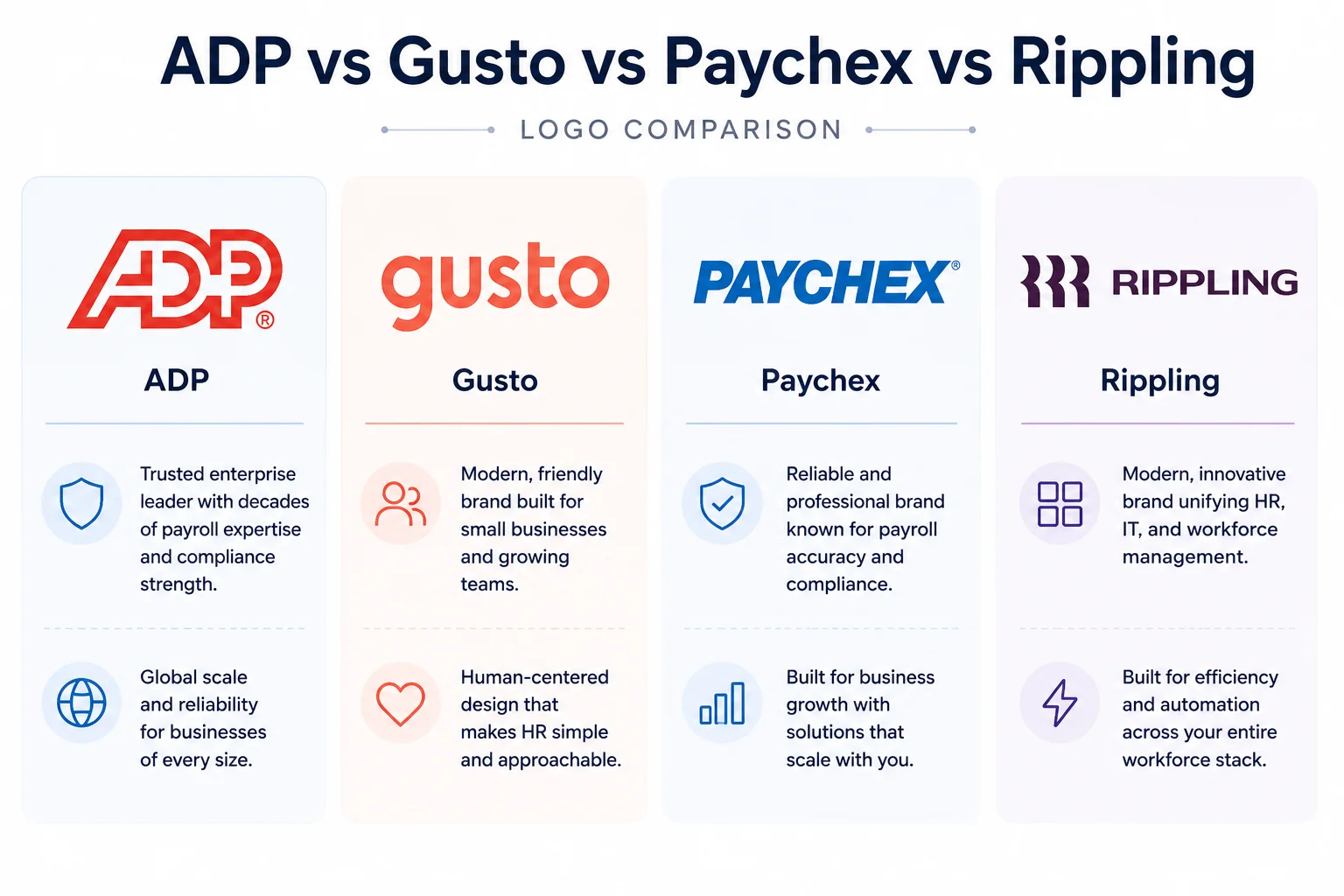
The simple version. Gusto wins on simplicity and price transparency at the small-business end. Paychex matches ADP on scale and tax depth, and the two often appear together as finalists. Rippling wins when the buyer wants payroll, IT provisioning, and HR in one modern platform and is willing to accept a slightly narrower tax-filing pedigree. ADP wins on raw scale, tax-filing depth, and the size of its integration ecosystem.
ADP pricing: what does ADP actually cost?
ADP uses a quote-based pricing model. Published list prices exist only for the lightest-weight products (RUN entry tier, Roll by ADP), and even those are starting points. The real cost is built from four variables.
Headcount
ADP scales per employee and has four plans (Essential, Enhanced, Complete, HR Pro). Workforce Now has tiered packages (Essentials, Plus, Premium) plus configurable modules. Lyric HCM is enterprise-quoted with full module bundling.
Modules and add-ons
Recruiting, advanced analytics ("Enhanced Insights"), benefits administration, time and attendance, learning management, and applicant tracking each carry their own PEPM charge or one-time setup fee. These are where invoices grow at renewal.
Implementation and services
One-time setup, data migration, and training are billed separately from the subscription. Implementation typically runs 15 to 50% of the first-year subscription cost.
Realistic ranges to budget against:
These ranges are directional, based on aggregate user-reported pricing from third-party sources including PayrollDetective, OutSail, Tech.co, and the ADP Marketplace. ADP will quote against your actual headcount, module mix, and contract length, and the quote always varies.
⚠️ The first-year math most ADP buyers get wrong. First-year total cost is typically 1.5x to 2x the subscription line, not 1x. Add implementation, training, W-2 printing fees, any per-payroll-run charges, and at least one analytics module the CFO will insist on. Budget accordingly or get caught off guard at month four.
A note on negotiation. ADP pricing is meaningfully negotiable, especially at the Workforce Now and Lyric tiers. Multi-year commitments, prepayment, and end-of-quarter timing all move the number. Buyers who accept the first quote leave money on the table.
ADP implementation: What does going live look like?
A clean ADP implementation runs 6 to 16 weeks for RUN and Workforce Now, longer for Lyric HCM or any deployment with significant integration work. The phases follow a predictable pattern.
🎯 Buyer tip: Run a parallel payroll before going live. The single biggest predictor of implementation success is whether you run at least one parallel payroll, where your old system and ADP both calculate the same pay period and you reconcile the differences. Skip this and the first live cycle becomes the test, which is where rep trust gets damaged.
Two practical notes for evaluators. First, integration work is what makes implementations slip. CRM, expense, time tracking, and commission integrations each add days or weeks, depending on how clean the source data is. Second, ADP implementation partners exist for Workforce Now and Lyric HCM. The good ones bring tax-jurisdiction expertise and earning-code design that an internal team usually does not have.
How does ADP fit inside a wider stack? The integrations that matter
💡 What makes ADP valuable beyond payroll: Most ADP buyers underestimate how much of the platform's value comes from what plugs into it, not what is native. ADP has 700+ Marketplace apps and an open API. The connectors that decide ROI: CRM, accounting, time and attendance, expense, and sales compensation.
ADP is the execution layer of a wider stack. Most of the operational value comes from how cleanly data flows in (CRM, expense, time tracking) and how cleanly pay and tax data flows out (to the GL, the data warehouse, and the reporting layer).
The categories that matter
Most ADP customers integrate across six functional areas.
- CRM and revenue systems - Salesforce and HubSpot feed deal data, opportunity stages, and rep assignments, which downstream tools then use to calculate variable compensation.
- Accounting and ERP - QuickBooks, NetSuite, Sage Intacct, and Xero pull payroll expense into the GL through ADP's GL Connect or direct integration. This is the connector finance teams rely on most for month-end close.
- Time and attendance - ADP's native time module is widely used, but Deputy, When I Work, Homebase, and similar tools also integrate for shift-based workforces.
- Expense and spend management - Ramp, Brex, Expensify, and Concur push reimbursements and corporate card transactions into the appropriate earning codes.
- HRIS and benefits -BambooHR, Rippling, and Workday integrate for HR data sync where ADP is the payroll engine but not the system of record for HR.
- Sales compensation -This is the category most finance and RevOps teams underestimate when planning an ADP rollout, because commission accounting is treated as a footnote until close week, when it suddenly becomes everything. Most teams handle this with a dedicated commission tool like Visdum, since ADP pays commissions but does not calculate them.
How integrations affect implementation
Integration architecture shapes the timeline. ADP deployments with two or fewer integrations typically go live in 6 to 8 weeks. Five or more integrations, especially those touching CRM, expense, and commission, often push the timeline to 12 to 16 weeks. The work is in the data mapping, not the connectors.
When have you outgrown manual payroll?
💡 The 3-of-7 rule: If three or more of the signals below are true, ADP (or a comparable enterprise-grade payroll system) typically pays back within a single fiscal year on time savings and compliance risk reduction alone.
- Payroll currently runs through a spreadsheet, a bookkeeper, or an outdated desktop tool
- You operate in three or more US states (multi-state tax filing is the most common trigger)
- Headcount has crossed 25 employees and is still growing
- You have received an IRS or state tax notice in the last 12 months
- Benefits administration is currently run through email and a broker portal
- Payroll takes more than 2 hours of finance time per cycle
- You have variable compensation (commissions, bonuses, overtime) that currently lives in a separate spreadsheet
The threshold most teams cross first is multi-state filing. Once you have employees in three or more states, the tax-filing burden alone usually justifies a real payroll platform.
What does ADP not do?
ADP excels at one thing: getting the right amount of money to the right person on the right day, with the right taxes withheld and the right filings made. It is hard work, and ADP solves it well.
It is not, and was not built to be:
- A sales commission calculation engine
- A compensation plan design tool
- A quota and attainment tracker
- A real-time earnings dashboard for sales reps
- An ASC 606 commission amortization tool
ADP can pay a commission. It cannot decide what the commission should be. If you hand ADP a number, it will distribute that number net of taxes. The work of producing that number, applying plan rules, splits, accelerators, clawbacks, and validating against revenue data, is not what ADP does. This is structural, not a limitation.
Think of it as three layers:
Revenue data → Commission logic layer → Payroll execution layer (ADP) → Paycheck
Most companies have the first and third layers. The middle layer, commission logic, is the one that goes missing or gets handled in a 40-tab spreadsheet. That is the operational seam where finance and RevOps teams lose the most time every cycle.
A scenario: Tuesday morning before payroll close
Maria is the Payroll Manager at a 180-person SaaS company. Payroll runs Friday. It is Tuesday at 10am. The VP of RevOps just messaged: "Final commission file by Wednesday EOD." She has not received it. It will probably arrive Thursday morning, which is what happened last month.
When it arrives, the file is an 84-row CSV. Each row is a rep, an SE, or a manager getting a commission, override, or SPIFF. The amounts will not tie to anything Maria can independently verify, because the calculation lives in a spreadsheet maintained by the RevOps analyst who is on PTO.
Maria's job:
- Reformat the CSV to ADP's earning code structure
- Validate employee IDs against ADP's master list (last month, two reps had ID mismatches and got paid zero)
- Upload to ADP Workforce Now as supplemental wages
- Submit before the Thursday 5pm cutoff
- Field the Friday morning emails from reps asking why their number is different
The payroll execution in ADP takes 12 minutes. The commission preparation takes Maria, RevOps, and Finance roughly 14 hours of combined work spread across three days.
This is not unique to Maria. On G2's sales compensation discussion board, an operator described the same setup: "Our team is looking for a reliable app to help track and manage sales commissions as we scale. Right now, we're relying on manual spreadsheets, and it's becoming a headache: errors, late payouts, lack of rep visibility, you name it." (G2 discussion thread)
ADP runs payroll cleanly. Everything upstream of payroll is where most growing companies lose time.
Where does Visdum fit with ADP?
ADP pays commissions. It does not calculate them. That calculation, applying plan rules, splits, accelerators, and clawbacks, then converting and routing the payout, is the layer most teams still run in spreadsheets.
Visdum is the commission layer that sits upstream of ADP:
- Calculates commissions automatically from your CRM and ERP data, with plan logic enforced at calculation time rather than re-keyed by hand.
- Keeps a full audit trail, every change versioned, so disputes and year-end ASC 606 review do not turn into a forensic exercise
- Gives each rep, manager, and finance lead a payout report showing exactly how the number was built before it reaches the paycheck
- Handles multi-currency and multi-entity payouts, converting commission to each rep's local payout currency with the rate and conversion date logged per record
- Syncs approved payouts into ADP, with employee IDs validated and earning codes mapped, so no one is reformatting a CSV at 5pm before the cutoff
The result: commission numbers are final before payroll instead of during it, and ADP keeps doing what it does best, paying people accurately and on time.
.webp)
The bottom line
ADP is what US businesses move to when payroll stops fitting in a spreadsheet or a desktop tool. It is the most widely deployed payroll engine in the country, the most reliable on multi-state tax filing, and the system most adjacent vendors integrate with first.
For finance and HR leaders, the decision rarely comes down to ADP vs no-ADP. It comes down to which ADP product, which modules, and which integrations will live around it. The platform is rarely the bottleneck. The integration sequencing and module selection are where implementations succeed or stall.
The most underestimated integration is sales compensation, because commission expense touches the GL, the audit, the forecast, and ASC 606 amortization. Run it in spreadsheets and every payroll cycle becomes a reconciliation exercise. Run it through a dedicated commission platform like Visdum that integrates with ADP, and the data flows in cleanly: calculations and approvals finish before payroll, approved payouts post to ADP with validated employee IDs and mapped earning codes, and each rep gets a payout report showing how the number was built.
.webp)
FAQs
What does ADP stand for?
ADP stands for Automatic Data Processing, Inc. Founded 1949 as Automatic Payrolls, Inc., renamed in 1961. Headquartered in Roseland, New Jersey. Trades on NASDAQ under ADP.
What is ADP used for?
ADP is used for payroll processing, tax filing, HR administration, benefits, time tracking, and talent management for over 1.1 million businesses. It distributes paychecks, files payroll taxes, and maintains employee records.
Is ADP a payroll company or an HR company?
Both. ADP started as a payroll bureau and expanded into full HCM. Smaller clients usually buy it for payroll alone. Larger clients use the full HCM suite.
How much does ADP cost?
ADP pricing is quote-based. RUN starts at approximately $79 per month plus $4 per employee on the Essential plan. Workforce Now runs roughly $22 to $30 per employee per month at 50 to 100 employees, plus implementation costs of $5,000 to $15,000. Lyric HCM and TotalSource are enterprise-quoted.
What is the difference between ADP RUN and ADP Workforce Now?
RUN is for 1 to 49 employees: streamlined payroll and basic HR. Workforce Now is for 50 to 999 employees: a full HCM suite with deeper HR, benefits, talent, and reporting.
What is ADP Workforce Now?
ADP's mid-market HCM product for 50 to 999 employees. Includes payroll, HR, benefits, time, talent, and reporting in one platform. It is the most common ADP product among growing US companies.
How long does ADP implementation take?
A clean RUN implementation runs 2 to 4 weeks. Workforce Now typically takes 6 to 12 weeks. Lyric HCM and complex multi-integration deployments can run 16+ weeks. Integration count is the biggest variable.
Does ADP file payroll taxes?
Yes. ADP files federal, state, and local payroll taxes on the employer's behalf for all full-service plans, and provides a tax penalty guarantee if its filings are incorrect.
Does ADP integrate with accounting software?
Yes. ADP integrates with QuickBooks, NetSuite, Sage Intacct, Xero, and most major ERPs through GL Connect and direct connectors. Payroll expense flows into the GL automatically.
Can ADP calculate sales commissions?
ADP can process a commission payment if you provide the amount. It does not calculate the commission. Variable comp logic, splits, accelerators, and clawbacks happen upstream of ADP, typically in a spreadsheet or a platform like Visdum, before payroll.
How is ADP different from Gusto or Paychex?
Gusto competes at the small-business end with a modern UI and published pricing. Paychex is the closest competitor to ADP in scale and tax-filing depth, and the two are usually shortlist finalists at mid-market and above. ADP differentiates on enterprise depth, global payroll, and ecosystem breadth.
Is ADP good for SaaS companies?
Yes, for payroll. Workforce Now is widely used by mid-market SaaS. For ASC 606 commission amortization, multi-currency variable comp, and CRM-integrated calculation, ADP does not solve those problems natively. A sales compensation platform sits upstream of ADP to handle them.
.webp)