What is Okta? Key Features & Use Cases
.webp)
A typical workday doesn’t start with work anymore; it starts with logins. CRM, email, Slack, dashboards, analytics tools, one after another. Somewhere along the way, passwords get reused, access gets messy, and no one’s really sure who has access to what.
And that’s where the real problem begins. As teams grow and tools pile up, managing access stops being a minor inconvenience and starts becoming a security risk.
That’s where Okta comes in. It brings authentication and access together in one place, so instead of juggling logins, businesses can actually control them.
In this article, we’ll cover:
- What Okta is and how it works
- Where businesses use Okta
- Key tools like SSO, Verify, and FastPass
- Pricing and core features
- Whether it’s the right fit for your business
What is Okta?
Okta is a cloud-based platform that helps businesses manage user logins and control access to applications from one central place.
Instead of dealing with multiple passwords and systems, it simplifies authentication while improving security.
It acts as an identity layer between users and the tools they use, verifying who they are and ensuring they only access what they’re allowed to, whether it’s for employees or customers.
In practice, Okta helps with:
- Managing access to multiple apps from one login
- Securing authentication with additional verification layers
- Centralizing user identities and permissions
- Supporting both employee and customer login systems
- Scaling easily as the business grows
What Okta is Used For
Okta is used by businesses to manage user access and secure logins across applications, systems, and data. It replaces fragmented login processes with a centralized system that controls who can access what.
It’s especially useful for companies handling multiple tools, teams, or users, helping them improve security while making access seamless.
a) Access Management
Okta becomes a layer on top of your entire tech stack. Then, it allows only authorized access to specific apps an employee may need, and blocks off others to ensure data integrity. So Okta allows you to:
- Control who gets access to which apps or systems
- Ensure users only see what they’re allowed to
Example:
An employee from the marketing team can easily access tools such as their CRM (HubSpot, Zoho) and analytics platforms (GA4, Search Console, Ahrefs). However, if configured accordingly, Okta restricts access to financial systems like payroll and budgeting. This helps protect data integrity within the organization by ensuring employees only have access to information relevant to their role.
b) Authentication & Security
One of the biggest problems with traditional logins is that passwords alone aren’t enough anymore. Okta fixes this by adding extra layers of verification, so even if someone has your password, they still can’t get in without that second level of approval. So Okta helps you:
- Verify user identity through methods like multi-factor authentication (MFA)
- Add an extra layer beyond just passwords
Example:
An SDR logs into their CRM from a new device while working remotely. After entering their password, they receive a push notification on their phone via Okta Verify. Only after approving it do they get access, preventing unauthorized login attempts even if the password was compromised.
c) Workforce Identity (Employees)
Managing employee access can get messy really fast, especially when every tool has its own login. Okta simplifies this by tying access to roles, so employees automatically get what they need without having to set up everything manually. So Okta helps you:
- Manage employee access to internal tools
- Simplify login across multiple work applications
Example:
A new SDR joins the team and is given access to tools like Slack, Google Workspace, CRM, and Visdum on day one. Instead of setting up separate logins, they log in once through Okta and instantly access all assigned tools without additional sign-ins.
d) Customer Identity (Users of your product)
- Handles login systems for apps, websites, or platforms
- Ensures secure and smooth user authentication
Example:
A user signs up on a SaaS platform using their email or Google account. Okta handles the authentication in the background, ensuring secure login, session management, and account protection, without the company needing to build or maintain its own login system.
Did you know?
Around 65% of people reuse passwords across multiple accounts, which means a single breach can expose multiple systems.
What Changes When You Use Okta
The difference between using SSO and not using it becomes very obvious in day-to-day work, especially for roles that rely on multiple tools.
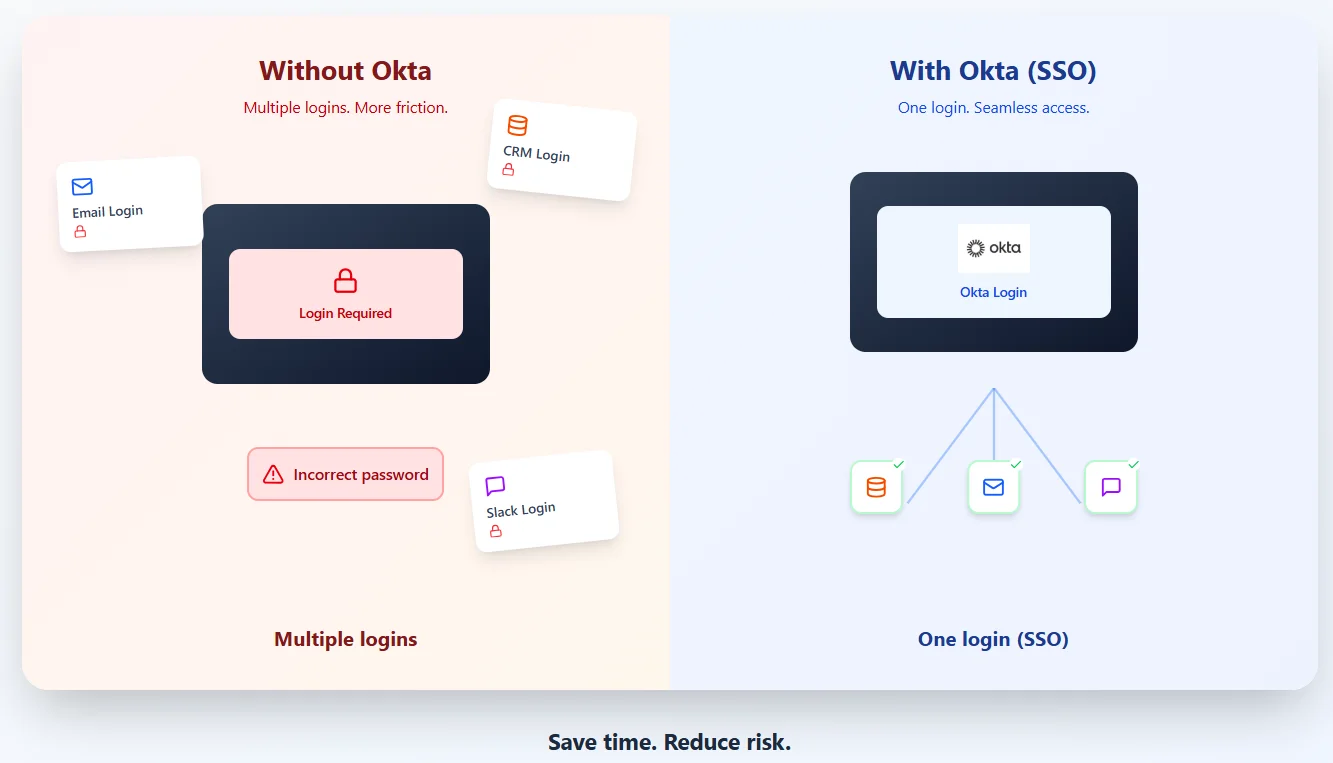
Take a typical SDR, for example. Their day usually starts with logging into a CRM, checking emails, opening Slack, and tracking performance or commissions on platforms like Visdum.
Without a centralized system, each of these tools requires a separate login, and even small delays, like password resets or access issues, start adding up.
Without SSO:
- Logging into each tool separately
- Dealing with password errors or resets
- Waiting for access to new tools
- Switching constantly between login screens
With Okta (SSO):
- One login to access all tools
- Instant access to CRM, Slack, email, and dashboards like Visdum
- No repeated authentication interruptions
- More time spent on actual work instead of logging in
What is Okta SSO (Single Sign-On)
Okta SSO allows users to access multiple applications with a single login, removing the need to remember separate credentials for every tool. It simplifies access while ensuring that authentication remains secure and centrally managed.
Instead of repeatedly logging into different systems, users authenticate once through Okta. Behind the scenes, Okta securely connects them to all approved applications, making the experience seamless without compromising security.
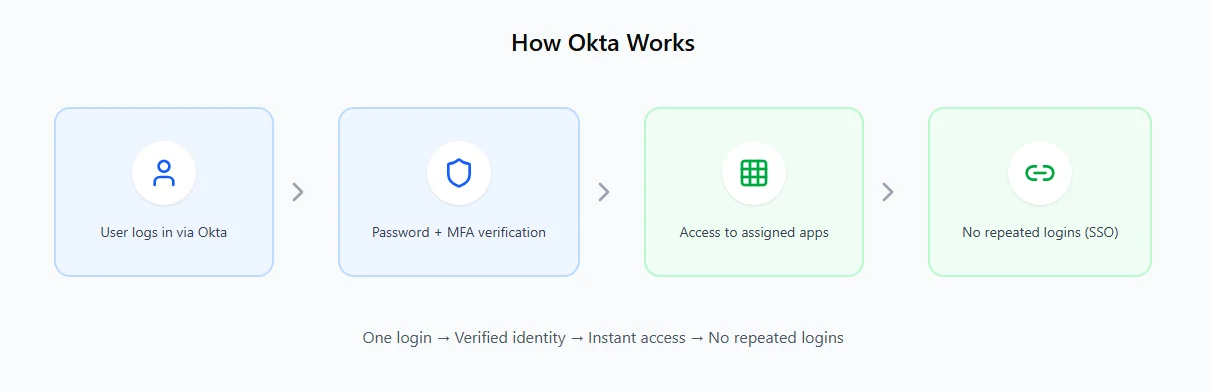
How it works
- A user logs in through Okta
- Okta verifies their identity (password, MFA, etc.)
- Once authenticated, access is granted to all assigned applications
- Okta maintains the session across tools without repeated logins
Example
An employee starts their day by logging into Okta and instantly gets access to tools like Google Workspace, Slack, and a CRM platform, without needing to log in separately to each one.
According to Darktrace, weak access controls and misconfigured permissions are common entry points that attackers use to gain higher privileges within SaaS environments.
Why it matters
- Reduces password fatigue and login friction
- Improves productivity across teams
- Strengthens security with centralized authentication
- Makes it easier for IT teams to manage access
Quick Tip: SSO doesn’t just improve convenience; it actually reduces security risks because users are less likely to reuse weak passwords across multiple apps.
Modern Authentication: Okta Verify & Okta FastPass
What is Okta Verify?
Okta Verify is a mobile authentication app that adds an extra layer of security during login. Instead of relying solely on passwords, it confirms a user’s identity through additional verification methods like push notifications or one-time passcodes (OTP).
It’s a key part of multi-factor authentication (MFA), ensuring that even if a password is compromised, unauthorized users still can’t access the account without the second verification step.
How it works
- User enters username and password
- A push notification is sent to their registered device
- User approves or enters an OTP to complete login
What is Okta FastPass?
Okta FastPass is a passwordless authentication method that allows users to log in without entering a password. It uses device-based verification to securely authenticate users, making the login experience faster and more seamless.
Instead of typing credentials or entering codes, FastPass verifies identity through trusted devices (like a laptop or phone), reducing friction while maintaining high security.
How it works
- User attempts to log in to an application
- Okta verifies the user through a registered device
- Authentication happens silently or with minimal interaction
- Access is granted without passwords or OTPs
Why companies prefer it
- Eliminates password-related risks
- Improves user experience significantly
- Reduces login friction for employees
- Offers strong, phishing-resistant security
Why do Businesses Need Okta?
Let’s be honest: our digital workspace has become a bit of a mess.
On any given Tuesday, the average employee is jumping between 20+ different tools.
You’ve got your staples like Slack and Salesforce, but then there’s the explosion of AI, the three different chatbots you’re testing, the image generators, the meeting recorders.
We are more "connected" than ever, but that connectivity comes with a massive, invisible security tax.
When your company's confidential data is spread across twenty different "front doors," each protected by a different (and let’s face it, probably reused) password, you aren't just at risk, you're an easy target.
According to Zscaler, SaaS security requires strong controls around authentication, access management, and monitoring to protect applications and data from unauthorized access and threats.
The Real-World Cost of Chaos
- The "Shadow AI" Problem: We’ve all done it, signed up for a new AI tool with a work email just to "see if it works." Without a central hub, these tools become Shadow IT. Your company data is suddenly living on a platform your IT team doesn't even know exists, let alone secures.
- The "Ghost" Employee: When someone leaves the company, offboarding shouldn't be a manual process of tracking down access across 20 different dashboards. IT might cut off their email and Slack, but what about that one AI research tool or the project management board? These "ghost" accounts stay active for months, acting as wide-open back doors for anyone who finds the credentials.
- Credential Fatigue is Real: Expecting an employee to manage 20+ unique, complex passwords is a recipe for failure.
Eventually, they give up and start using "Password123" or variations of their dog’s name just to stay productive. One weak link in that 20-tool chain, and your entire infrastructure is compromised.
Okta Pricing
Okta’s pricing is modular, allowing businesses to scale from basic access management to advanced, AI-driven security.
Note - For workforce identity solutions, pricing is usually billed annually and often starts with a minimum contract of around $1,500 per year.
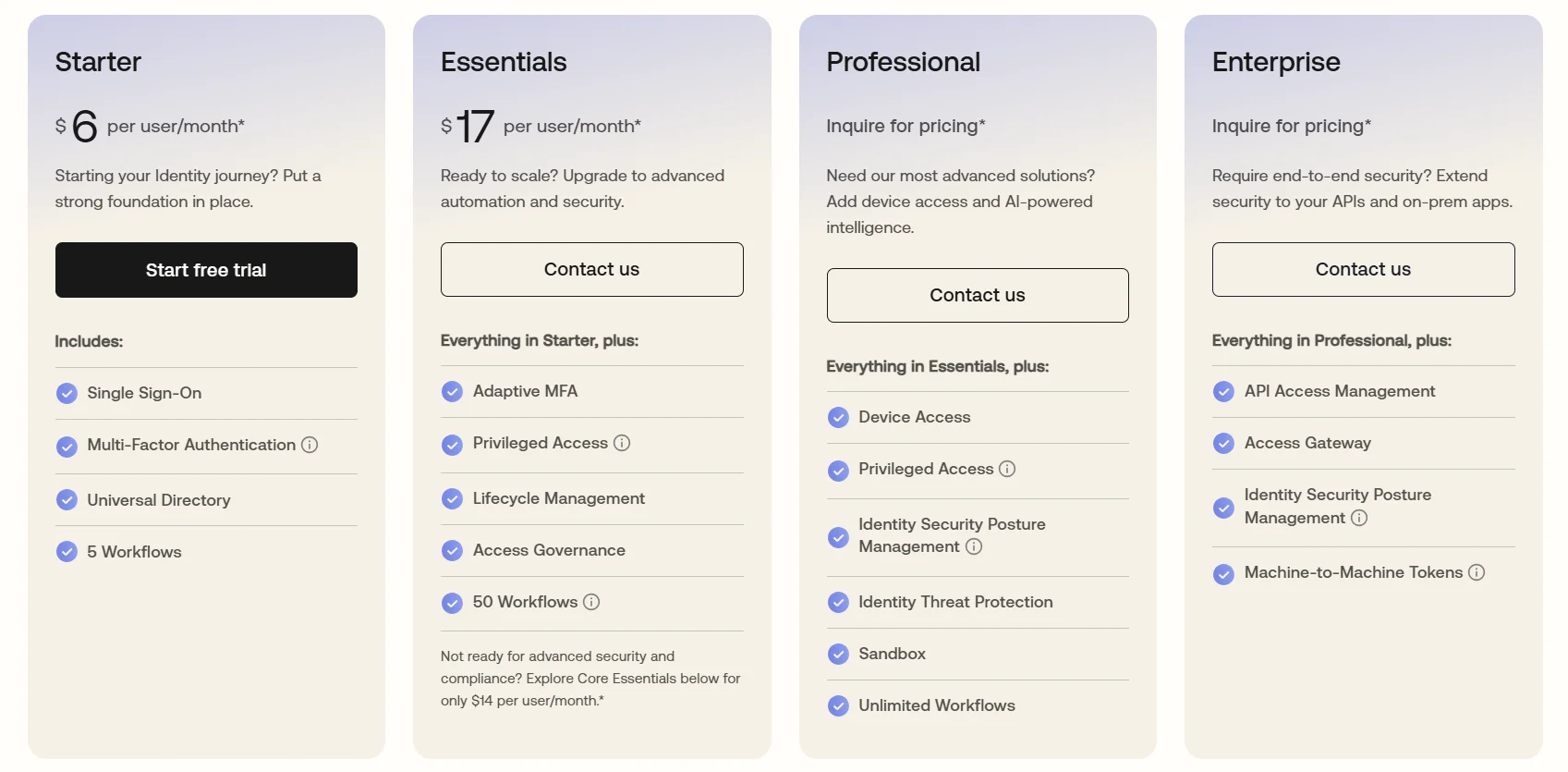
1. Starter: Building the Foundation
- Price: $6 per user/month
- Best for: Small teams needing essential security.
- Key Features: Includes Single Sign-On (SSO), Multi-Factor Authentication (MFA), a Universal Directory for user management, and up to 5 automated workflows.
2. Essentials: Scaling Automation
- Price: $17 per user/month (or $14 for Core Essentials)
- Best for: Growing companies prioritizing compliance and efficiency.
- Key Features: Everything in Starter, plus Adaptive MFA, Privileged Access, Lifecycle Management (onboarding/offboarding), and Access Governance. This tier increases your automation capacity to 50 workflows.
3. Professional: Advanced Security & Intelligence
- Price: Inquire for pricing
- Best for: Organizations requiring deep device visibility and threat detection.
- Key Features: Everything in Essentials, plus Device Access, Identity Threat Protection, Sandbox environments for testing, and unlimited workflows.
4. Enterprise: Modern Identity Governance
- Price: Inquire for pricing
- Best for: Global enterprises with complex API and on-premise needs.
- Key Features: Everything in Professional, plus API Access Management, Access Gateway (for on-prem apps), Identity Security Posture Management, and Machine-to-Machine (M2M) tokens.
Customer Identity (Auth0)
For developers building external-facing apps, Okta offers the Customer Identity Cloud.
While there is a robust free tier for up to 25,000 monthly active users, paid professional plans typically start around $23 to $35 per month, scaling based on feature requirements like social logins or custom branding.
Key Features of Okta
Okta offers a range of features that really simplify how businesses manage logins and secure access across different tools.
Instead of juggling multiple systems for authentication and permissions, everything is handled in one place, which makes things far less messy.
What stands out is how it brings identity, access, and security together into a single platform. This makes it much easier for teams to manage who gets access to what, without constantly dealing with manual work or scattered systems.
Key features include:
- Single Sign-On (SSO):
Allows users to access multiple applications with one login, improving convenience and reducing password fatigue. - Multi-Factor Authentication (MFA):
Adds an extra layer of security through methods like push notifications or OTPs, helping prevent unauthorized access. - Lifecycle Management:
Automates user onboarding and offboarding, ensuring the right access is granted or removed at the right time. - Universal Directory:
Centralizes user identities, making it easier to manage profiles, permissions, and access across systems. - API Access Management:
Secures APIs by controlling which users and applications can access backend services. - Adaptive Security:
Uses context such as device, location, or behavior to adjust authentication requirements and reduce risk dynamically.
Okta vs Traditional Authentication
Is Okta the Right Fit for Your Business?
Okta works best for businesses that are managing multiple tools, users, and access points, especially as they scale.
If login management is starting to feel complex or security is becoming a concern, a centralized solution like Okta can make a big difference.
At the same time, it’s not always necessary for every team, especially smaller setups with limited tools and users.
Okta is a good fit if you:
- Use multiple SaaS tools (CRM, Slack, dashboards, etc.)
- Have growing teams or remote employees
- Need stronger security (MFA, passwordless login)
- Want to automate onboarding and offboarding
- Manage both employee and customer logins
It might not be necessary if you:
- Have a very small team with minimal tools
- Don’t require advanced security layers
- Can manage access manually without much effort
Conclusion
If I had to sum it up, Okta is really about making something messy, like logins, access, and security, feel simple and controlled. Instead of dealing with multiple systems and constant password issues, everything just works more smoothly in one place.
What stands out is how it balances both sides, strong security for businesses and a seamless experience for users. Whether it’s SSO, Verify, or passwordless options like FastPass, it’s clear that identity is becoming the new layer of security, and tools like Okta are shaping how that looks going forward.
FAQs
What exactly does Okta do?
Okta helps businesses manage user logins and control access to applications from one place. It verifies user identity and ensures people can only access the tools or data they’re authorized to use.
Why do companies use Okta?
Companies use Okta to simplify login management and improve security. It reduces password-related issues, enables features like Single Sign-On (SSO) and multi-factor authentication, and gives IT teams better control over user access.
What is Okta Verify?
Okta Verify is a mobile authentication app used to securely confirm a user’s identity during login. Instead of relying only on a password, it adds an extra verification step through push notifications or one-time passcodes (OTP).
Does Okta track your activity?
Okta mainly tracks login-related activity, like sign-ins, devices, and access attempts, to ensure security. It doesn’t track everything you do, but it can log access events to help organizations monitor and prevent suspicious activity.
.webp)