QuotaPath Pricing Explained: Plans, Cost Drivers, & Key Considerations
.webp)
If you’re evaluating Quotapath pricing, that’s already a thoughtful move. Quotapath has positioned itself as a structured commission tracking platform for growing revenue teams, and it often makes the shortlist for companies moving beyond spreadsheets.
But once you get past the listed Essential, Growth, and Premium tiers, the real evaluation begins. What really matters is how those plans scale with your team, how they impact daily operations, and whether the platform supports long-term growth without adding friction.
In this guide, you’ll get:
- A breakdown of official Quotapath pricing plans and per-user monthly costs
- A clear look at what drives total investment over time
- Insights from user feedback on performance and usability
- A side-by-side comparison with other modern alternatives Visdum to help you evaluate fit
By the end, you’ll have a practical understanding of whether Quotapath aligns with your team’s size, complexity, and growth plans, not just today, but long term.
What Do QuotaPath Pricing Plans Look Like?
QuotaPath currently offers three structured pricing plans, each with a clearly defined per-user monthly rate, making QuotaPath pricing per user straightforward to estimate based on your team size.
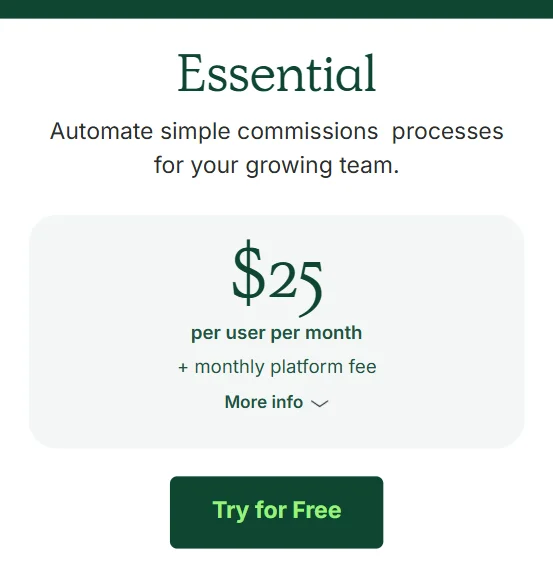
1. Essential - $25 per User per Month
Designed for growing teams that need basic commission automation and plan visibility.
.webp)
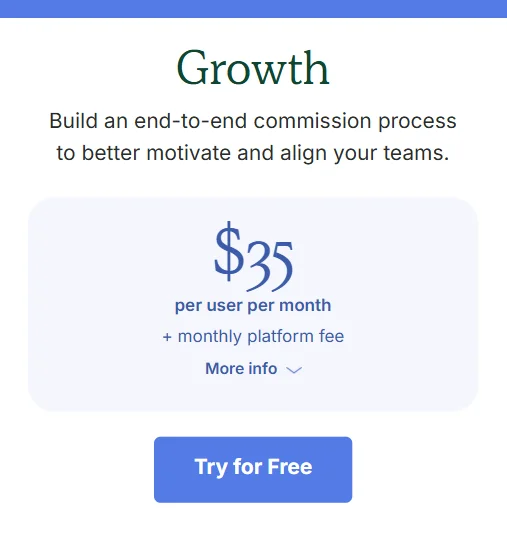
2. Growth - ~$35 per User per Month
Ideal for teams that want advanced planning, team support features, and enhanced calculations.
.webp)
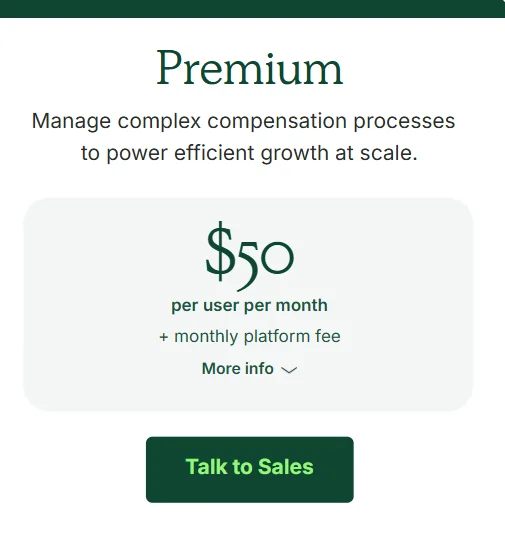
3. Premium - ~$50 per User per Month
Built for large or scaling teams that require full control over workflows, deeper reporting, and enterprise-grade features.
.webp)
Below is the official breakdown of QuotaPath pricing by per-user monthly rate and plan:
| Plan | Price (per user / month) |
|---|---|
| Essential | ~$25/user/month |
| Growth | ~$35/user/month |
| Premium | ~$50/user/month |
Each tier builds on the previous one, adding advanced capabilities while increasing the monthly rate accordingly.
What Drives the Total Cost of QuotaPath?
QuotaPath’s pricing structure is clear, but the total cost is influenced by more than just the per-user rate.
Here are the key cost drivers:
1. Seat Count
Your total subscription cost increases with every additional user, including sales reps, managers, and finance users.
2. Plan Tier
Choosing Growth or Premium over Essential adds features, but also increases cost. Teams with complex needs (multi-currency, custom reporting, advanced approvals) will naturally incur higher subscription costs.
3. Billing Frequency
While the pricing page shows per-user monthly rates, annual billing or negotiated terms can change your effective cost.
4. Implementation & Support
While all plans include implementation and support, Premium plans offer more dedicated success resources, which typically reflect a higher total contract value.
Tier structure matters as much as the headline rate here. On QuotaPath, multi-level approvals, custom reporting and multi-currency sit in the higher tiers, so the capabilities finance teams tend to need arrive with a price step. Visdum takes a different shape: one per-payee subscription with support, hosting and integrations included rather than unlocked by tier, plus a one-time configuration fee. What moves that subscription is plan count, process complexity and the integrations you need, never deal volume, transaction count or API usage. The Visdum pricing page sets out both lines in full.
User Feedback on QuotaPath Pricing & Platform Performance
Based on aggregated review data from G2 and user comments, several recurring themes appear, not about pricing itself, but about value, usability, and platform experience:
Data Update Delays
Users report slow updates to earnings and syncs, which can delay visibility into performance.

Integration Challenges
Some users note frustrating setup experiences with CRM integrations and complex syncing.

Slow Load Times
Multiple reviewers mention that dashboards and reports can load slowly, hindering efficiency.


Support & Training Delays
Some users mention that customer support response times can be slower than expected, and training may not always feel hands-on or proactive.
.webp)
While we dug deep into QuotaPath's G2 reviews, one thing stood out. While QuotaPath commission software seems like a good fit for smaller businesses with simple comp plan structures, the platform falls short when it comes to handling enterprise-grade sales commission management.
Why Teams Consider Alternatives
Even with clear pricing, some teams look beyond QuotaPath for reasons including:
- Complex navigation for advanced features
- Slower data updates and load times
- Integration and sync frustrations
- Desire for more intuitive dashboards and reporting
- Need for faster implementation cycles
Platforms like Visdum are often evaluated as alternatives specifically for faster go-live timelines, more transparent payout logic, and highly customizable visual reporting.
.webp)
QuotaPath vs Visdum: How They Compare
How do QuotaPath and Visdum score on G2?
| Metric | Visdum | QuotaPath |
|---|---|---|
| Mid-Market Relationship Index | #1 of 20 (9.81) | #8 (8.92) |
| Mid-Market Usability Index | #1 of 19 (9.47) | #7 (8.73) |
| Implementation Index (overall) | #2 of 16 (9.05) | #3 (8.75) |
| Ease of Use | 99% | 92% |
| Ease of Admin | 96% | 92% |
| Average user adoption | 87% | 80% |
| Star rating | 4.8 | 4.7 |
| Reviews | 602 | 265 |
Source: G2, Summer 2026.
Since pricing is just one part of the evaluation, here’s a side-by-side comparison between QuotaPath and Visdum to help you see how they differ in focus and value. For more detail on how QuotaPath compares to Visdum, see the full head-to-head.
| Category | Quotapath | Visdum |
|---|---|---|
| 🚀 Implementation Time | Standard onboarding; setup depends on CRM sync and plan complexity | ✅ Go-live in ~3 weeks (0.65 months) with plug-and-play integrations |
| 🛠 Plan Design | Structured plan builder with tier-based access | ✅ Visual rule builder for faster, flexible configuration |
| 💰 Commission Transparency | Core payout tracking; reporting depth varies by tier | ✅ Granular earnings & payout breakdowns from deal → paycheck |
| 📊 Dashboard Experience | Standard dashboards; some users report complexity | ✅ Highly customizable, decision-ready dashboards built for clarity |
| ⚡Real-Time Updates | Some users report syncing delays | ✅ Real-time syncing across CRM, billing, and payout data with immediate dashboard refresh |
| 🔐 Approvals & Workflows | Multi-level approvals in Premium tier | ✅ Built-in approval workflows designed to reduce disputes |
| 🔗 Integrations | CRM-focused; deeper integrations in higher tiers | ✅ CRM + billing + ERP + HRIS integrations with automation workflows |
| 🎯 Best Fit | Mid-market teams scaling into structured comp management | ✅ Small & Mid Market teams prioritizing speed, transparency, and operational clarity |
.webp)
Why Teams Often Choose Visdum over QuotaPath
When comparing Quotapath and Visdum, you’ll often notice the difference isn’t just about pricing or feature lists.
It really comes down to how the platform feels in daily use, how quickly your team can get started, how easily reps understand their earnings, and how smoothly operations run.
Here’s where Visdum tends to stand out :
Cleaner, More Intuitive Interface
The platform is designed for clarity, helping reps and managers understand earnings without navigating complex reporting layers.
Its visual rule builder allows teams to configure commission logic without writing complex formulas, making plan setup more accessible for RevOps and finance users.
As highlighted in user reviews, many teams appreciate how intuitive and easy the platform is to navigate, even for non-technical users.
Faster Implementation
Visdum is designed for rapid deployment, with most teams going live in approximately 3 weeks (0.65 months). Pre-built, plug-and-play integrations reduce dependency on heavy configuration and developer involvement.
For fast-scaling sales teams, this shorter implementation cycle means faster time-to-value and reduced operational disruption.
Seamless Integrations
Visdum offers seamless integrations with CRMs, billing systems, ERPs, and HRIS platforms, ensuring commission data flows automatically without manual uploads or spreadsheet work.
Real-time syncing reduces errors, improves payout accuracy, and gives revenue teams a single source of truth for performance tracking.
Real-Time Earnings Visibility
Performance dashboards update dynamically, giving reps and managers immediate access to quota attainment and payout progress.
This enables proactive decision-making rather than waiting on delayed syncs or static reports.

AI Copilot for Smarter Commission Workflows
Visdum’s AI Copilot is a smart, conversational assistant designed to make managing sales compensation easier.
It acts like a guide within your system, helping you get answers, understand plans, and check important details quickly.
Role-Based, Customizable Reporting
Visdum’s reports are structured by role and designed for clarity, allowing for the implementation of custom commission plans. Leaders can move from KPIs to detailed contributing factors without fragmented dashboards.
Reports can be structured based on:
- The metrics a role cares about
- The time frame they operate in for SOC compliance
- The specific plan or component being reviewed
- The required level of detail (summary vs. underlying data)
It’s built for in-the-moment decision-making. not just end-of-quarter analysis.
Ultimately, teams that prioritize speed, clarity, and operational transparency often find Visdum better aligned with how modern revenue organizations work.
Instead of navigating layered reports or waiting on delayed updates, you get faster implementation, real-time visibility, and tools built for everyday usability.
Firebolt, an analytics database company, put QuotaPath through a formal evaluation alongside Everstage and Qobra before moving to Visdum. Sundeep, Firebolt's Head of Growth, on how that comparison played out:
"We looked at a number of companies, Everstage, QuotaPath, Qobra, and obviously Visdum. The sales process was much smoother with Visdum than any other company. The whole evaluation process allowed us to do proof of concepts and very quickly showcase value." — Sundeep, Head of Growth, Firebolt

.webp)
Conclusion
Quotapath offers transparent, tier-based pricing that makes budgeting relatively straightforward. For smaller teams or early-stage revenue organizations, especially those under 50 employees, its clearly defined plans and predictable per-user model can feel structured and manageable.
However, pricing alone shouldn’t drive your decision. If you prioritize faster implementation, stronger payout visibility, real-time syncing, and a more intuitive experience, it’s worth comparing alternatives before committing.
The right choice ultimately depends on how your team works, and how quickly you need value from your commission platform.
FAQs
How much does QuotaPath cost per user per month?
Quotapath pricing starts at approximately $25 per user per month for the Essential plan, with Growth at ~$35 and Premium at ~$50 per user per month. The total cost depends on the plan tier and number of users.
What are the QuotaPath pricing plans?
Quotapath offers three main pricing plans - Essential, Growth, and Premium. Each tier adds more advanced features such as team-based planning, multi-level approvals, custom reporting, payroll integration, and API access.
What drives the total cost of QuotaPath?
Your total investment depends on seat count, selected pricing tier, billing structure, and the level of implementation and support required. Teams with complex commission structures may require higher-tier plans.
Is QuotaPath better than alternatives like Visdum?
Quotapath offers transparent tier-based pricing and structured commission management. However, some teams compare it with platforms like Visdum if they prioritize faster implementation, real-time syncing, more intuitive dashboards, and deeper payout transparency.

.webp)