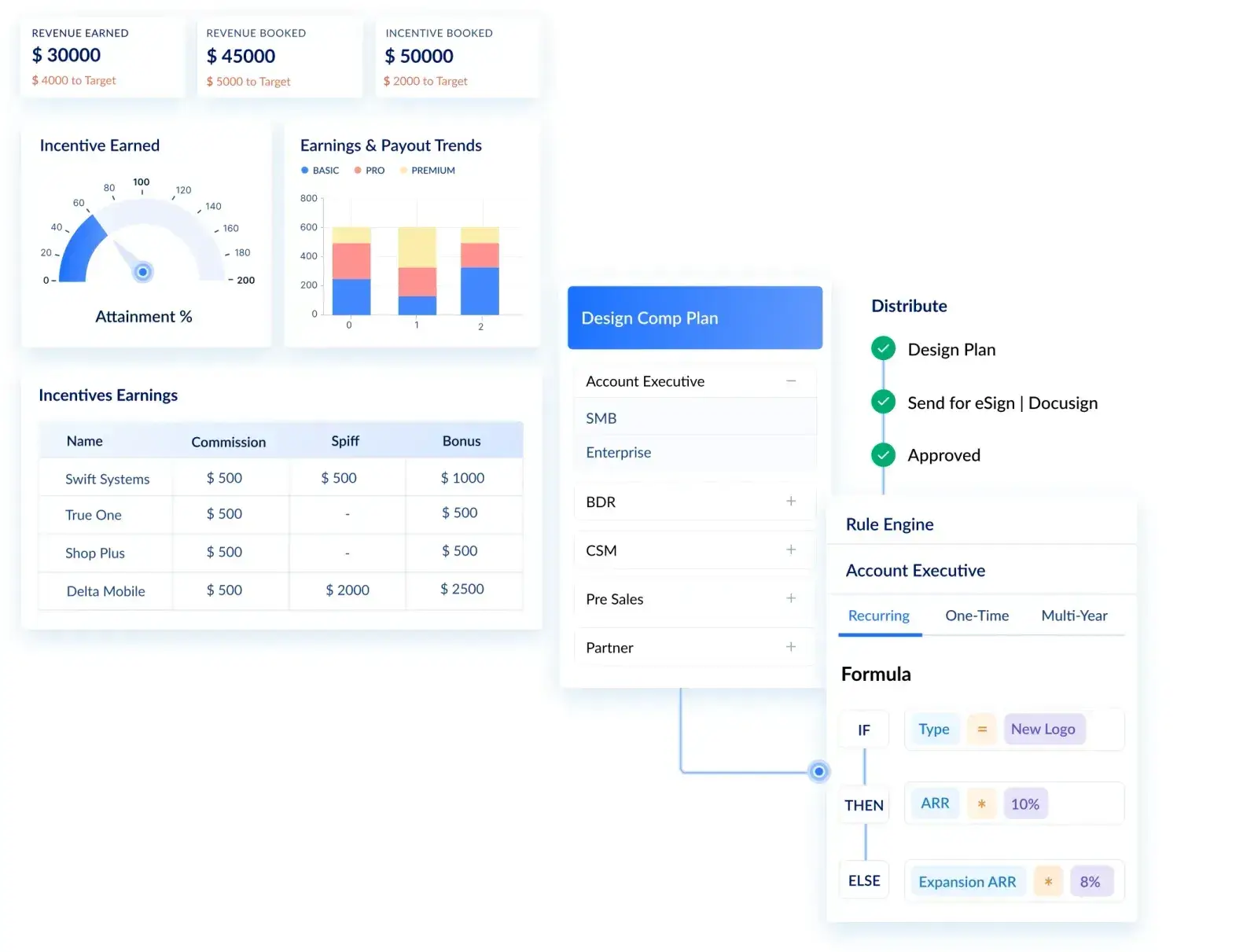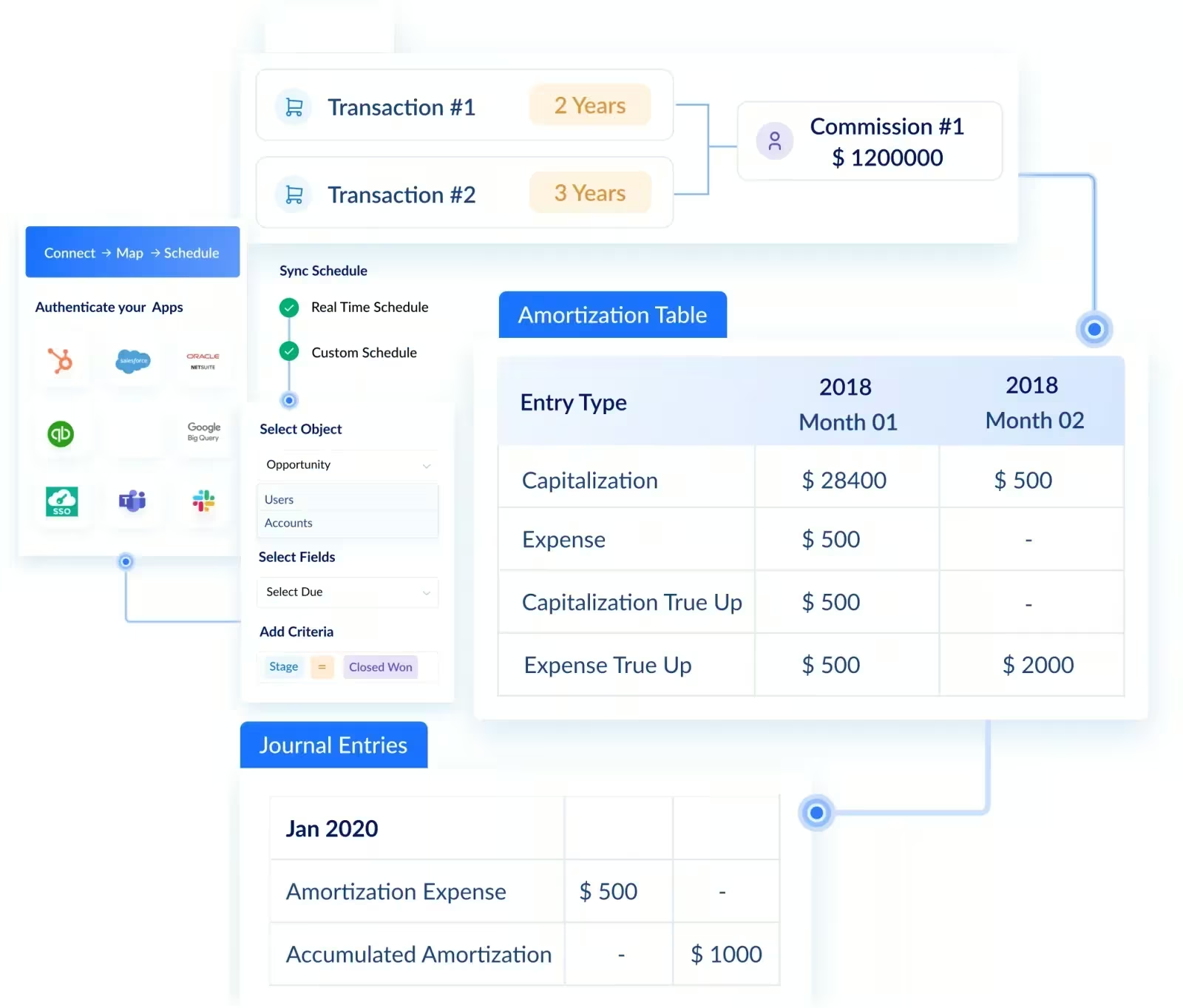
Microsoft Dynamics 365 Business Central + Visdum: Streamlining Commission Management
.webp)
Every finance team running Microsoft Dynamics 365 Business Central has a moment they dread: month-end close, when someone needs to reconcile commission payouts against posted invoices and collected payments.
The data is all there. Invoices are posted. Payments are recorded. Revenue is recognized. And none of it can be turned into accurate commission payouts without someone manually pulling CSVs, opening a spreadsheet, and running a process that takes hours and produces results no one fully trusts.
This is not a Business Central problem. It is structural. Business Central is built to manage financial operations, not compensation logic. That gap belongs to a different layer entirely.
This article covers:
- Why Business Central cannot handle commission calculations natively, and where the structural gap comes from
- How Visdum integrates with Business Central to automate the full commission workflow
- What finance and RevOps teams can expect in terms of accuracy, audit readiness, and time saved
What Is Microsoft Dynamics 365 Business Central?
Microsoft Dynamics 365 Business Central is a cloud-based ERP platform built for mid-market and enterprise companies. It manages:
- General ledger accounting and period close
- Accounts receivable and payable
- Sales order and invoice management
- Inventory and project tracking
- Revenue recognition aligned with ASC 606
Business Central sits within the broader Microsoft Dynamics 365 product family. One common point of confusion is its relationship to Dynamics 365 Sales. These are separate products built for separate teams:
Commission accuracy depends on financial data: invoices posted, payments collected, and revenue recognized. That data lives in Business Central. This article is focused entirely on how those financial records connect to commission execution.
💡 Did You Know?
As compensation plans evolve, spreadsheet-based commission processes become increasingly difficult to manage due to formula dependencies, version-control issues, and manual reconciliation efforts.
The Reality: Why Microsoft Dynamics 365 Business Central Is Not Built for Commission Automation
Business Central is built around accounting logic. Commission execution requires compensation logic. These are fundamentally different.
To understand the scale of the problem, here is what the manual commission process actually looks like when Dynamics 365 data is exported into Excel:
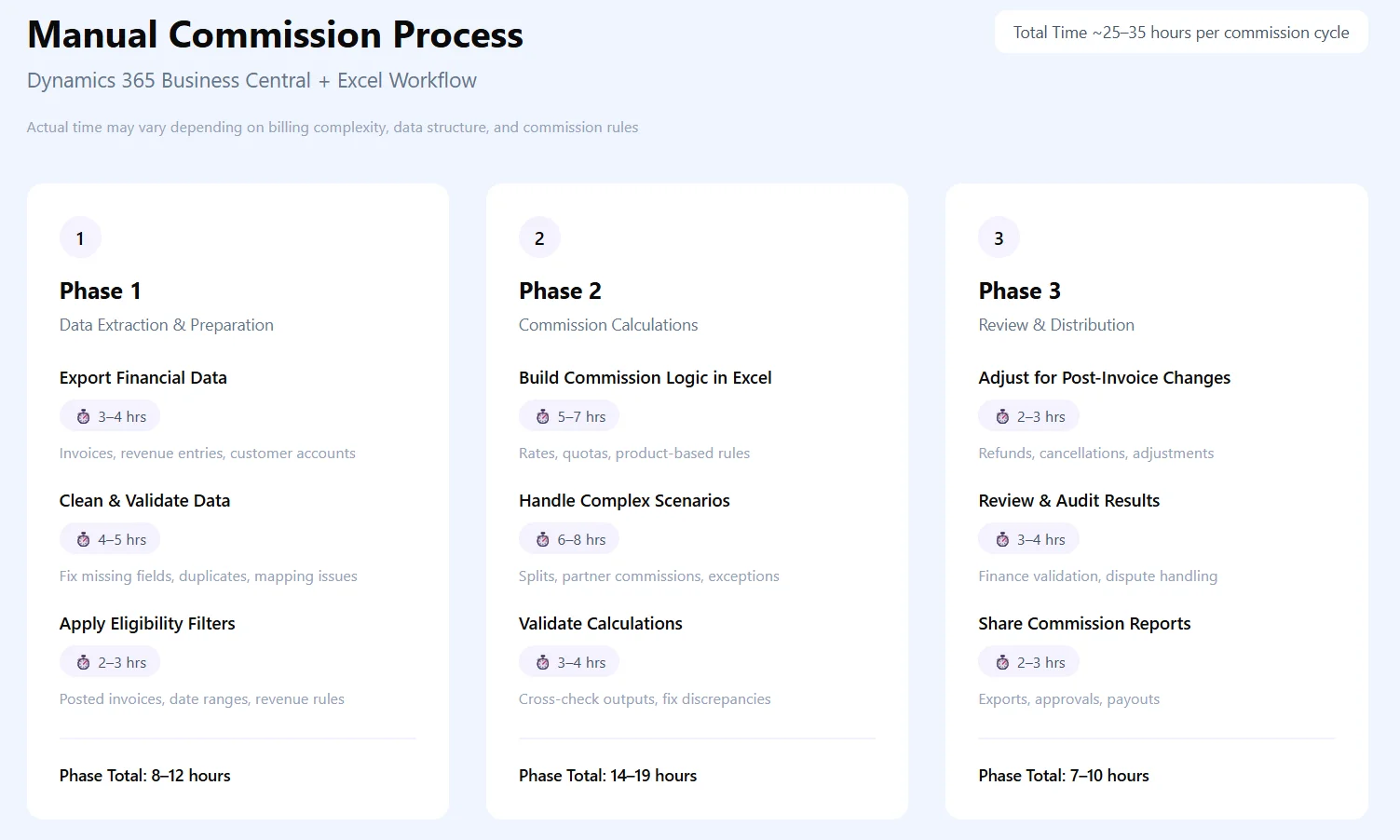
25 to 35 hours per commission cycle, just to produce a number that reps still dispute. This is the operational cost of using a CRM and a spreadsheet to do a job neither was designed for.
Why Commission Management Breaks When Handled in ERP Systems
ERP systems are built to record what happened financially. They are not built to decide what that means for compensation. That distinction is where the breakdown begins.
- Invoice data does not equal commission data
Business Central records when an invoice is paid, not what commission rule applies to it. The rate, the tier, the split - none of that exists in the ERP. Someone has to apply it manually, every cycle. - Payment timing creates calculation gaps
Commissions are often calculated before all invoices for a period have cleared. Partial payments, late payments, and billing adjustments in Business Central do not automatically update a commission spreadsheet already in progress. - ERP records have no compensation context
Business Central knows the invoice owner, not the commission owner. Multi-rep deals, overlay credits, and manager splits are invisible to the system. Finance has to reconstruct this manually from a separate source. - Plan changes break the entire process
When a comp plan changes mid-quarter, there is no way to apply old rules to old invoices and new rules to new ones inside a spreadsheet linked to a live ERP export. Everything has to be manually separated and recalculated. - No audit trail on calculations
Business Central logs financial transactions. It does not log who changed a commission formula, when, or why. When a dispute arises, there is nothing to trace back to.
💡Did You Know?
80% of spreadsheets contain at least one error. For commission teams managing tiers, splits, and accelerators across dozens of reps, that error rate compounds every single cycle.
How the Visdum and Microsoft Dynamics 365 Business Central Integration Works
Visdum connects to Business Central as a downstream commission logic layer. It does not replace Business Central or alter any ERP records. Business Central remains the financial system of record. Visdum reads from it, applies compensation logic, and produces commission outputs.
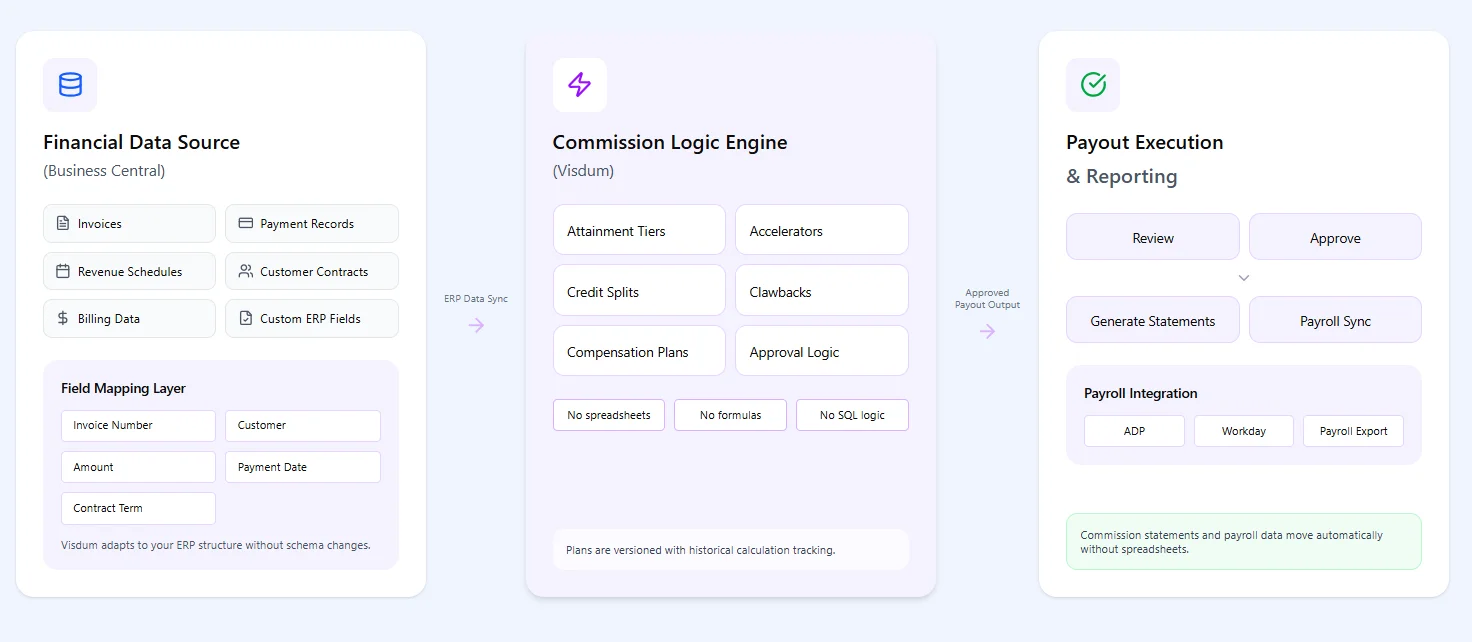
The architecture follows three distinct layers:
Layer 1 - Financial Data Source (Business Central)
Invoices, payment records, revenue recognition schedules, customer contracts, and billing data all live here. This is the input layer.
During integration setup, Visdum walks you through a field mapping step where your Business Central records are matched directly to Visdum fields such as invoice number, customer, amount, payment date, and contract term, before the data stream goes live.
If your setup uses custom fields or non-standard configurations, those are mapped here too.
You are not forced to restructure your ERP to fit the integration. The input layer adapts to how your finance team already works in Business Central.
Layer 2 - Commission Logic Engine (Visdum)
Compensation plan rules, crediting hierarchies, attainment tiers, accelerators, splits, and clawback conditions are all configured here.
Visdum reads Business Central payment data and applies these rules to calculate what each rep earns on each invoice paid. Plan configuration is done through Visdum's visual rule builder, no code, no formulas, no spreadsheet logic to maintain. If you can define your comp plan in plain language, you can build it in Visdum.
For a full walkthrough, this guide covers how to create a commission plan in Visdum in under 10 minutes.
Plans are versioned with effective dates. A plan change for Q2 does not affect Q1 calculations already in the system. The logic history is preserved alongside the calculation history.
Layer 3 - Payout Execution and Reporting
Once calculations are approved, commission statements are generated in Visdum and sent directly to each rep's inbox with a full breakdown of how their number was calculated. Every sign-off is logged, and nothing goes to payroll until the approval flow is complete.
Visdum integrates directly with payroll platforms, including ADP, Workday, and others, so payout data moves from commission calculation to payroll processing without anyone touching a spreadsheet. Payment goes out on the scheduled date, every time.
This architecture means Business Central does not change. Finance teams continue working in it the same way they always have. Visdum reads the data and runs the compensation logic independently.
Why Commission Management Breaks When Tied to ERP Exports
The manual export-and-spreadsheet workflow has specific, compounding failure modes. These are not edge cases. These are the normal operating conditions for any team managing commissions out of Business Central without a dedicated system.
Stale Data Drives Incorrect Calculations
Finance exports Business Central data in the 1st week of each month. Between export and commission processing (3-5 days), invoices are updated and payments clear. For a team processing 60 deals monthly, 8-12 deals will have status changes after the export.
Commission calculations run on stale data. Reps get paid on figures that no longer match Business Central. During reconciliation, finance spends 4-6 hours identifying and correcting these mismatches.
How Visdum Solves This: Visdum syncs directly with Business Central on a continuous cycle. When an invoice is updated or a payment clears, the commission calculation reflects it automatically. No re-exports. No manual reconciliation.
Spreadsheet Logic Does Not Scale to Plan Complexity
A flat-rate plan works in a spreadsheet. Add tier thresholds, quota multipliers, rep splits, and clawback provisions, and the formula becomes brittle.
- One plan change breaks formulas across hundreds of rows
- Errors compound silently until payout disputes surface them
How Visdum Solves This: All compensation logic lives in Visdum's visual rule builder. Tiers, splits, accelerators, and clawbacks are configured once and applied consistently to every payment event. No formulas to maintain, no rows to fix.
Cross-Team Misalignment
Finance calculates from Business Central exports. Sales operations tracks quota attainment separately. Reps wait for a monthly email.
- Everyone works from different numbers
- Disputes multiply because there is no shared source of truth
How Visdum Solves This: Visdum becomes the single source of truth for all three teams. Finance approves, RevOps configures, and reps see their live earnings in one platform, all sourced from the same Business Central data.
Month-End Close Delays
Commission reconciliation blocks accrual finalization. Exports take time, processing takes longer, and the close cycle stretches.
- Finance cannot sign off until the manual process completes
- A single error in the spreadsheet pushes the entire close further out
How Visdum Solves This: Because calculations run automatically against live Business Central data, the month-end close becomes a review and approval process rather than a reconciliation exercise. Finance signs off on numbers that are already accurate.
ASC 606 Amortization Requires Manual Tracking
Under ASC 606, SaaS companies must capitalize sales commissions as a "cost of obtaining a contract" and amortize the expense over the expected customer relationship period, typically the contract term.
The manual problem:
Finance tracks contracts in Business Central, commission data lives in spreadsheets, and amortization schedules are maintained separately. Each month requires manual journal entries.
During audit, finance teams spend 40-60 hours reconciling three data sources: Business Central contracts, commission spreadsheets, and amortization schedules.
Common errors: wrong amortization period (using 12 months instead of 24), missed billing triggers (amortizing before payment received), lost audit trail (which version of the calculation was used?).
What Visdum automates:
When a commission is calculated, Visdum automatically generates the amortization schedule linked to the Business Central contract.
A $24,000 commission on a 24-month contract = $1,000/month expense, logged with contract reference and billing event.
When contracts are amended or payments delayed, schedules update automatically. Audit-ready reports show: all commissions capitalized in Q1, remaining unamortized balance by rep, commissions by contract with full amortization schedule.
Audit prep time: 60 hours → 2 hours (97% reduction)
.webp)
⚡ Quick Tip: ASC 606 audits most commonly flag commission amortization schedules maintained in spreadsheets. A system-generated schedule tied to your billing record eliminates this risk entirely.
What This Integration Solves
Step-by-Step: How to Connect Microsoft Dynamics 365 Business Central with Visdum
Step 1: Log in to Visdum and link your Business Central account
Go to the ERP integrations section in Visdum, select Microsoft Dynamics 365 Business Central, and authenticate using your Microsoft Entra ID credentials.


Step 2: Set up a new data stream
Create a new data stream, give it a clear name like Earnings Stream, and select Microsoft Dynamics 365 Business Central as your data source.

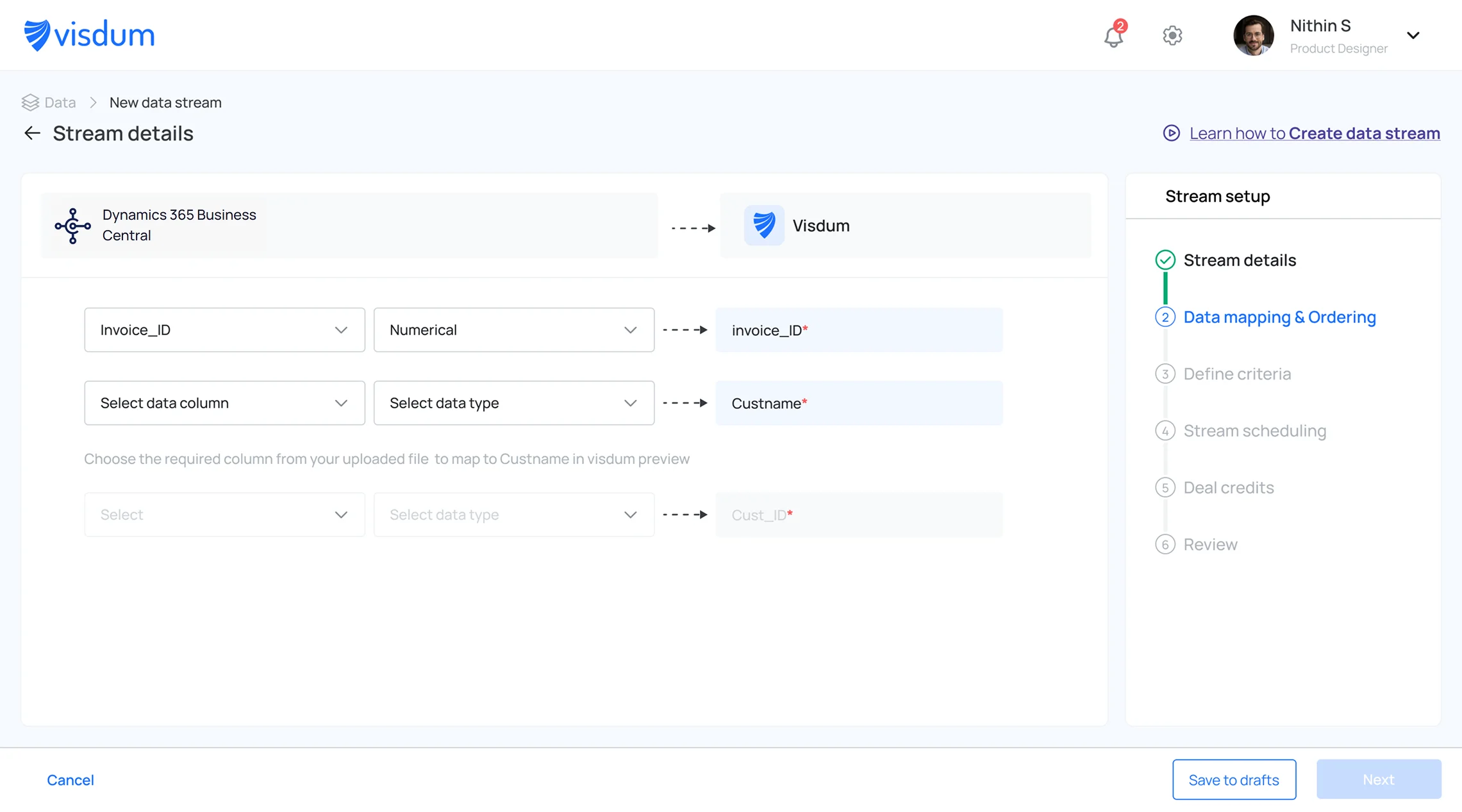
Step 3: Map your data fields
Match key Business Central fields such as invoice ID, customer ID, payment amount, and transaction date, to the corresponding Visdum fields.
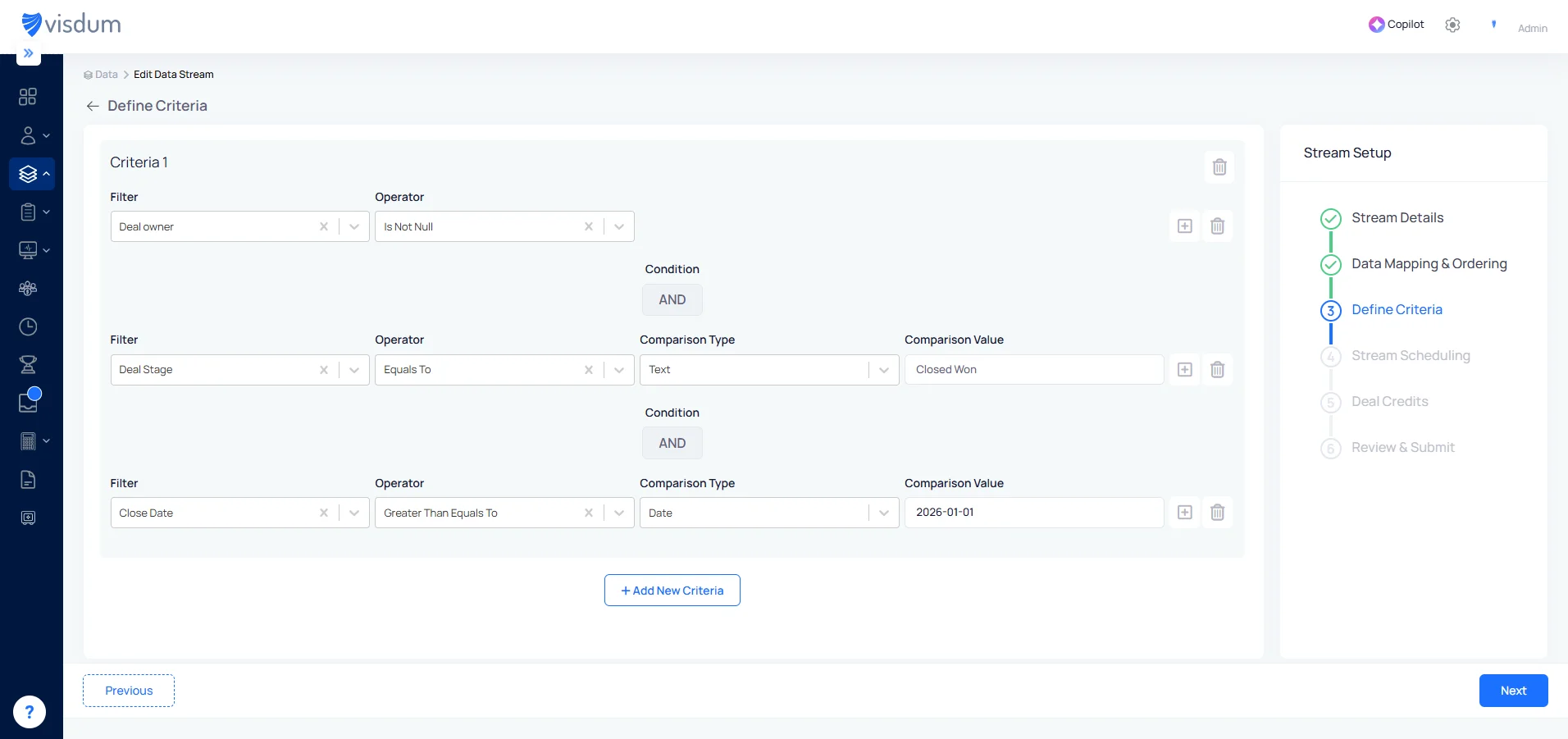
Step 4: Define your criteria
Set conditions to control which records sync. For example, only invoices with a status of Paid after a specific date should trigger commission calculations.
Step 5: Schedule your data sync
Choose how often data should refresh, daily, weekly, or at custom intervals, and Visdum will keep commission calculations current automatically.
.webp)
Step 6: Assign Deal Credits
Define how revenue credit is assigned across contributors. Set rules for who gets credited, account owner, manager, or split across multiple roles, and at what percentage. Visdum applies these rules automatically to every transaction that meets your criteria.
.webp)
Step 7: Review and activate
Check all settings, mappings, and filters. Once satisfied, activate the stream to start syncing live data from Business Central.

Done! Your Business Central account is successfully integrated with Visdum, keeping all commission data in sync and ensuring accurate, timely payouts across your team.
Business Central Alone vs. Business Central + Visdum
RevOps and Finance Perspective: Workflow Alignment and Measurable Outcomes
The impact of this integration is felt across three teams that currently operate with misaligned data and separate workflows.
Finance
For finance teams, the integration turns month-end commission close from a multi-day reconciliation exercise into a review and approval process.
- Month-end close shortens: commission accruals no longer require a manual export-and-calculate cycle
- Finance managers review and approve calculations in Visdum rather than rebuilding them from scratch
- ASC 606 amortization schedules are maintained automatically
- Audit preparation time drops: every calculation has a documented trail
- Teams report 60 to 80% reductions in commission-related close work after implementation
RevOps
For RevOps, the integration replaces spreadsheet-based plan management with a versioned, auditable system that stays connected to live ERP data.
- Plan logic is defined in Visdum, not approximated in spreadsheets
- Plan changes are versioned with effective dates and applied consistently across all reps
- Disputes are resolved in minutes: the exact calculation log and plan version are immediately accessible
- No manual formula updates required when plans change
Sales Leadership and Reps
For sales teams, the biggest change is visibility. Reps no longer wait for finance to tell them what they earned.
- Reps have real-time visibility into their own earnings and attainment
- Managers get team-level attainment views that support mid-quarter coaching
- Reps stop asking finance for commission updates
- Trust in the payout process increases because numbers are consistent and visible
When Should You Consider This Integration?
The decision comes down to operational cost versus structural risk.
Operational cost:
How many hours does your finance team spend on commission reconciliation each cycle? If the answer is more than 8 hours for a team under 20 reps, you are already spending more on manual labor than the integration costs.
Structural risk:
Have you experienced an audit finding related to commission documentation? A single audit cycle spent reconstructing commission data from spreadsheets costs $15,000-$30,000 in internal time and potential remediation work.
Clear signals to automate:
Team complexity exceeds spreadsheet capacity:
- 15+ reps with non-flat commission plans
- Any plan with tier thresholds, quota multipliers, or role-based splits
- Plans change more than once per year
Close cycle is delayed by commission reconciliation:
- Month-end close extends 3+ days waiting for commission sign-off
- Finance has missed a close deadline due to commission disputes
- Commission disputes consume more than 5 hours quarterly
Compliance exposure:
- ASC 606 amortization schedules maintained in spreadsheets (not system-generated)
- No version control on commission calculations (audit trail gaps)
- At least one dispute that could not be resolved due to missing documentation
If two or more conditions apply, the manual process is already generating measurable cost and audit risk.
Example: How a Deal Flows from Business Central to Commission Payout
The following scenario walks through the complete flow from invoice to payout, and compares the automated process against the manual alternative.
Company Profile
• Acme SaaS Corp, $85M ARR
• 35 reps, 8 sales engineers
• Business Central tenant: US region
• Commission plan: tiered with rep and SE splits
Deal Details
• $240K annual contract, billed quarterly at $60K per quarter
• Contract term: 24 months
• Sales rep: Sarah Chen
• Sales engineer: Mike Rodriguez (40% commission split)
• Commission rate: 10% on paid invoices
Timeline and Data Flow
ASC 606 Handling
• Total commission across 4 quarterly payments: $6K x 4 = $24K
• Monthly amortization: $24K / 24 months = $1,000 per month
• Expense recognition period: April 2026 through March 2028
• Schedule generated automatically, tied to the Business Central billing record
Conclusion
Microsoft Dynamics 365 Business Central is a capable financial system. It manages invoices, payments, revenue recognition, and period close with the precision that mid-market and enterprise finance teams require.
It is not designed to execute commission logic. That requires a different layer: one that applies plan rules, calculates splits, tracks quota attainment, generates audit trails, and produces ASC 606 amortization schedules.
Visdum is that layer. It sits on top of Business Central's financial data, applies compensation logic, and produces outputs that finance and sales can trust:
• Manual work is eliminated
• The audit gap is closed
• Every team works from the same Business Central-sourced data in real time
If you are managing commissions in spreadsheets connected to Business Central exports, that operational cost grows with every new rep, every new plan, and every quarter. The right time to fix it is before the next close cycle.
.webp)
FAQs
What is Microsoft Dynamics 365 Business Central?
Microsoft Dynamics 365 Business Central is a cloud-based ERP platform for mid-market and enterprise companies. It manages general ledger accounting, accounts receivable and payable, invoicing, inventory, project tracking, financial reporting, and ASC 606-aligned revenue recognition. It serves as the financial system of record for organizations running on the Microsoft ecosystem.
How is Business Central different from Dynamics 365 Sales?
Business Central is an ERP. It handles financial operations: invoicing, payments, inventory, and accounting. Dynamics 365 Sales is a CRM. It handles pipeline management, opportunity tracking, and customer relationships. They serve different teams and hold different data. Commission accuracy depends on financial data from Business Central, not CRM pipeline data.
Can Business Central handle commission calculations natively?
No. Business Central manages financial transactions and accounting records. It has no native capability to apply commission plan logic, track quota attainment, apply tier thresholds, allocate splits, manage plan versioning, or generate commission-specific audit trails. A dedicated commission automation platform is required.
How does Visdum integrate with Microsoft Dynamics 365 Business Central?
Visdum connects via the Microsoft Dynamics 365 Business Central API with read-only access to invoice records, payment events, and customer data. When Business Central marks an invoice as paid, Visdum syncs the event, triggers the commission calculation, applies the active plan rules, logs the calculation with full audit detail, and routes it for finance approval. Visdum does not write back to Business Central.
How does Visdum handle ASC 606 compliance for commissions?
Under ASC 606, sales commissions on multi-year contracts must be capitalized and amortized over the contract term, not expensed at close. Visdum automates this entirely. Once a commission is calculated, it generates the amortization schedule, updates it when contracts are amended, and produces audit-ready reports tied back to the original Business Central billing record.
When should companies automate commission workflows?
The clearest indicators: 10 or more reps with plans including tiers, splits, or accelerators; calculations taking more than four hours per cycle; at least one unresolved dispute or audit issue from insufficient documentation; ASC 606 amortization maintained outside Business Central; and reps regularly asking finance for their numbers. When two or more conditions apply, the manual process is already generating measurable cost.