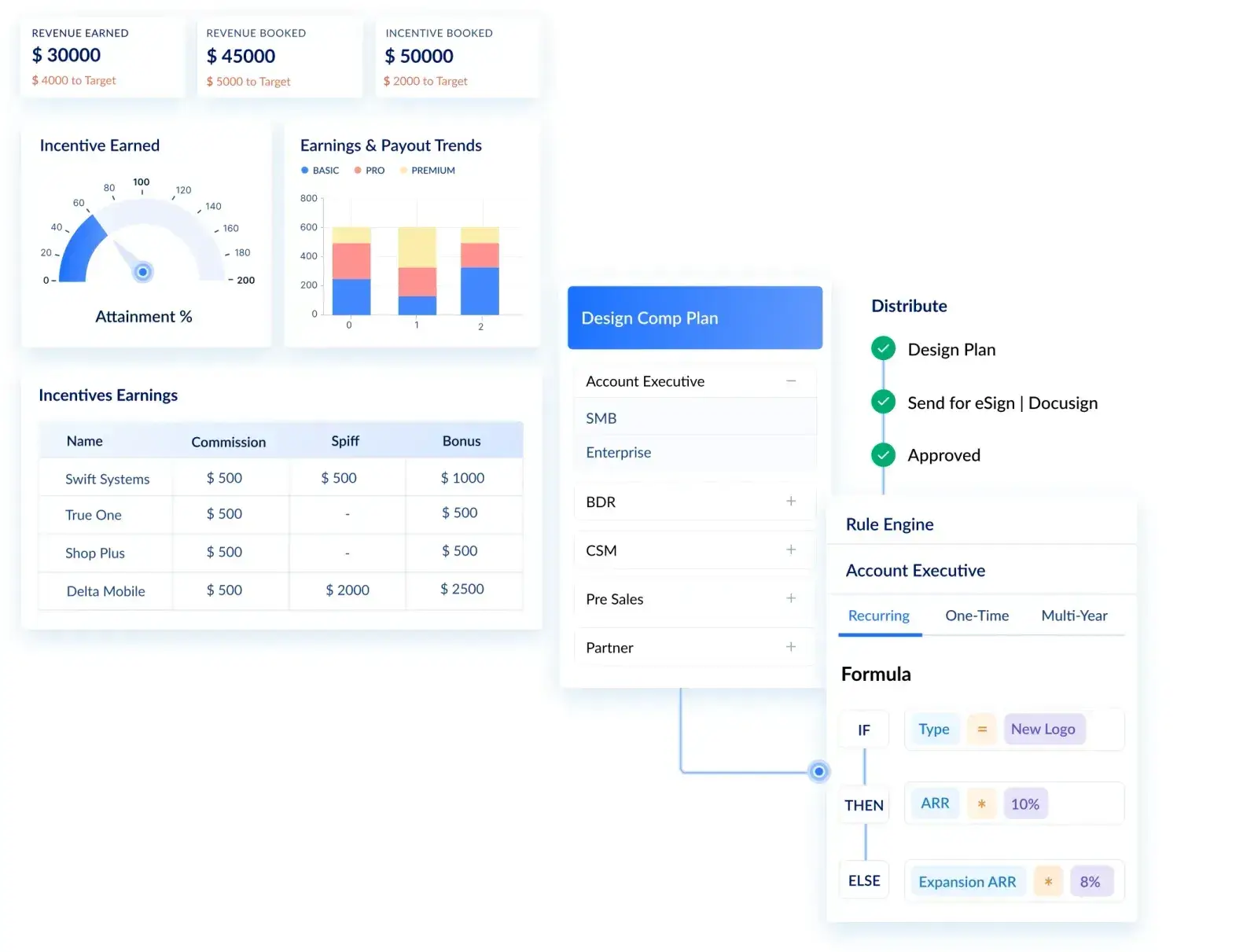
Visdum + Dynamics 365 Sales for Automated Commission Payouts
.webp)
Your sales team closes deals in Dynamics 365 Sales. Finance calculates commissions in a spreadsheet. Someone reconciles the two in a three-hour monthly ritual that ends in disputed numbers and missed payouts.
This is not a process problem. It is an architecture problem. Dynamics 365 Sales is built to track pipeline, not to execute compensation.
The moment a deal closes, the CRM's job is largely done. Everything that happens next, crediting the right rep, applying the correct quota attainment tier, splitting revenue across a team, enforcing clawbacks, and generating payout reports, falls outside what any CRM is designed to handle.
Visdum is a commission automation platform built to take over exactly where Dynamics 365 Sales ends its job. Once a deal is closed and the CRM has done its part, Visdum picks up the data and turns it into accurate, auditable commission payouts.
This article covers:
- What Dynamics 365 Sales actually does
- Why it does not handle commissions
- How integrating Visdum turns your CRM data into a reliable commission system
What is Dynamics 365 Sales
Microsoft Dynamics 365 Sales is a cloud-based CRM platform that manages the full B2B sales cycle: leads, opportunities, accounts, contacts, quotes, and orders. It sits within the broader Microsoft Dynamics 365 ecosystem alongside modules for Finance, Customer Service, Marketing, and Field Service.
Unlike standalone CRMs, Dynamics 365 Sales is natively integrated with Microsoft 365 (Outlook, Teams, Excel, SharePoint) and the Power Platform (Power BI, Power Automate, Dataverse). This makes it a natural anchor for organizations that have standardized on the Microsoft stack.
For mid-market and enterprise companies already running Microsoft infrastructure, Dynamics 365 Sales offers a lower integration overhead than alternatives like Salesforce. It is where opportunity data lives, where sales stages are tracked, and where revenue is forecasted.
What the Sales Module in Dynamics 365 Does
The sales module in Dynamics 365 is built around pipeline visibility and deal management. It handles:
- Lead qualification and conversion
- Opportunity tracking and stage progression
- Deal ownership and account relationships
- Revenue forecasting and reporting
But once a deal is marked Closed Won, its job ends.
The Reality: Why Dynamics 365 Sales Isn’t Built for Commission Automation
CRM systems are designed to answer one question: what is happening in the pipeline? Commission systems answer a different question: who gets paid what, based on what conditions, and when?
Those are structurally different problems. Dynamics 365 Sales manages relationships and stages. It does not understand compensation plan rules, crediting hierarchies, quota period logic, or payout schedules. Expecting it to do so is equivalent to running payroll in a project management tool.
What should be a calculation becomes a multi-step workflow.
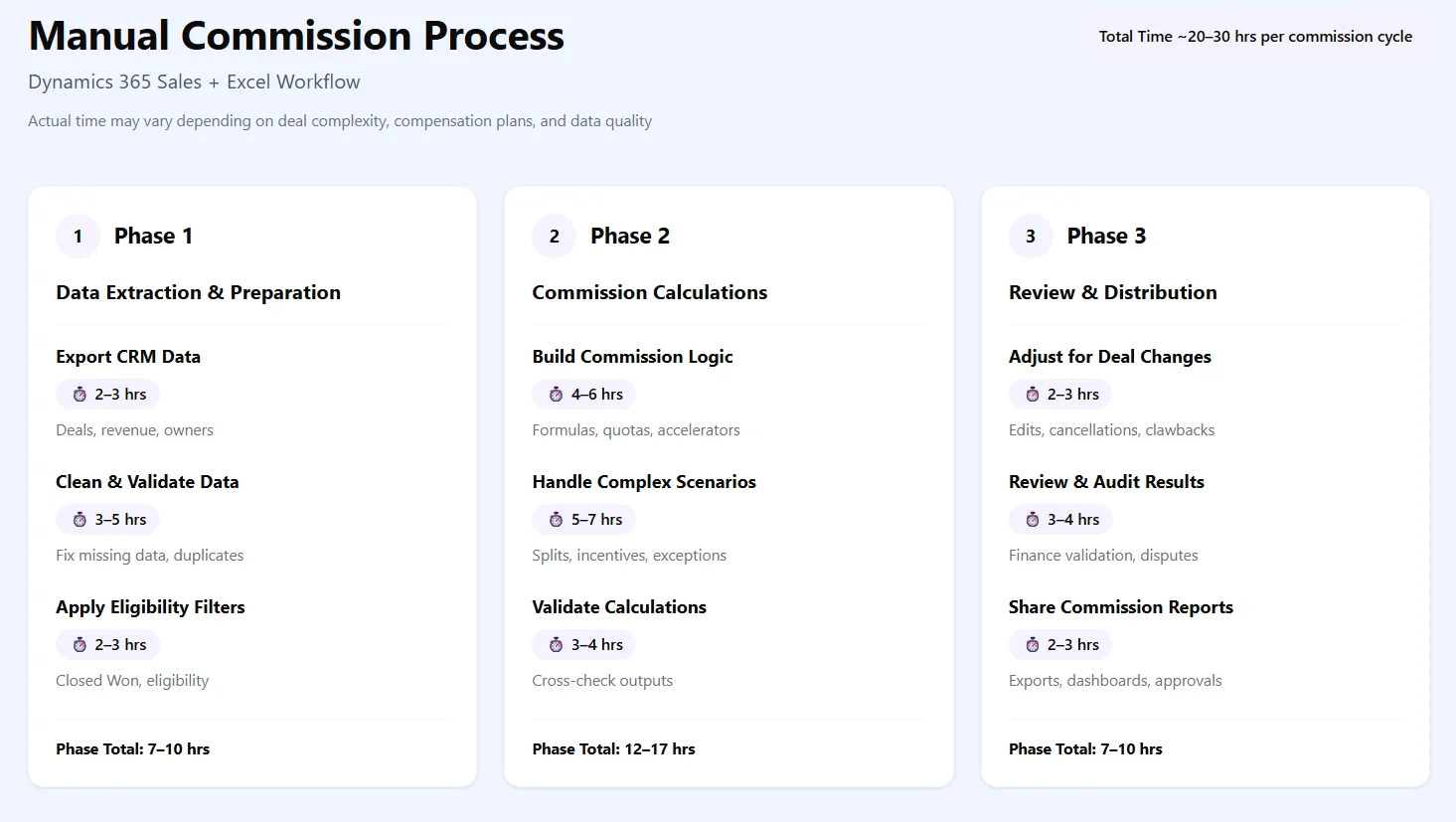
As shown above, a single commission cycle can take 20–30 hours, involving data cleanup, formula building, adjustments, and reviews.
This happens because:
- CRM = data layer
- Commissions = logic layer
And Dynamics does not handle that logic natively. The result is not just inefficiency but it is a structural gap.
As long as commission logic sits outside the CRM, teams will rely on:
- Spreadsheets
- Manual checks
- Reconciliation cycles
This is where most commission workflows start to break.
Did you know?
According to Salesforce's State of Sales report, sales reps spend only 28–30% of their week on actual selling activities. The rest goes to admin, meetings, and manual tasks, including tracking their own commissions.
How Visdum + Dynamics 365 Sales Integration Works
Visdum sits on top of your CRM and uses its data as input.
It does not replace Dynamics. It extends it to involve the logic layer that was missing till now.
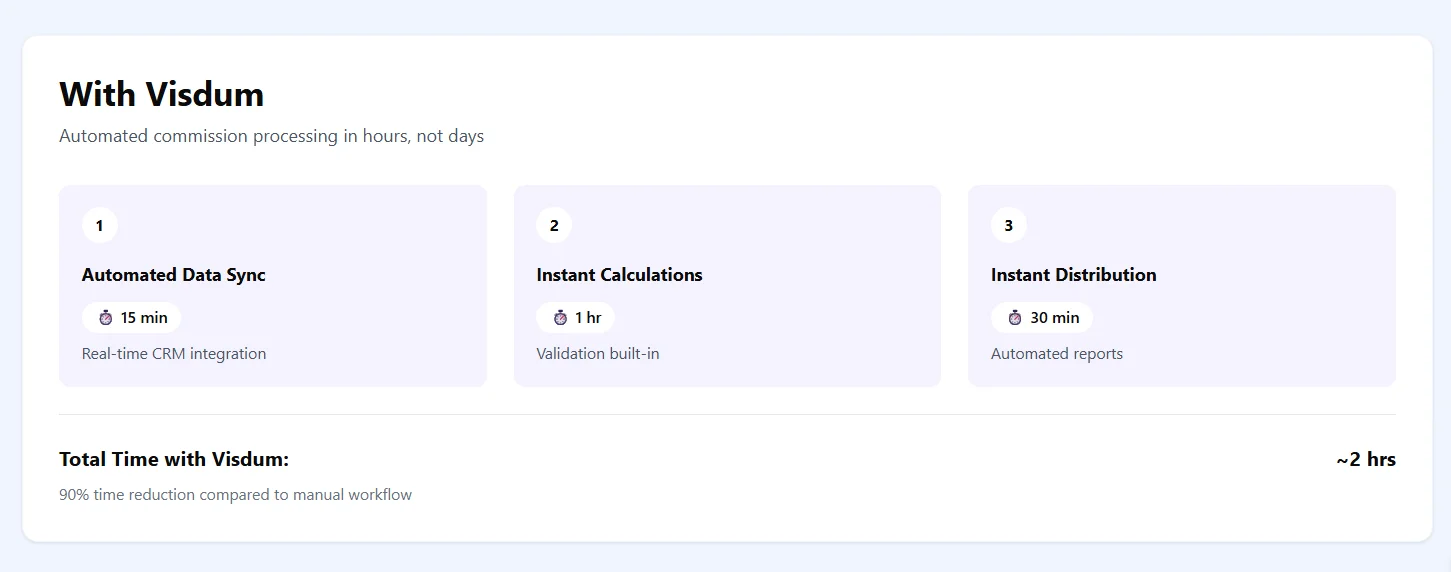
Visdum is a commission automation platform built to sit directly on top of CRM data. The integration with Dynamics 365 Sales connects Visdum to your opportunity, order, and user data so that commission calculations happen automatically as deals close and progress through your revenue system.
The integration architecture follows a three-layer model:
Layer 1 - CRM as the data source (Dynamics 365 Sales)
Deals, close dates, product lines, revenue amounts, opportunity owners, and quota attainment data live here. This is the input layer.
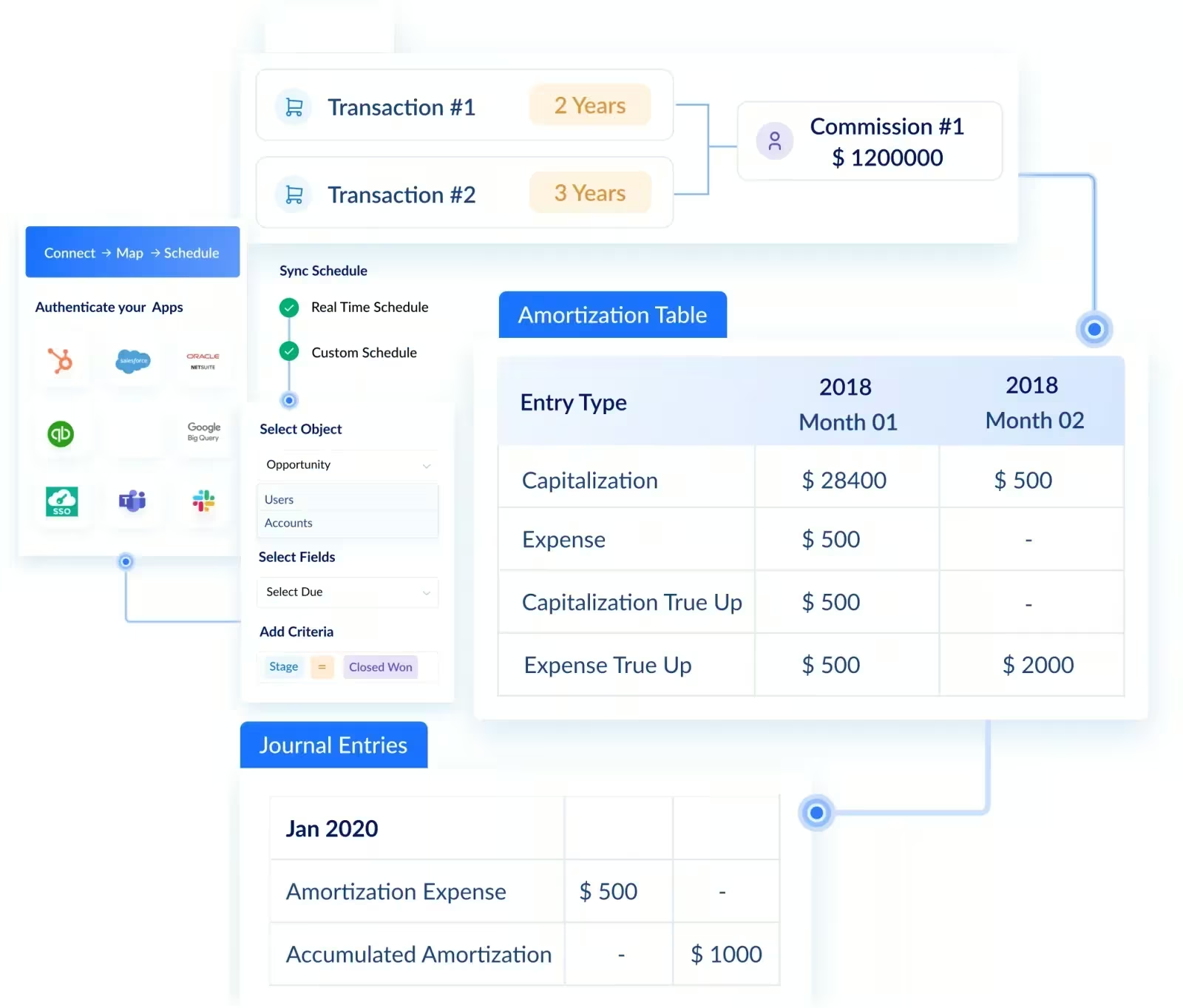
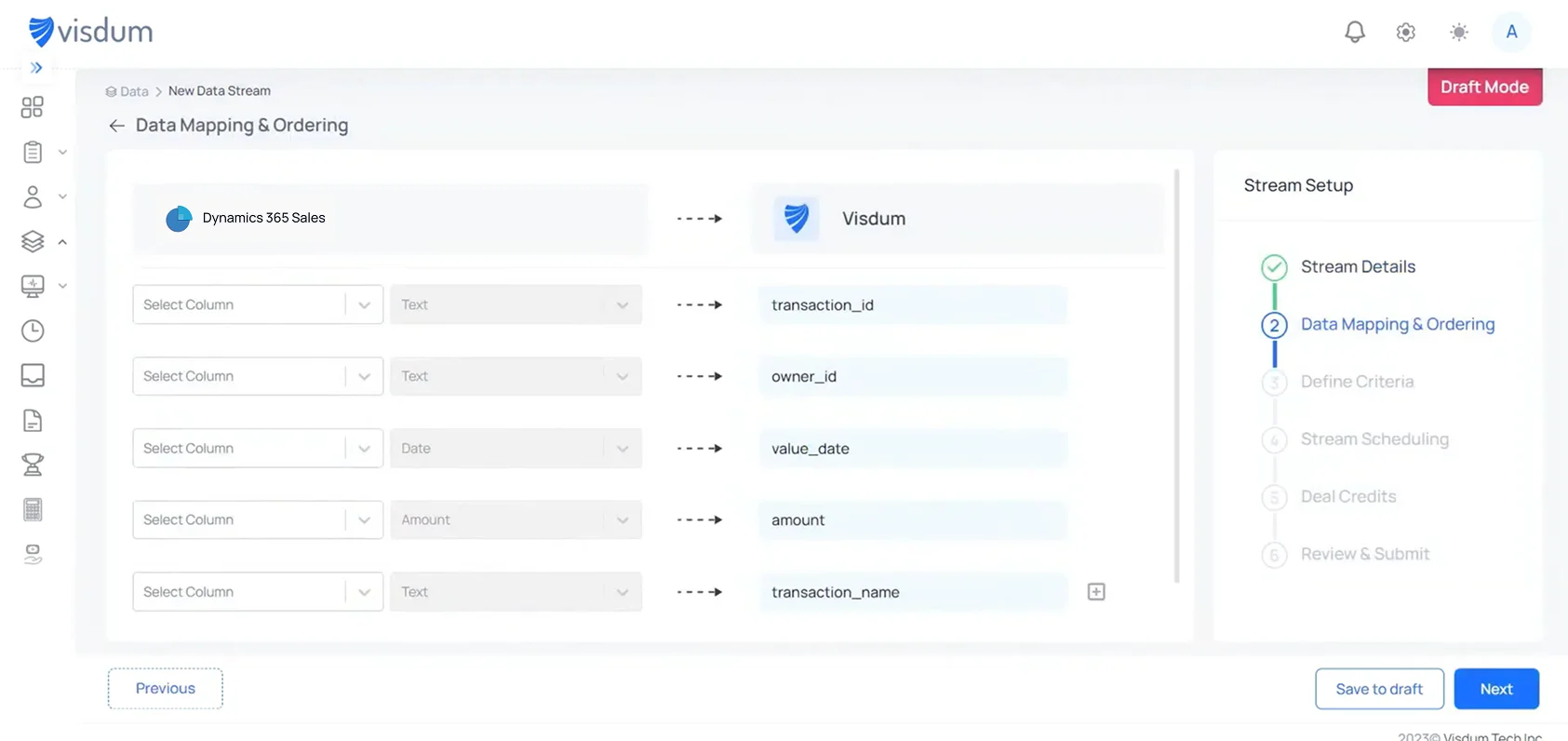
During integration setup, Visdum walks you through a field mapping step where your Dynamics 365 columns are matched directly to Visdum fields such as transaction ID, owner, date, amount, and transaction name.
This is where input customization happens. If your Dynamics 365 setup uses non-standard fields like custom opportunity stages, bespoke product categories, modified ownership hierarchies, you map those here. You are not forced to restructure your CRM to fit the integration. The input layer adapts to how your team already works in Dynamics.
Layer 2 - Commission logic engine (Visdum)
Compensation plan rules, crediting hierarchies, attainment tiers, accelerators, splits, and clawback conditions are configured here. Visdum reads CRM data and applies these rules to calculate what each rep earns on each deal. Plan configuration is done through Visdum's visual rule builder - no code, no formulas, no spreadsheet logic to maintain. If you can define your comp plan in plain language, you can build it in Visdum.
For a full walkthrough, this guide covers how to create a commission plan in Visdum in under 10 minutes. And if you want to see how the visual rule builder and dashboards work together, this overview covers both in detail.
Layer 3 - Payout execution and reporting
Once calculations are approved, everything that follows is automated. Visdum integrates directly with payroll platforms, including ADP, Workday, and others, so payout data moves from commission calculation to payroll processing without anyone touching a spreadsheet. Payment goes out on the scheduled date, every time.
Commission statements can be sent for approvals and are also generated automatically and delivered directly to each rep's inbox. No rep has to ask finance where their number came from. No finance manager has to compile and send statements manually.
Visdum's AI Copilot takes this further - it lets Finance, RevOps, and Sales Ops ask natural-language questions and get instant answers on commission pay, incentive structures, quota assignments, and corrective actions, without digging through reports.
This architecture means your CRM does not change. Reps continue working in Dynamics 365 the same way they always have. Visdum reads the data and runs the compensation logic independently.
.webp)
Why Commission Management Breaks in CRM Systems
This is not a tooling issue. It is a structural one.
1. Data Changes After Deal Closure
Deals do not stay static:
- Discounts change
- Contracts are amended
- Revenue gets adjusted
But commission calculations are often based on exported snapshots, not live data.
In most setups, once data is pulled out of the CRM for calculations, it becomes disconnected from future changes. Any update in deal value, ownership, or timing does not automatically reflect in payouts.
This forces teams to manually revisit past calculations, creating rework and increasing the risk of inconsistencies.
Result: mismatches between CRM and payouts.
How Visdum Solves This: Visdum syncs directly with Dynamics 365 Sales on a continuous basis. When a deal value changes or a contract is amended, the commission calculation updates automatically. No re-exports. No manual reconciliation.
2. Compensation logic is complex and variable
A single deal may trigger different commission rates depending on the product mix, the rep's current attainment tier, whether a channel partner was involved, and whether the deal was new business or an expansion.
CRM opportunity records capture deal data but cannot evaluate compensation rules dynamically.
How Visdum Solves This: Visdum applies your compensation plan logic directly against live CRM data such as tiers, product splits, deal credit rules, and expansion rates, without requiring any manual interpretation or external spreadsheet.
3. Credit Allocation Is Not Native
Multiple stakeholders are involved:
- Account executives
- SDRs
- Partners
CRM systems track ownership, but they do not define how revenue should be attributed across multiple contributors.
As compensation plans get more complex, teams start managing credit splits externally. Over time, this creates a gap between what the CRM shows and how payouts are actually calculated.
How Visdum Solves This: Credit allocation rules are configured directly in Visdum. Every contributor is assigned their share based on defined logic, applied consistently across every deal, so no external spreadsheet required.
4. Logic Lives Outside the System
Commission plans include:
- Accelerators
- Thresholds
- Tiered payouts
These cannot be reliably modeled inside CRM workflows. As plans evolve, logic becomes harder to maintain within CRM constraints. Teams end up building separate models in Excel or data systems where calculations can be controlled more flexibly.
However, this also means logic is no longer directly tied to the source data, making the system harder to maintain and scale.
How Visdum Solves This: Visdum provides a dedicated logic layer where commission plans are configured and applied directly on top of live CRM data.
Instead of maintaining formulas across spreadsheets or SQL queries, all rules are defined in one place and executed consistently. This ensures that changes in plans do not require rebuilding logic or revalidating outputs across multiple systems.
5. Clawbacks require deal outcome tracking beyond close
When a customer churns within 90 days, the initial commission may need to be reversed.
Dynamics 365 has no native mechanism to watch post-close events and trigger retroactive adjustments.
How Visdum solves this: Visdum tracks post-close events and supports retroactive adjustments within the same system.
Instead of manually reversing commissions in spreadsheets, clawbacks and updates are automatically applied based on predefined rules, ensuring accuracy without additional reconciliation effort.
6. No Audit Trail
When finance needs to answer:
“Why was this payout calculated this way?”
Commission calculations often exist across multiple spreadsheet versions with manual edits layered over time.
There is no centralized record of what logic was applied, when it changed, or who made the change. This makes audits, dispute resolution, and historical tracking difficult and time-consuming.
How Visdum solves this: Every calculation in Visdum is logged with a full audit trail, plan version, data inputs, who approved it, and when. Any dispute can be resolved in minutes, not days.
7. Cross-Functional Dependency
Every payout cycle involves:
- Sales (validation)
- Finance (calculation)
- RevOps (data handling)
This creates delays and friction. Since no single system owns the entire workflow, each team depends on the other to complete its part.
Data needs to be validated, logic needs to be applied, and outputs need to be reviewed across teams. This coordination slows down the process and increases the chances of errors, especially as volume and complexity grow.
How Visdum Solves This: Visdum centralizes the commission workflow in one system. Sales validates, RevOps configures, and Finance approves, all within the same platform, with no handoffs across spreadsheets or email threads.
8. Month-end close becomes a bottleneck
Finance teams spend days reconciling what Dynamics 365 shows versus what got exported, adjusted, and re-adjusted across multiple spreadsheet versions. Errors compound. Trust erodes between Sales and Finance.
How Visdum Solves This: Because calculations run automatically against live Dynamics 365 data, month-end close becomes a review and approval process rather than a reconciliation exercise. Finance signs off on numbers that are already accurate.
Did you know?
Manual commission processes can take up to 6 weeks to complete, frustrating both reps and finance teams.
What This Integration Solves
Step-by-Step: How to Connect Dynamics 365 with Visdum
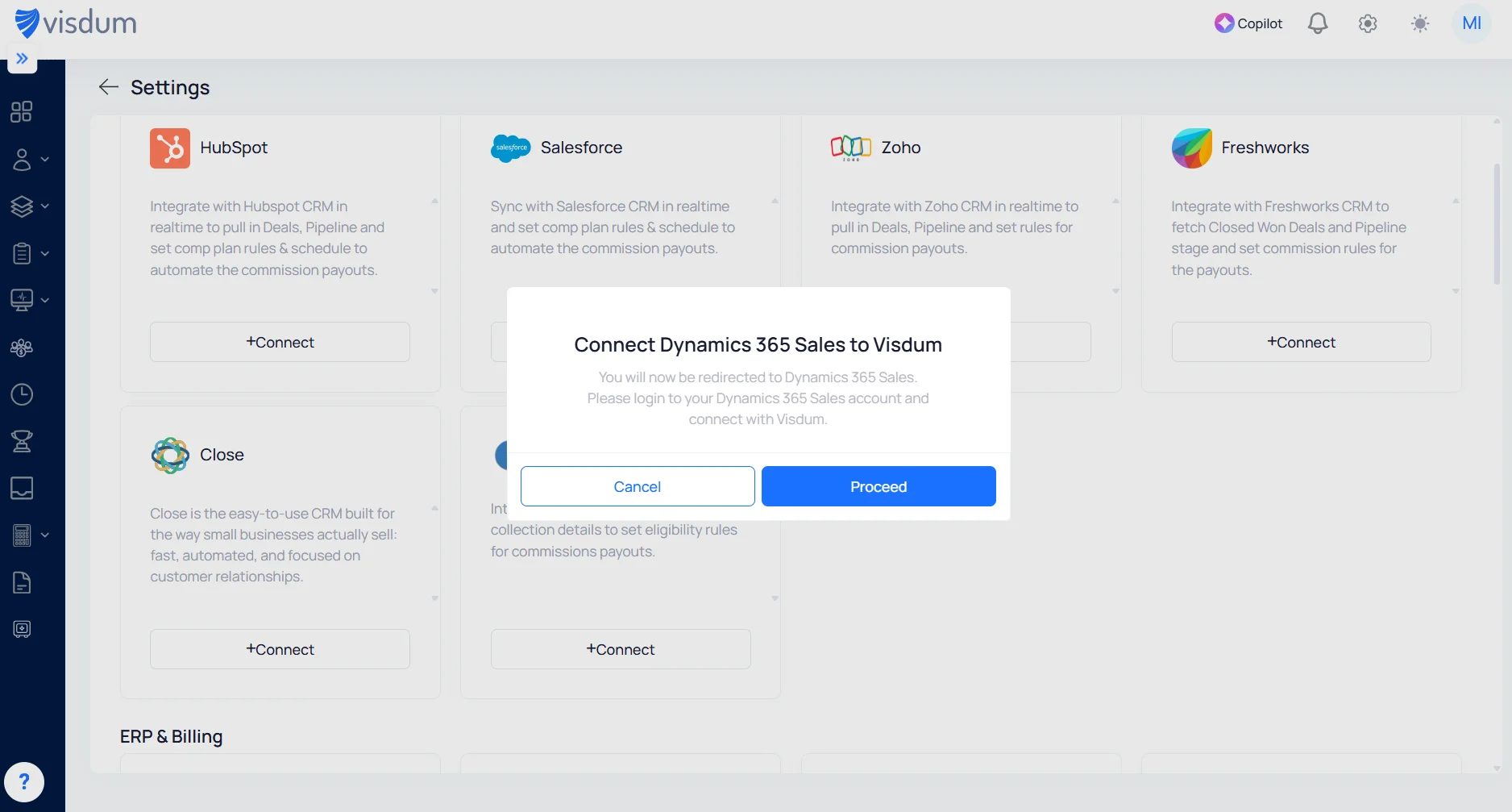
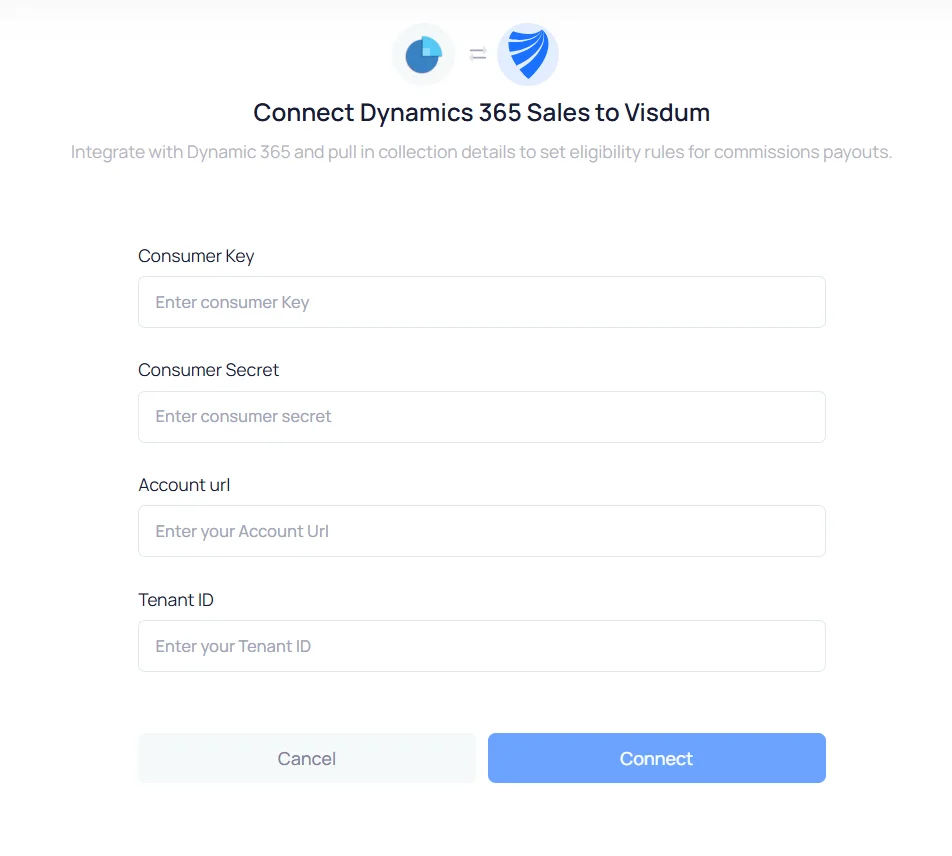
Step 1: Connect Dynamics 365 Sales to Visdum
Start by connecting your Dynamics 365 Sales account to Visdum. Go to the CRM integrations section in Visdum, select Microsoft Dynamics 365 Sales, and click Connect.
Authenticate using your credentials (Consumer Key, Secret, Account URL, Tenant ID) to securely link your CRM.
.webp)
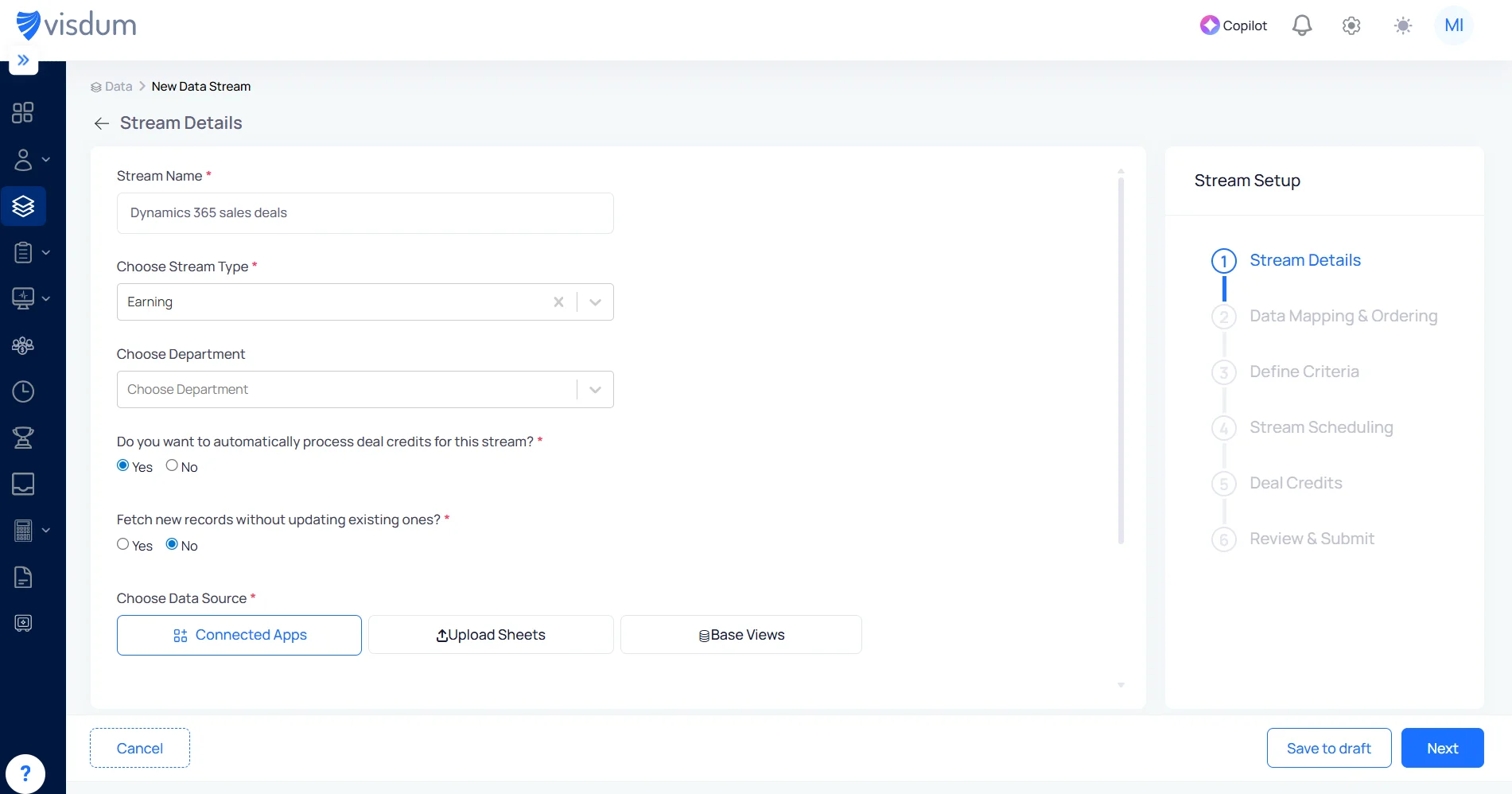
Step 2: Create New Data Stream
Enter a stream name, select Earning as the stream type, and choose Microsoft Dynamics 365 Sales under Connected Apps as your data source.
Set preferences like deal credits and data sync, then click Next to proceed.
Step 3: Map Your Data Fields
Map fields from Microsoft Dynamics 365 Sales to Visdum fields like transaction ID, owner, date, and amount.Ensure each field is correctly aligned, then click Next to continue.
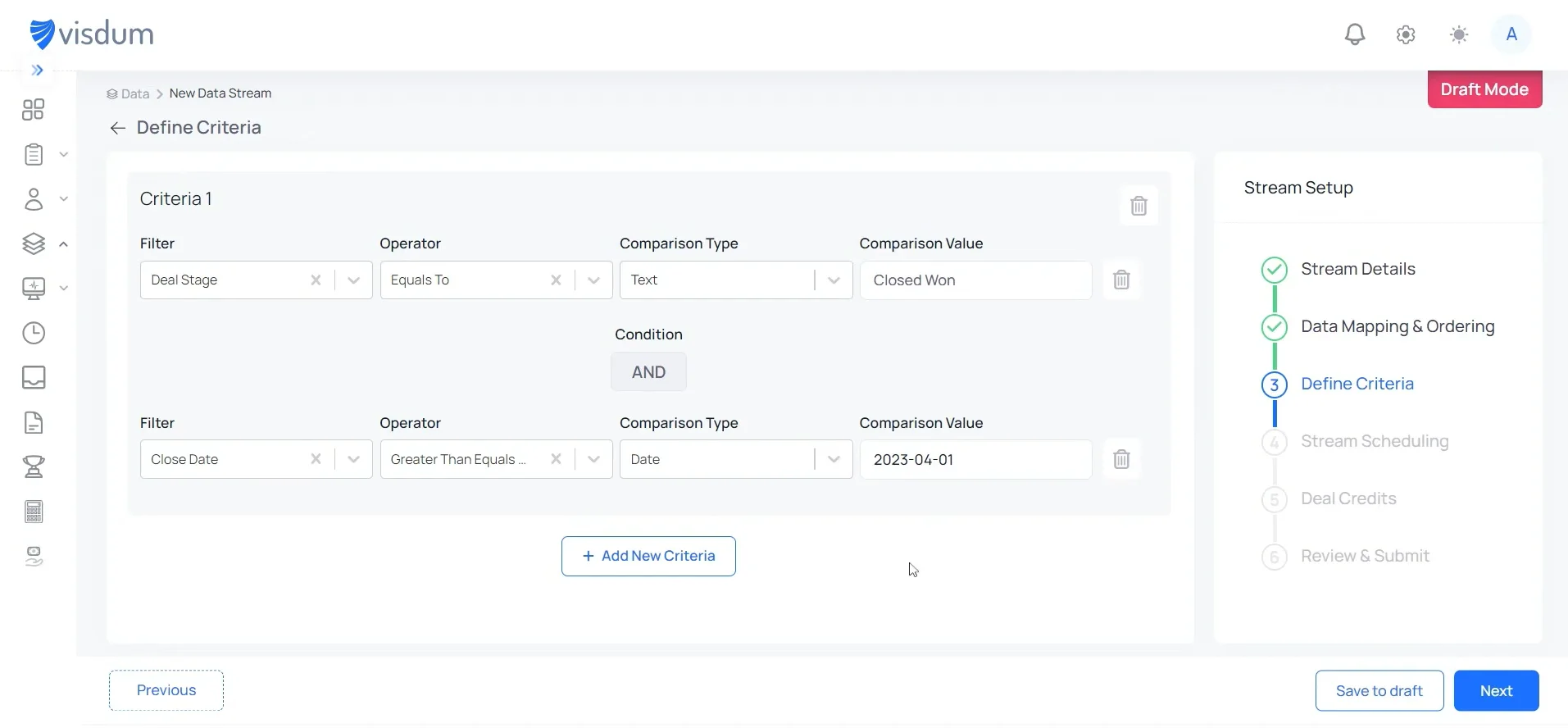
Step 4: Define Criteria
Set conditions like Deal Stage = Closed Won and apply filters such as close date or eligibility rules.This ensures only relevant deals from Microsoft Dynamics 365 Sales are used for commission calculations.
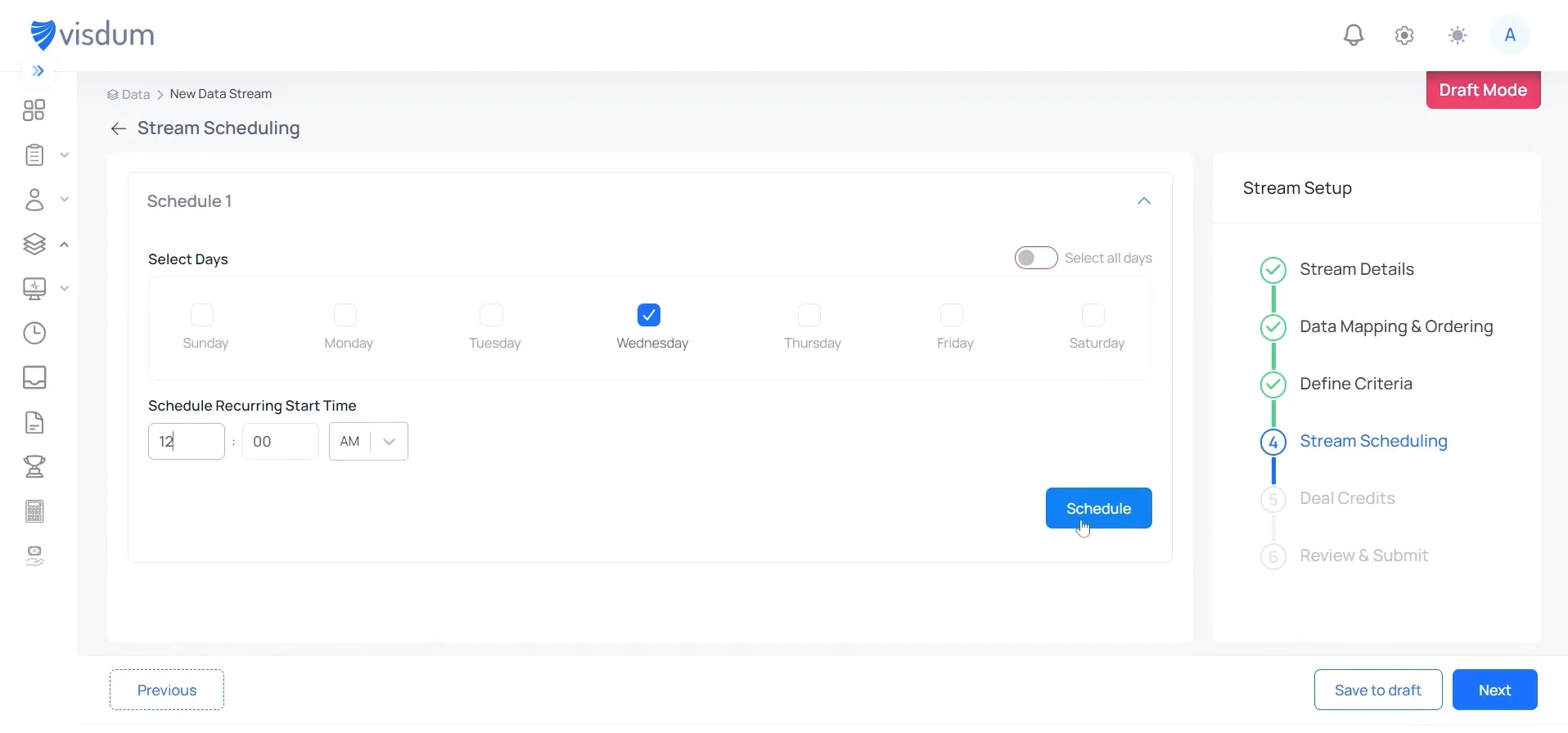
Step 5: Schedule Data Sync
Select how frequently you want your data to sync by choosing days and time for the schedule.This ensures data from Microsoft Dynamics 365 Sales is regularly updated for accurate commission calculations.
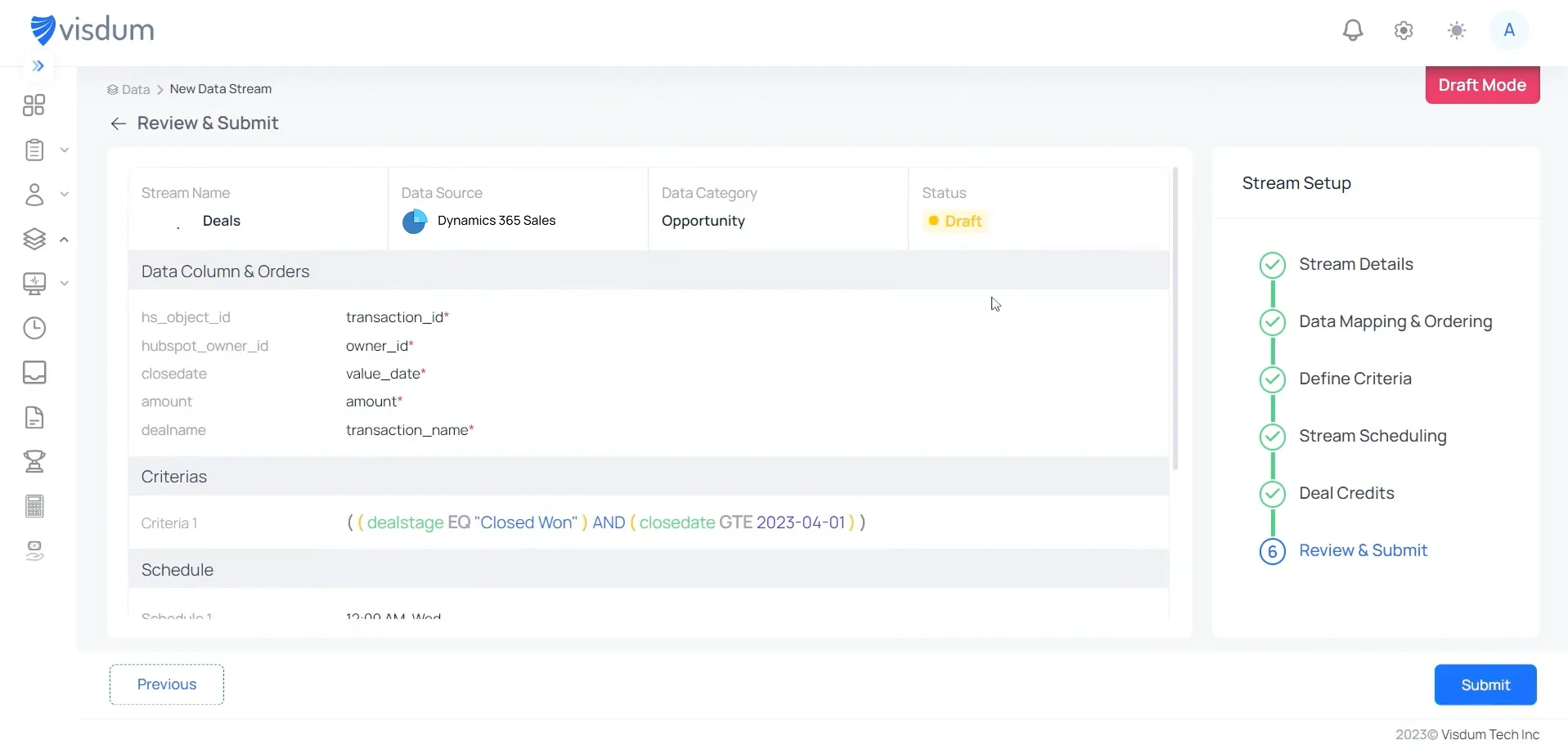
Step 6: Review & Submit
Review your data mapping, criteria, and schedule to ensure everything is correctly configured.Once verified, click Submit to activate the data stream and start syncing data from Microsoft Dynamics 365 Sales.
Dynamics 365 Alone vs Dynamics 365 + Visdum
👉See how Visdum helps Sales Ops automate payouts end-to-end
RevOps Perspective: What Actually Changes
Before (Manual Workflow)
- Export deal data from Microsoft Dynamics 365 Sales into Excel
- Clean and align data across multiple sources
- Build and maintain commission logic manually
- Recalculate payouts every time deals are updated
- Validate outputs with Finance and resolve disputes
⏱ Commission cycles take days, often involving multiple back-and-forth iterations
After (With Visdum)
- Deal data flows directly from CRM without exports
- Commission logic is centrally defined and consistently applied
- Changes in deals automatically reflect in payouts
- Validation is built into the system with full visibility
- Teams access real-time commission data without dependency
⏱ Commission cycles are reduced to hours with minimal manual intervention
RevOps moves from managing spreadsheets → managing systems
Finance moves from manual validation → automated trust
Sales moves from guessing payouts → real-time visibility
When Should You Consider This Integration
You have likely outgrown manual workflows if:
- Commission cycles take more than 5 days
- Your compensation plan has more than two or three tiers, split arrangements, or product-level variations that your spreadsheet cannot reliably model
- Reps regularly dispute their commission statements or ask RevOps to verify calculations
- You are scaling headcount faster than your manual process can track quota attainment and crediting
- Month-end commission close takes more than two business days and involves handoffs across Sales, Finance, and Operations
At this stage, the issue is no longer calculation. It is system design.
Example: From Deal to Commission Payout
Real-World Implementation Example
Mid-Market SaaS Company ($35M ARR, 90 reps, using Microsoft Dynamics 365 Sales)
Meet Jordan, a RevOps manager responsible for commission operations across six plans: AEs, SDRs, CSMs, channel reps, and overlays.
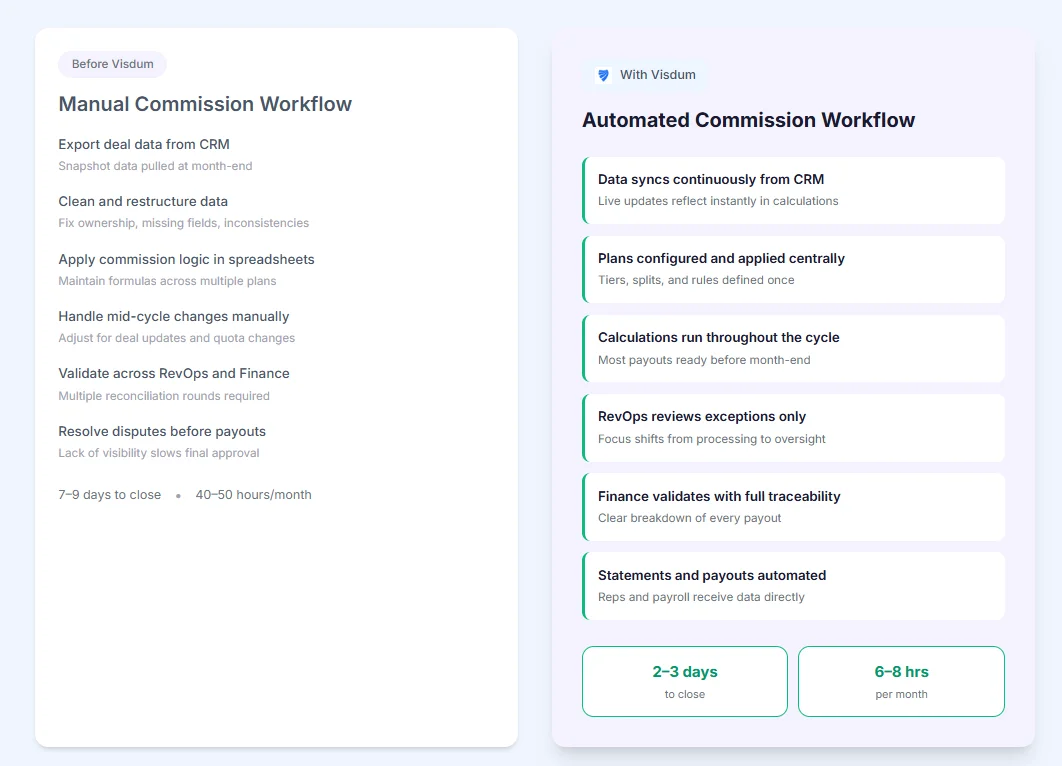
Jordan's month-end, before Visdum:
- Manually exports deal data from Dynamics 365 into a multi-tab spreadsheet
- Day one is spent cleaning the export before any calculation starts
- Mid-month quota changes and late deal updates are not reflected, Jordan catches these manually
- Finance is waiting. Disputes are already coming in
- Total: 7 to 9 days to close. 40 to 50 hours of Jordan's month, gone
Jordan's month-end, after Visdum:
- Dynamics 365 feeds deal data into Visdum automatically throughout the month
- All six plans run in Visdum, tiers, splits, accelerators, and clawbacks are applied consistently to every rep
- When month-end arrives, calculations are already done
- Jordan reviews, finance approves, statements land in rep inboxes, payroll receives data automatically
- Total: 2 to 3 days to close. 6 to 8 hours of Jordan's month.
.webp)
Conclusion
Microsoft Dynamics 365 Sales is built to manage pipeline and revenue visibility, but not commission execution. As a result, teams rely on spreadsheets and manual workflows once deals are closed, leading to delays, errors, and misalignment.
The integration between Visdum and Dynamics 365 Sales closes that gap at the architecture level. Your CRM continues to be the source of truth for deal data. Visdum becomes the source of truth for what those deals pay out, to whom, and under what conditions.
If your team is currently managing commissions in spreadsheets while running pipeline in Dynamics 365, you already know where the friction is. The question is when you decide to fix it at the system level rather than the process level.
FAQs
What is Microsoft Dynamics 365 Sales?
Microsoft Dynamics 365 Sales is a cloud-based CRM application that manages the B2B sales cycle, including lead management, opportunity tracking, pipeline forecasting, quote generation, and sales activity logging. It is part of the Microsoft Dynamics 365 suite and integrates natively with Microsoft 365 applications.
What is the sales module in Dynamics 365?
The sales module is the core CRM component of Dynamics 365 that gives sales teams tools to manage accounts, contacts, opportunities, and quotes. It includes a native forecasting feature, AI-assisted selling insights, and integration with Outlook, Teams, and Excel for activity capture and reporting.
Can Dynamics 365 Sales handle commission calculations?
No. It captures the data commissions depend on — closed deals, revenue, opportunity ownership — but has no native logic for tiers, splits, clawbacks, or accelerators. Teams end up in Excel until plan complexity makes that unsustainable.
How does Visdum integrate with Dynamics 365 Sales?
Visdum connects via API, maps your CRM fields to its commission engine, and automatically pulls deal data as opportunities close. It applies your plan rules such as tiers, splits, accelerators, clawbacks, generates statements, and pushes payout data to payroll. The CRM does not change.
When should companies automate commissions?
When commission close takes more than five days, RevOps is spending 20-plus hours per month on calculations, or disputes are a recurring occurrence every quarter. If more than one applies, the manual process is already costing more than the solution.
.webp)